A website can appear broken even when your internet connection is fine. A login may keep sending us back to the sign-in page, a shopping cart may empty itself, or a payment form may refuse to load. Website Cookies are often part of the problem.
The important detail is that enabling cookies no longer means simply turning every cookie on. Modern browsers separate normal site data from third-party cookies and add privacy protections that can block cross-site tracking. Chrome, Firefox, Safari, and Edge now give us more control over which sites can store data and which third parties can access it.
That means the best fix is often to enable cookies for the website that needs them, rather than weakening every privacy setting in the browser.
What Does It Mean to Enable Cookies?
Websites store small pieces of information in our browser, known as cookies, to remember certain details and preferences. They allow websites to remember useful details, such as our login status, selected preferences, items added to a cart, and information needed as we move from one page to another.
There is an important difference between first-party cookies and third-party cookies. A first-party cookie is placed in your browser directly by the website you are visiting. A third-party cookie comes from another service included on that website. Google explains that third-party cookies can be blocked separately from other site data in Chrome.
This distinction explains why a website can work normally after we enable basic cookies while still showing an error related to a third-party service.
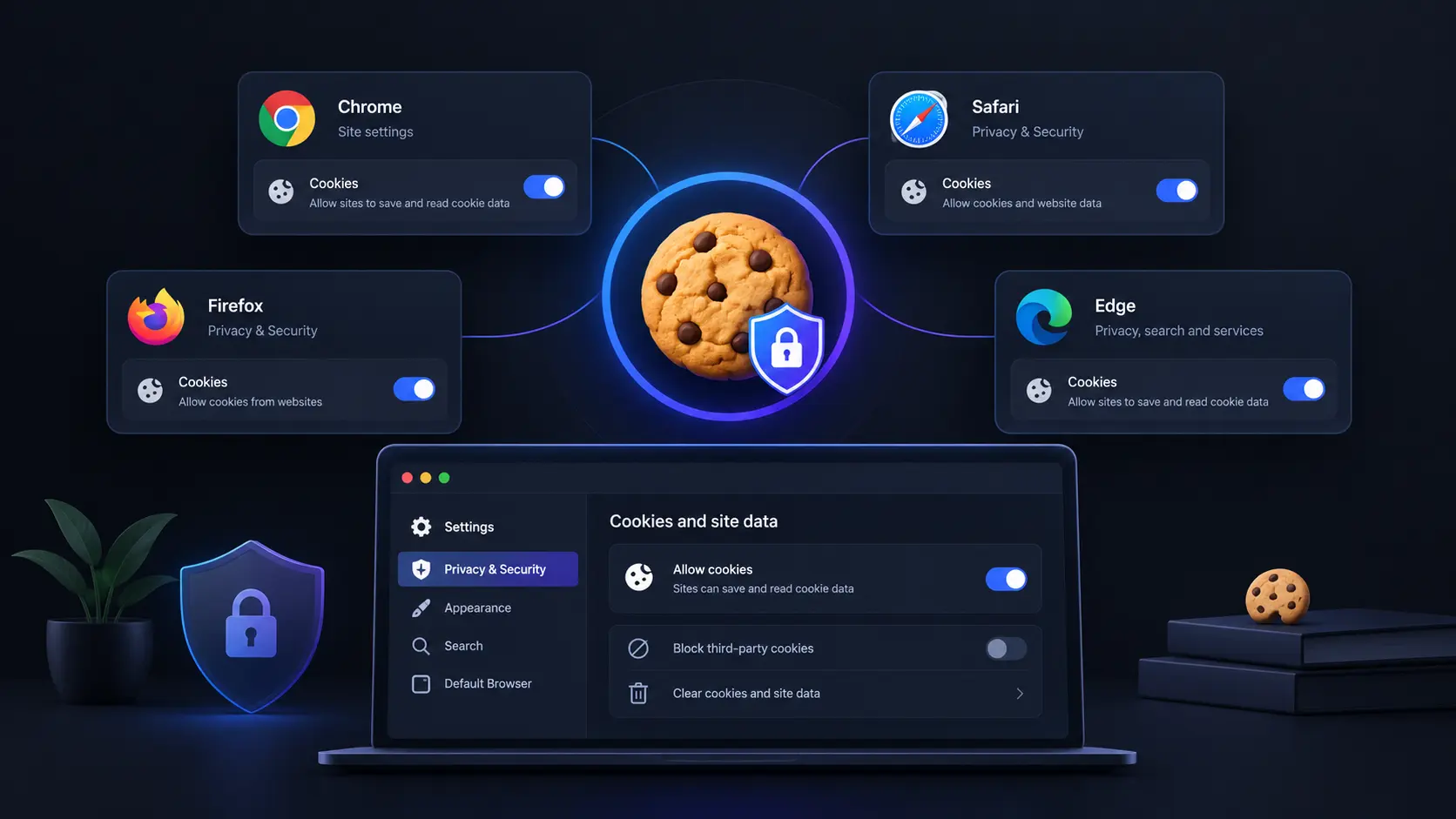
Chrome’s current settings separate third-party cookies from other website data. Google also recommends allowing sites to save data so websites to work normally.
On a Windows or Mac computer
Open Chrome.
Select the three-dot menu in the top-right corner.
Choose Settings.
Select Privacy and security.
Open Third-party cookies.
Choose Allow third-party cookies if the website specifically requires them.
If we only need cookies for one website, Chrome lets us add that website to the allowed list instead of allowing third-party cookies everywhere.
On Android
Open Chrome.
Tap the three-dot menu.
Select Settings.
Tap Site settings.
Select Third-party cookies.
Choose the setting that fits the website we are using.
Chrome also supports site-specific exceptions, which can be useful when one service fails while the rest of the web works normally.
Practical tip: If a website only says that cookies are disabled, do not immediately allow every third-party cookie. Try a site-specific exception first.
How to Enable Cookies in Safari
Safari takes a different approach because Apple focuses heavily on limiting cross-site tracking.
On a Mac
Open Safari.
Select Safari > Settings.
Open Advanced.
Ensure the Block all cookies option is disabled.
Apple states that blocking all cookies can prevent some websites from working correctly.
Safari also has a separate Prevent cross-site tracking option. Keeping this enabled can block third-party tracking while still allowing normal first-party website data to work.
This is an important distinction. We usually do not need to disable Safari’s privacy protections just because a website needs cookies.
On an iPhone
Open Settings.
Tap Apps.
Select Safari.
Tap Advanced.
Turn off Block All Cookies.
Apple’s current iPhone guidance confirms that disabling this setting allows websites that require cookies to work normally.
If a particular website still fails, check Safari’s Prevent Cross-Site Tracking setting. Safari limits third-party cookies and related data by default.
Firefox comes with stronger privacy protections enabled by default than many people realize. Its Enhanced Tracking Protection blocks known trackers, and Firefox’s Total Cookie Protection isolates cookies so websites cannot easily use them to track us across other sites. Complete Cookie Protection is enabled by default in the Firefox browser.
To allow cookies more broadly
Open Firefox.
Select the menu button.
Choose Settings.
Select Privacy & Security.
Review Enhanced Tracking Protection.
Choose Standard, or select Custom and adjust cookie protection.
Firefox allows us to change cookie controls without turning off every privacy feature.
If only one website is broken
Visit the affected website and select the shield icon beside the address bar. Firefox allows us to turn Enhanced Tracking Protection off for that specific website. The page then reloads with the site’s protection exception.
This is often the better approach because blocking cross-site cookies can cause some websites, login systems, payment forms and embedded services to stop working.
How to Enable Cookies in Microsoft Edge
Edge gives us global and site-specific cookie controls.
On Windows
Open Edge.
Select Settings and more.
Choose Settings.
Open Privacy, search, and services.
Select Cookies.
Turn on Allow sites to save and read cookie data.
Microsoft lists this as the setting that allows websites to save and retrieve cookie data.
Edge also lets us block third-party cookies separately. If one website needs them, we can add that website under the allowed cookie list rather than changing the setting for every site.
Why Cookies Can Be Enabled but a Website Still Does Not Work
This is the part many cookie guides miss.
Turning cookies on does not guarantee that every website will work. A site may depend on third-party cookies, JavaScript, pop-ups, browser permissions, an embedded payment service, or another component that has been blocked.
For example, Firefox explains that blocking third-party tracking can sometimes prevent images, videos, login buttons, or payment forms from working correctly.
We can troubleshoot in this order:
Refresh the website after changing cookie settings.
Check whether the problem happens in another browser.
Allow cookies for the specific website.
Check whether third-party cookies are required.
Clear the affected site’s stored data.
Check browser extensions or content blockers.
If the website is not working in private or Incognito mode, switch to a regular browser window.
Some browsers apply stricter cookie restrictions in private browsing. For example, Chrome blocks third-party cookies by default in Incognito mode. If the issue affects only one website, a site-specific exception is usually more precise than changing global browser settings.
Should We Allow All Website Cookies?
Not necessarily.
Cookies can provide useful features, but third-party cookies can also be used for cross-site tracking. Modern browsers increasingly separate useful website storage from tracking protection.
A sensible setup is to allow normal first-party cookies while keeping third-party tracking protections enabled. Then create an exception only when a trusted website genuinely needs additional access.
This approach gives us a better balance between website functionality and privacy than simply selecting “allow everything.”
Conclusion
The most useful way to enable cookies is not to switch every privacy feature off. Chrome, Safari, Firefox and Edge now give us more precise controls, including ways to allow website data while limiting third-party tracking.
If a website is failing, start with the smallest change that fixes the problem. Allow cookies for that site, check whether third-party cookies are required, and keep broader tracking protections enabled where possible. That approach can restore website functionality without giving every site and third-party service unrestricted access to our browser data.
FAQs
Do cookies remember our passwords?
Cookies can help a website remember a login session, but they generally do not store our actual password in plain text. Password managers and browser password storage handle saved passwords separately.
Why does a website keep asking us to accept cookies?
The site may not be able to save its consent choice, or its required cookie may be blocked or deleted. Privacy settings, browser extensions, and automatic deletion settings can all affect stored site data.
Does clearing cookies remove our browsing history?
Not necessarily. Cookies and browsing history are different types of browser data. Clearing cookies can sign us out of websites and remove saved site preferences without necessarily deleting the entire browsing history.
Are cookies dangerous?
Cookies themselves are not automatically harmful. They are a normal web technology. The privacy concern mainly comes from how some cookies and related tracking technologies are used, especially across multiple websites.
A GDPR Cookie Banner can look compliant while still collecting data too early. The bigger issue in 2026 is not whether a banner exists, but whether the website actually respects the choice shown on screen. Recent enforcement has focused on a simple test: can people refuse non-essential cookies as easily as they can accept them, and does the website wait for that choice before tracking begins?
This makes the technical setup behind a Cookie Banner just as important as its wording and design. We examine the key requirements, recent enforcement lessons, and practical checks businesses can use to test their Cookie Consent process.
What a GDPR Cookie Banner Must Actually Do
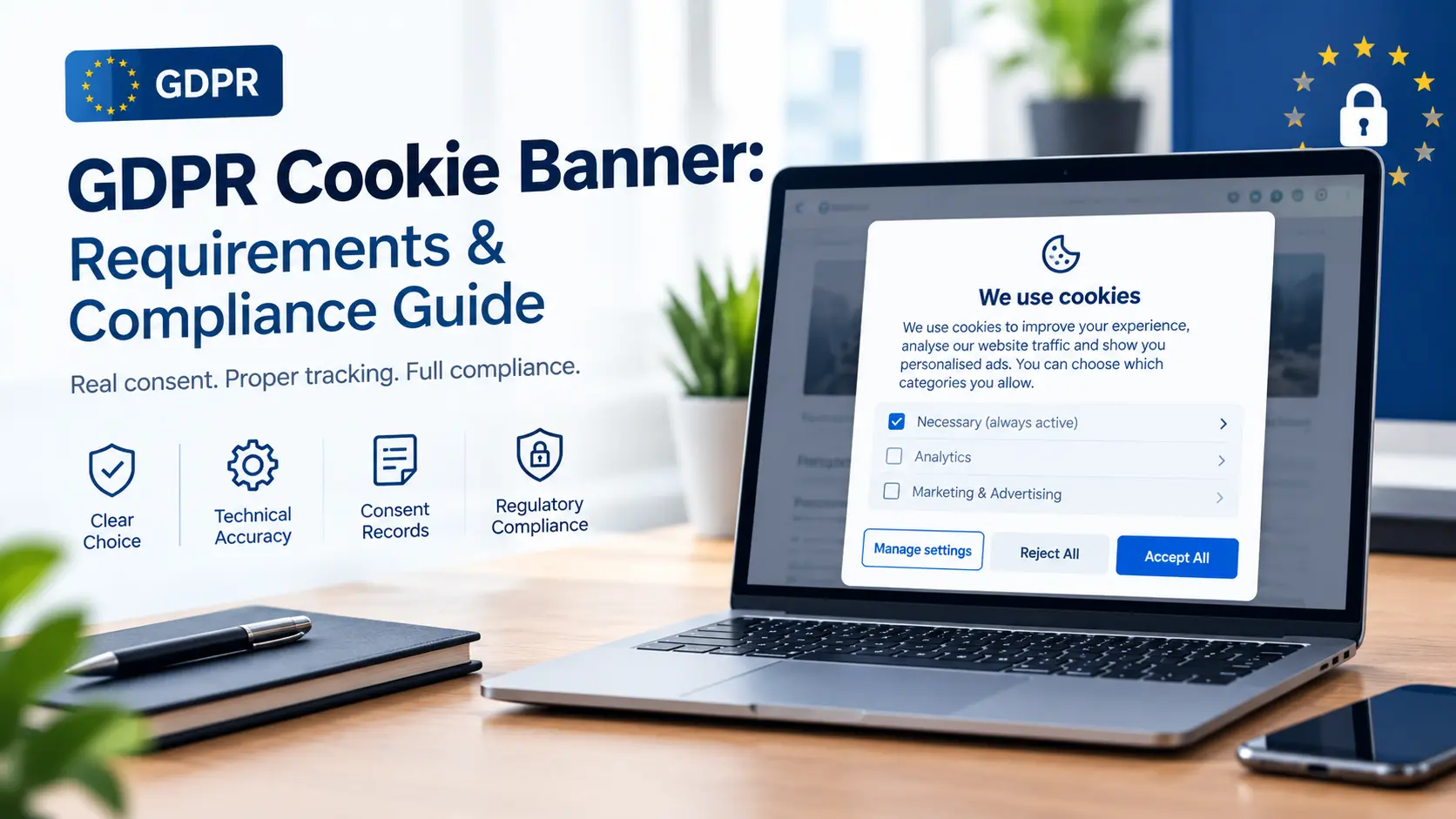
A compliant banner should give users a clear choice before non-essential cookies or similar tracking technologies are placed on their device.
Under European privacy rules, consent must be freely given, specific, informed, and based on a clear positive action. Simply continuing to browse does not create valid consent.
A practical banner should therefore:
Explain that non-essential cookies are being used.
State the main purposes, such as analytics or advertising.
Provide a clear way to accept.
Provide an equally clear way to reject.
Let users manage individual categories where appropriate.
Avoid placing non-essential cookies before consent.
Provide a way to withdraw or change consent later.
For a broader explanation of privacy obligations, businesses can also review
The Overlooked Test: What Happens After the Click?
Many cookie reviews stop at the visible banner. That misses one of the most important compliance checks. We should test what the website actually does after each choice.
For example, suppose a visitor selects Reject All. The banner disappears, but an advertising platform still receives tracking data. The button may look compliant, but the underlying consent system is not.
The UK ICO’s current guidance says non-essential storage technologies should only be used after valid consent, unless an applicable exception applies.
A useful compliance test is:
Open the website in a fresh browser session.
Inspect cookies and other tracking technologies before making a choice.
Select Reject All.
Check whether non-essential trackers are still activated.
Repeat the test with Accept All.
Test the settings panel and consent withdrawal process.
This technical check can reveal problems that are invisible from the banner itself.
Cookie Banner Requirements for Clear Consent
The design should not push users toward acceptance. In December 2024, France’s CNIL ordered website publishers to change misleading cookie banners. Examples included hiding the refusal option, making it visually weaker, and presenting the acceptance option multiple times while showing refusal only once. CNIL stated that rejecting cookies should be as easy as accepting them. The European Data Protection Board’s Cookie Banner Taskforce also found broad agreement among European authorities that refusing or rejecting cookies should not be made harder than accepting them.
This means businesses should avoid designs such as:
Accept All as a large button with rejection hidden in small text.
A refusal link buried below several paragraphs.
Repeated acceptance prompts with only one refusal option.
Confusing phrases such as “Continue without accepting” when the actual choice is unclear.
Pre-selected non-essential cookie categories.
A balanced design does not require every website to use identical colors or button layouts. Regulators assess whether the overall presentation is misleading.
GDPR Cookie Consent and Cookie Categories
A useful Cookie Consent system separates cookies according to their actual purpose.
Strictly Necessary Cookies
These support functions the visitor has requested or the website needs to operate, such as maintaining a shopping basket or certain security functions. Depending on the technology and legal basis, these may fall within an exception to the consent requirement.
Analytics Cookies
Analytics tools may require consent when they are not covered by a valid exemption. We should not assume that calling data “anonymous” automatically removes the need for careful assessment.
Advertising and Tracking Cookies
Advertising, profiling, and similar tracking technologies generally require particular attention because they can follow users across services or build behavioral profiles. Businesses should maintain an accurate record of which technologies belong to each category rather than relying on the default categories supplied by a Consent Management Platform.
Consent Records Matter Too
A banner does more than collect a click. Businesses may need to demonstrate how consent was obtained.
We recommend recording information such as:
The consent status.
The date and time of the choice.
The consent version or configuration shown to the user.
The categories selected.
The mechanism used to collect the choice.
The exact retention approach should match the organisation’s legal and operational needs.
We should also plan for changes. If a website adds new trackers, changes purposes, or materially changes how technologies are used, the existing consent setup may need to be reviewed. The ICO specifically notes that fresh consent may be needed when cookie use changes.
A 2026 Compliance Lesson From Recent Enforcement
Recent enforcement shows that regulators are checking implementation, not just policy language. In 2024, CNIL reported 11 organisations were penalised for making cookie refusal harder than acceptance.
The ICO later reported that its assessment of the UK’s top 1,000 websites found 979 meeting its compliance checks at their most recent test, while 21 were still failing. The checks included whether advertising cookies were stored before users could choose and whether rejecting them was as easy as accepting them. The practical lesson is clear: a polished banner cannot compensate for a broken consent mechanism.
How to Audit a Cookie Banner
We can use a simple five-part audit:
1. Check Before Consent
Open the site without making a choice. Look for non-essential cookies, pixels, scripts, tags, and other tracking technologies.
2. Check the Refusal Path
Select the refusal option. Confirm that the relevant non-essential technologies remain blocked.
3. Check the Settings
Open the detailed preferences panel. Each category should be understandable, and choices should not be misleading.
4. Check Withdrawal
Find the privacy or consent control after making a choice. Users should have a practical way to change their decision.
5. Check Mobile
Repeat the process on a phone. A refusal option that is visible on desktop can become hidden or difficult to use on a smaller screen.
Conclusion
The strongest GDPR Cookie Banner is not simply the one that looks transparent. It is the one that behaves transparently. Recent regulatory work points to a practical standard: give users a real choice, respect that choice technically, and make refusal no harder than acceptance. Businesses that test the scripts behind their banner, keep their cookie inventory accurate, and review consent after website changes can address the part of cookie compliance that a banner alone cannot solve.
FAQ
Does every website need a GDPR Cookie Banner?
Not necessarily. The requirement depends on the technologies used, their purpose, applicable exemptions, and the laws applying to the website. Necessary technologies may qualify for an exception, while non-essential tracking generally needs a valid consent mechanism.
Is clicking “Accept” enough for Cookie Consent?
A click can provide the required positive action, but the surrounding information and choice must also meet the requirements for valid consent. Consent should be informed, specific, and freely given.
Can a website use “Accept” and “Manage Settings” without “Reject All”?
This design can create compliance concerns, particularly where refusal is harder than acceptance. Recent regulatory action shows that authorities are closely examining whether users can reject non-essential cookies as easily as they can accept them.
How often should Cookie Consent be reviewed?
We should review the banner whenever tracking technologies, purposes, vendors, or consent settings change. Regular technical scans are also useful because a website can become non-compliant after a new marketing or analytics script is added.
The biggest Privacy Policy vs Privacy Notice mistake is treating the two as the same document. That can create a practical compliance gap, especially when a business publishes one long privacy page but fails to provide relevant information when personal data is collected. The European Data Protection Board selected transparency and information as its coordinated enforcement focus for 2026. Twenty-five European data protection authorities are taking part, examining how organisations meet their obligations under GDPR Articles 12, 13, and 14. For businesses reviewing their GDPR privacy requirements, the key issue is therefore not simply whether a privacy page exists. It is whether people receive clear information about their data at the right time.
Privacy Policy vs Privacy Notice: What Is the Difference?
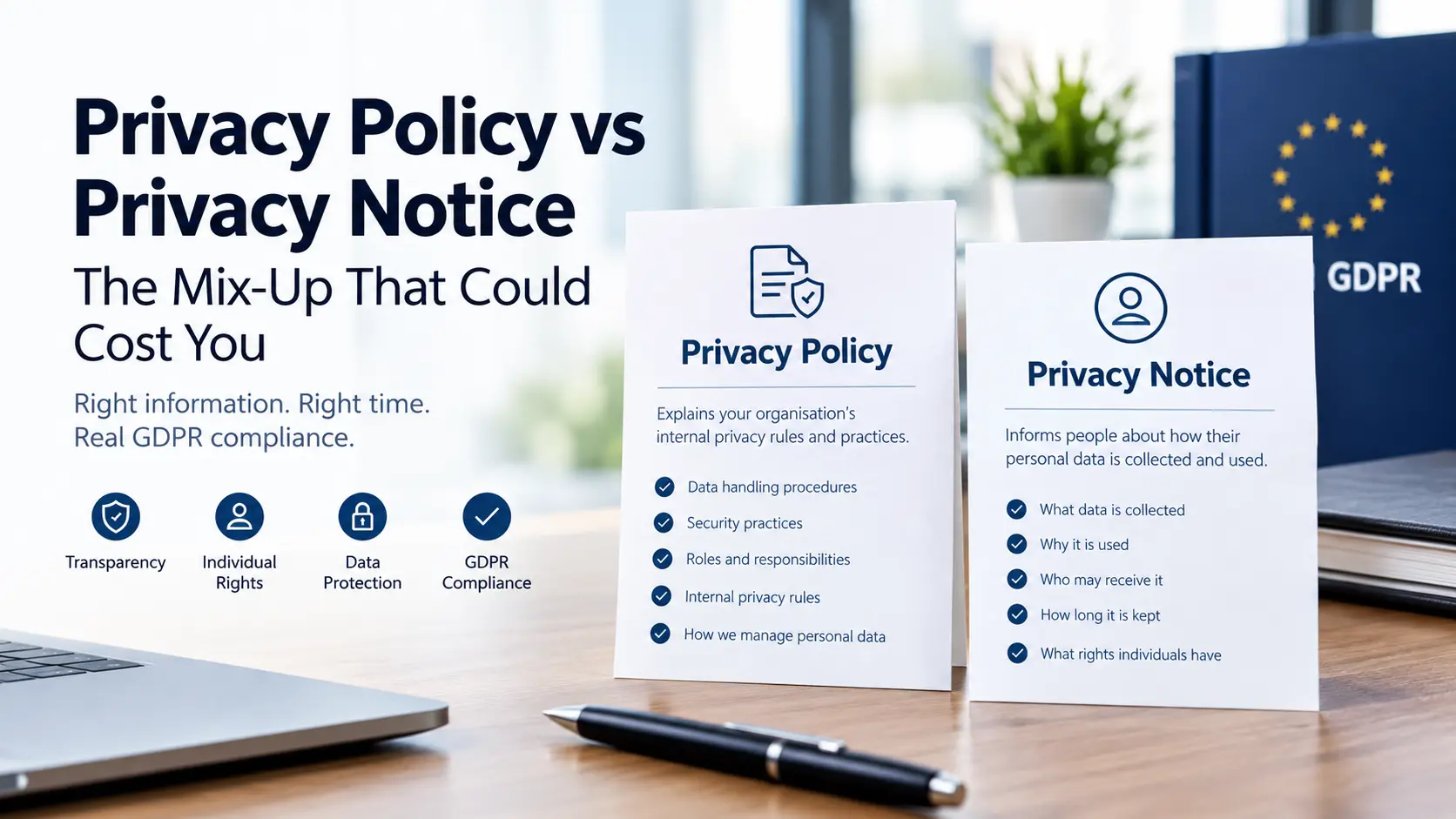
A privacy notice is mainly designed to inform people about how their personal data is processed. It can explain what data is collected, why it is used, who may receive it, how long it is kept, and what rights individuals have. A privacy policy can have a broader purpose. It may describe an organisation’s internal privacy rules, procedures, responsibilities, security practices, and approach to handling personal information.
The Bigger Problem: A Good Privacy Policy Can Still Be Too Late
A common setup is to publish a detailed privacy policy and place a link in the website footer. That alone may not provide enough transparency. Under GDPR, Articles 13 and 14 require organisations to provide specific information when personal data is collected directly or obtained from another source. The timing matters. Consider a newsletter form.
A visitor enters an email address and submits the form. The company has a 4,000-word privacy policy explaining marketing, analytics, cookies, retention, and third-party services. But the visitor may not see the relevant information before submitting their email address.
The ICO’s guidance on the right to be informed states that privacy information should generally be provided when personal data is collected. It also recommends approaches such as layered information and just-in-time notices. A short just-in-time privacy notice can explain the immediate processing and direct the person to fuller information.
GDPR Privacy Requirements Go Beyond Publishing a Page
A stronger approach starts with the actual data flow rather than a generic privacy template.
Map What Your Business Collects
Review personal data collected through:
Website forms
Customer accounts
Purchases
Newsletter subscriptions
Cookies and analytics
Customer support
Recruitment
Mobile applications
Third-party platforms
Then connect each type of information to a specific purpose.
This helps identify differences between what the business actually does and what its privacy information says. For a wider checklist of the rules businesses should review, see our guide to GDPR requirements and compliance rules.
Match Each Purpose With the Right Information
For each processing activity, check the relevant legal basis, purpose, recipients, retention period, international transfers, and individual rights. Avoid vague statements such as “we use your data to improve our services” when the organisation actually uses different information for advertising, analytics, profiling, customer support, or other separate purposes.
Each purpose should be explained clearly enough for an ordinary person to understand. This becomes even more important when businesses use AI tools or automated processing. Our guide to GDPR and AI applications and data privacy covers this issue in more detail.
The 2026 Enforcement Focus Makes Timing More Important
The EDPB’s 2026 coordinated enforcement action focuses on transparency and information. European data protection authorities are examining how organisations meet their information duties in practice.
That makes several details worth checking.
Does the notice explain new uses of personal data before processing starts?
Does it identify important recipients?
Does it explain retention clearly?
Can users find the relevant information on mobile devices?
Does the notice still match the company’s current vendors and technology?
The ICO also says organisations should regularly review privacy information and bring new uses of personal data to people’s attention before starting the new processing. (ICO)
Privacy Policy Requirements Should Follow Your Data Map
A useful privacy review should check:
Who controls the personal data
What information is collected
Why it is processed
Which legal basis applies
Who receives it
Where it is transferred
How long it is retained
What rights individuals have
How people can exercise those rights
Whether profiling or automated decision-making is involved
The information should be concise, transparent, intelligible, easily accessible, and written in clear language, according to ICO guidance.
This is where Data privacy compliance becomes a business process rather than simply a legal-page exercise. Marketing forms, analytics tools, customer databases, AI applications, and third-party services can all change what the privacy notice needs to say.
Conclusion
The real Privacy Policy vs Privacy Notice problem is not the label used on the page. It is assuming that publishing one document automatically satisfies every transparency obligation. The 2026 EDPB enforcement focus makes that distinction more practical. Businesses should connect their privacy information to their real data flows and provide relevant information where and when people interact with those flows. A privacy policy can explain the bigger picture. A well-designed privacy notice makes sure people receive the information they need at the point it matters. That distinction is increasingly important for effective GDPR privacy requirements and practical Data privacy compliance.
FAQ
What are the main Privacy Policy requirements under GDPR?
They include information about processing purposes, legal basis, recipients, retention, transfers, individual rights, and other information required under GDPR Articles 13 and 14.
Is a Privacy Notice legally required?
GDPR creates transparency and information duties. The title of the document is less important than whether the required information is provided clearly and at the appropriate time.
Can a Privacy Policy also be a Privacy Notice?
Yes. One document can serve both purposes if it contains the required information and is presented appropriately. However, one long page may not work well for every point where personal data is collected.
How often should privacy information be updated?
It should be reviewed when processing changes, including changes to purposes, vendors, technologies, retention periods, or international data transfers. Organisations should also consider whether people need to be informed about new processing before it begins.
The most important GDPR requirement in 2026 is not simply having a privacy policy. Organisations need to prove what personal data they process, why they process it, where it goes, how long they keep it, and how they respond when a person exercises their rights. That practical proof is becoming more important as regulators focus on real implementation. The European Data Protection Board (EDPB) selected transparency and information duties as the subject of its 2026 coordinated enforcement action, involving 25 European data protection authorities. Recent enforcement also shows that basic rights can create real exposure. This gives businesses a useful way to approach GDPR requirements: treat compliance as an evidence system, not a document exercise.
What Are the Main GDPR Requirements?
The GDPR rules require organisations to build their data practices around several core principles. The European Commission identifies seven key principles, including lawfulness and transparency, purpose limitation, data minimisation, storage limitation, accuracy, security, and accountability.
1. Have a lawful reason for processing
Personal data processing needs a valid legal basis under Article 6. Depending on the activity, this can include consent, contract, legal obligation, vital interests, public task, or legitimate interests. The legal basis should be recorded for each processing activity. A vague statement such as “we use data to improve our services” may not explain enough about a specific use. For sensitive categories, such as health or biometric information, additional conditions can apply.
2. Collect only what you need
Data minimisation means organisations should avoid collecting personal information simply because it might become useful later. For example, an online booking form may need a customer’s name and contact details, but collecting unrelated information without a clear purpose creates another compliance burden.
3. Explain processing clearly
Privacy notices should tell people what data is collected, why it is used, the legal basis, who receives it, retention information, international transfers where relevant, and the rights available to the individual. This is especially important in 2026 because the EDPB’s coordinated enforcement work is examining transparency and information requirements under Articles 12, 13, and 14. A useful internal test is simple: Could an ordinary customer understand the data practice without asking your legal team?
The Overlooked GDPR Checklist: Map the Data, Not Just the Policy
A privacy policy cannot show everything an organisation actually does with personal data. A record of processing activities, often called a ROPA, provides a more useful operational view. Under Article 30, organisations may need records covering processing purposes, data categories, affected individuals, recipients, international transfers, retention periods where possible, and security measures.
Our practical checklist should therefore include:
Data source: Where did the information come from?
Purpose: Why is it being processed?
Legal basis: What permits the processing?
Recipients: Which vendors, teams, or partners receive it?
Location: Does the data leave the European Economic Area?
Retention: When should it be deleted?
Security: What controls protect it?
Rights process: How will access, deletion, objection, or correction requests be handled?
This mapping can expose problems that a privacy policy will not. For example, a company may have an accurate notice but discover that an old analytics platform still receives customer information.
GDPR Requirements for Vendors, AI, and International Transfers
Third-party tools deserve special attention. A business can remain responsible for its GDPR obligations even when another company processes the data. Contracts with processors should define their responsibilities, and organisations should know which vendors receive personal information. The European Commission also provides guidance covering processor relationships, data transfers, security, and other business obligations. International transfers also require care. EU data protection rules provide safeguards for transfers to third countries, including adequacy decisions, standard contractual clauses, and binding corporate rules.
This matters because GDPR protections are technology-neutral. Personal data remains protected whether it is processed through traditional software, automated systems, or newer AI applications.
Security and Breach Response Are Part of GDPR Compliance
GDPR rules require security measures that match the risks involved. Organisations should consider measures such as access controls, encryption where appropriate, backups, authentication, monitoring, and staff procedures.
A breach response plan should also be tested before an incident happens. Under Article 33, certain personal data breaches must be notified to the supervisory authority within 72 hours after becoming aware of the breach, unless the breach is unlikely to result in risks to people’s rights and freedoms. The key takeaway is that strong security measures and proper documentation must work together.
A business should be able to show what happened, which data was affected, when it discovered the incident, and what action it took.
GDPR Compliance Checklist for 2026
Use this short checklist for an annual review:
Map every major personal data process.
Record a lawful basis for each process.
Review privacy notices for accuracy and clarity.
Check consent mechanisms where consent is used.
Review processor contracts and vendor access.
Check international data transfers and safeguards.
Set retention periods and deletion procedures.
Test data subject rights procedures.
Review security controls.
Test the breach response process.
Identify whether a Data Protection Impact Assessment (DPIA) must be conducted.
Review AI tools, scraping activities, and automated processing.
Keep evidence showing that controls actually operate.
Conclusion
The strongest GDPR requirements checklist for 2026 is built around evidence. A privacy notice matters, but it should match the systems, vendors, retention rules, rights procedures, security controls, and AI tools operating behind it. The latest enforcement direction reinforces that point. Regulators are examining whether organisations actually provide information and respect individual rights, while European guidance continues to address international transfers, security, and modern data processing. For businesses, the practical goal is straightforward: know your data, document why you use it, control where it goes, and be able to prove that your GDPR rules work in practice.
FAQ: Speech Disorder Data and GDPR
Does GDPR protect information about a speech disorder?
Yes. Information about a person’s health can fall within special category personal data under the GDPR when it reveals information about their health. Organisations handling such information need to consider both a lawful basis under Article 6 and an applicable condition under Article 9.
Can a speech therapy provider collect speech disorder information?
Yes, where the processing has an appropriate legal basis and satisfies the additional rules for special category data. The provider should collect only information needed for the stated purpose and protect it with suitable security controls.
Can speech disorder information be shared with another company?
It may be possible, but the organisation must assess the legal basis, purpose, recipient, contractual arrangements, and applicable safeguards before sharing it. The answer depends on the specific processing activity.
A major difference between the CCPA and GDPR is becoming clearer in 2026: privacy compliance is moving beyond privacy policies and into the technology businesses use to collect, share, delete, and profile personal data. California’s rules now include stronger requirements around opt-out signals, automated decision-making, risk assessments, cybersecurity audits, and data brokers. At the same time, the GDPR continues to apply to businesses outside Europe when they offer services to people in the EU or monitor their behaviour. That means a business can no longer assume that having a privacy policy and cookie banner is enough. The practical question is whether its systems actually respect a person’s privacy choice.
CCPA vs GDPR: The Core Difference
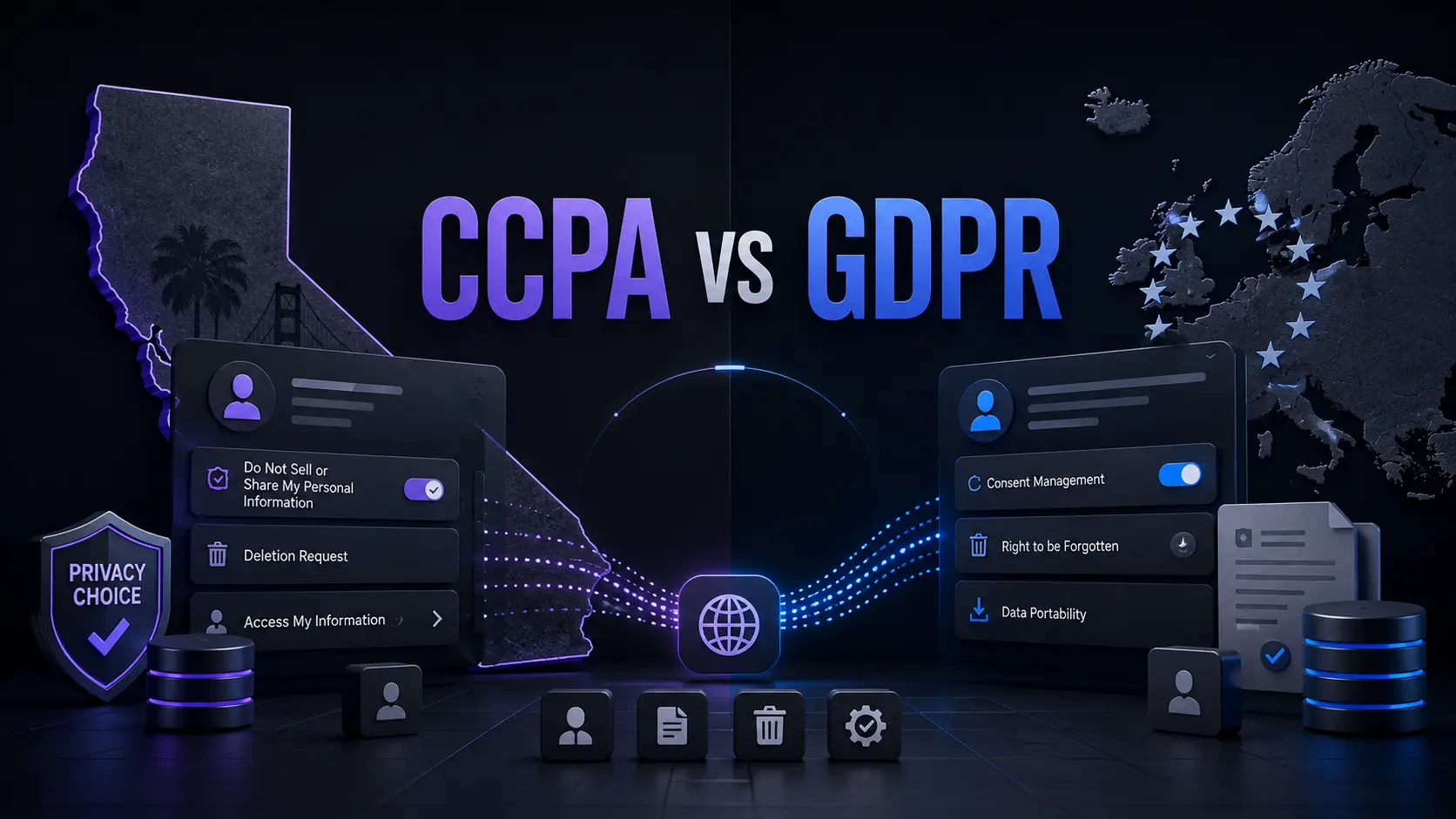
The CCPA, formally the California Consumer Privacy Act as amended by the California Privacy Rights Act, is California’s broad consumer privacy law. The CPRA did not create a separate law. It changed the CCPA and added new rights and obligations. The GDPR is an EU regulation that applies across the European Economic Area and can also reach organisations outside Europe.
The biggest difference is how each law approaches scope.
Area
CCPA
GDPR
Main focus
Consumer privacy and control over personal information
Protection of personal data and individual rights
Geographic reach
California-focused, with rules that can affect businesses outside California
Can apply to organisations outside the EU
Opt-out
Strong rights to opt out of sale and sharing
Different legal bases and consent rules apply
Sensitive data
Right to limit certain uses
Stronger special-category data rules
Automated decisions
New requirements are being phased in
Existing rules cover certain automated decision-making
Maximum administrative fine
Generally up to $2,663 per violation, or $7,988 for intentional violations under current California amounts
Up to €20 million or 4% of the company’s total annual global turnover, depending on the type of violation.
California’s monetary thresholds were adjusted for inflation in 2025.
Who Does the CCPA Apply To?
The CCPA does not apply to every business simply because someone from California visits its website. Coverage depends on factors such as the business’s activities and statutory thresholds. One threshold tied to annual gross revenue was adjusted to $26.625 million from January 1, 2025. Other CCPA tests can apply based on the amount of personal information handled or the business’s role in selling or sharing personal information. This differs from the GDPR.
The GDPR can apply to a small business outside the EU if it offers goods or services to people in the EU or monitors their behaviour there. Company size alone does not remove a business from GDPR coverage. For example, a small Australian software company that specifically sells subscriptions to customers in Germany may need to assess GDPR obligations even though it has no European office. A business targeting California customers may instead need to determine whether it meets the CCPA definition of a covered business.
The Rights Consumers Get Under CCPA and GDPR
The laws overlap, but they give people different forms of control.
Under the CCPA, California consumers are entitled to several privacy rights, including:
Know what personal information a business collects, uses, and shares.
Delete personal information, subject to exceptions
Correct inaccurate information
Opt out of the sale or sharing of personal information
Limit certain uses and disclosures of sensitive personal information
Receive equal treatment when exercising privacy rights
The GDPR provides a different rights framework. Depending on the circumstances, individuals can request access, correction, deletion, restriction of processing, data portability, and objection to certain processing. Consent can also be withdrawn where consent is the legal basis. This creates an important practical difference: CCPA often gives consumers a direct opt-out from certain commercial data uses, while GDPR compliance depends heavily on why the organisation is processing the data in the first place.
The Overlooked CCPA Detail: Your Privacy Choice Must Reach the Technology
One of the most important CCPA developments is not simply another consumer right. It is the growing requirement for businesses to make privacy choices work across their technical systems. California already requires covered businesses to honour qualifying opt-out preference signals, such as Global Privacy Control, for sale and sharing. In September 2025, California, Colorado, and Connecticut announced a joint investigation into businesses that may have failed to honour these signals.
California then went further. In October 2025, the Governor signed the California Opt Me Out Act, requiring browsers operating in California to offer users a simple built-in way to send opt-out preference signals. For businesses, this changes the technical question.
It is not enough to place a “Your Privacy Choices” link in a footer. The signal must affect what happens behind the page. If a visitor sends an opt-out signal, businesses need to consider whether their advertising tools, analytics systems, customer databases, and third-party vendors actually stop the relevant sale or sharing. That makes privacy engineering part of CCPA compliance, not just legal drafting.
CCPA Data Brokers Are Facing a New Practical Test
Another major 2026 development is California’s Delete Request and Opt-Out Platform, or DROP. Beginning January 1, 2026, California residents can use DROP to submit a single request to participating data brokers. Starting August 1, 2026, data brokers must access the mechanism at least once every 45 days and process qualifying deletion requests. The system matters because it changes deletion from a company-by-company process into a centralized request. California is also actively enforcing data broker rules.
In January 2026, CalPrivacy announced a $45,000 fine against Datamasters for failing to register as a data broker and ordered it to stop selling Californians’ personal information. The same announcement described a separate $62,600 fine against S&P Global for a registration failure.
These cases show why businesses should examine whether their marketing, audience-building, enrichment, or data-resale activities could make them subject to California’s data broker rules.
How the GDPR Differs on International Reach
The GDPR’s reach is broader than many businesses expect. An organisation outside the EU can fall under the GDPR if it offers goods or services to individuals in the EU or monitors their behaviour there. Simply having a website that happens to be accessible from Europe does not automatically establish GDPR coverage. The business’s actual activities matter. The GDPR also has a strong focus on the legal basis for processing.
A business generally needs a lawful reason to process personal data. Depending on the activity, that can include consent, contract, legal obligation, legitimate interests, or other recognised grounds. This is different from treating privacy mainly as a consumer opt-out system. For businesses operating internationally, CCPA and GDPR should therefore be assessed separately, even when the same customer data is involved.
New CCPA Rules Matter for AI and Automated Decisions
California’s privacy rules are also moving into artificial intelligence and automated decision-making. Regulations adopted in 2025 became effective January 1, 2026. They introduced requirements covering risk assessments, cybersecurity audits, and automated decision-making technology. Some automated decision-making requirements begin in 2027, while certain cybersecurity audit reporting deadlines extend into 2028, 2029, and 2030 depending on business revenue.
This is an important difference from older CCPA comparisons.
A privacy review should now ask more than, “What information do we collect?”
It should also ask:
What decisions does our technology make using personal information, and can a consumer exercise the rights that California provides?
Businesses using profiling, recommendation systems, advertising technology, or automated eligibility decisions should map those systems before assuming their existing CCPA controls are sufficient.
CCPA vs GDPR: What Businesses Should Do
Businesses dealing with both California and EU users should build a single data map first, then test it against each law.
We should identify:
What personal information is collected
Where it comes from
Why it is processed
Which vendors receive it
Whether it is sold or shared
How deletion and correction requests move through systems
How opt-out signals are detected
Whether sensitive information receives additional controls
Whether profiling or automated decisions are involved
How privacy choices are recorded and enforced
The goal should not be to copy one law’s policy wording into another jurisdiction. The stronger approach is to make the underlying data systems capable of enforcing each person’s applicable rights.
Conclusion
CCPA vs GDPR is not simply a comparison between two privacy policies. The more useful distinction is how each law makes businesses give people control over personal data. The CCPA has developed into a system where opt-out signals, data brokers, automated decision-making, risk assessments, and technical controls matter alongside traditional privacy notices. The GDPR remains broader in its territorial reach and places strong emphasis on the legal basis and conditions for processing personal data. For organisations operating across California and Europe, the practical lesson is clear: map the data, map the technology, and then test each processing activity against the law that applies to the people involved.
CCPA vs GDPR FAQs
Does GDPR automatically apply to every business with European visitors?
No. A business outside the EU can fall under the GDPR when it offers goods or services to people in the EU or monitors their behaviour there. Mere accessibility from Europe does not automatically establish coverage.
Does CCPA apply to small businesses?
Not necessarily. CCPA coverage depends on the statutory tests, rather than simply whether a company is large or small. A business should check its revenue, data-processing activities, and other applicable criteria.
Is CCPA compliance the same as having a privacy policy?
No. A privacy policy is only one part of compliance. CCPA obligations can affect website controls, opt-out signals, advertising systems, vendor contracts, data deletion processes, and automated technologies.
What is the biggest practical CCPA change in 2026?
For many businesses, the important shift is that privacy choices increasingly need to work through technology rather than remain on paper. Opt-out signals, centralized data-broker deletion through DROP, risk assessments, and new automated decision-making rules all reinforce this direction.
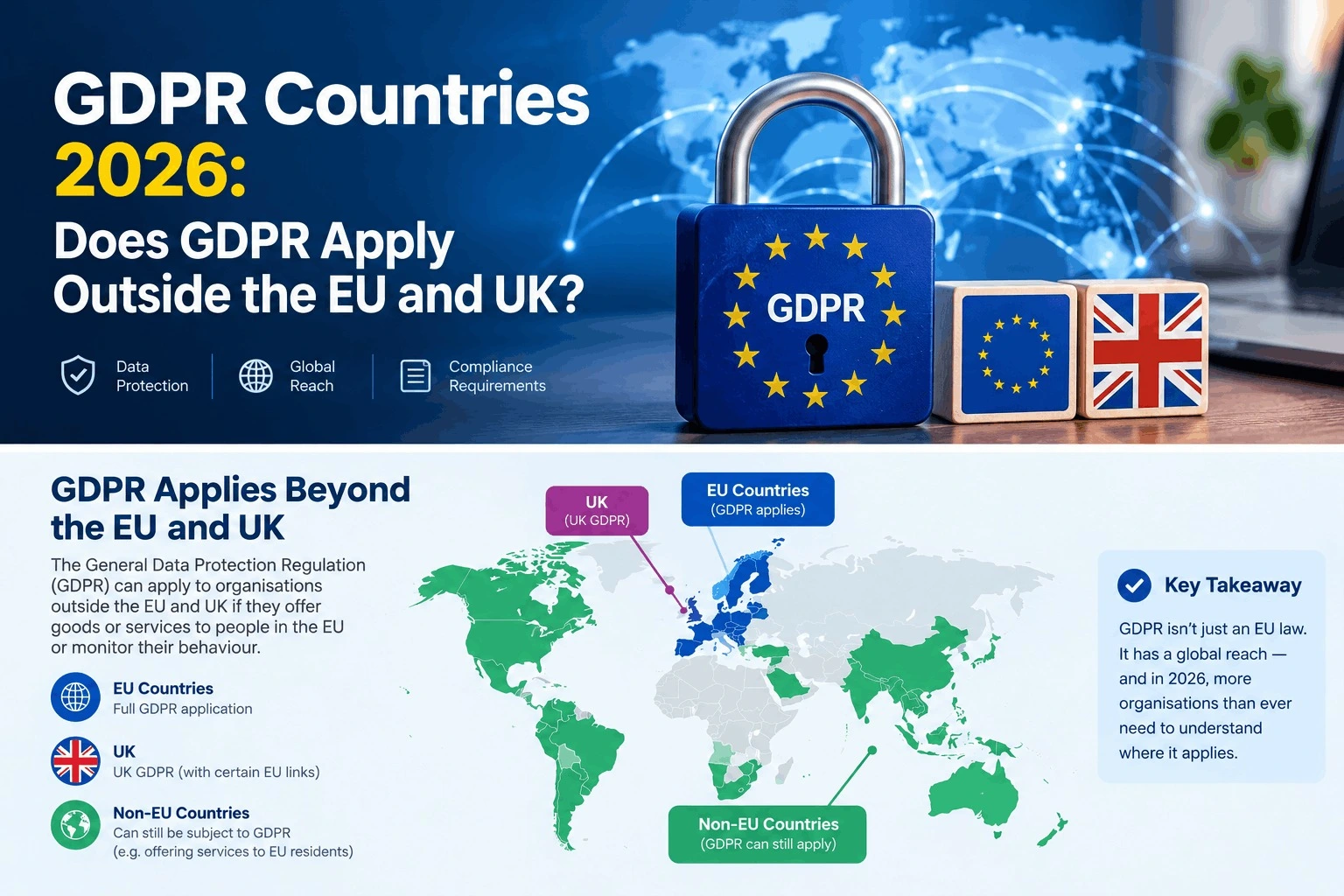
If you run a website, SaaS product, online store, or marketing platform, understanding GDPR Countries is important when you serve people across borders. The EU General Data Protection Regulation does not simply apply based on where a company is registered. Its territorial scope can also cover businesses outside the European Union. The UK has its own UK GDPR framework, which can also apply to organizations outside the UK. In 2026, businesses also need to consider changes introduced by the UK’s Data (Use and Access) Act 2025.
GDPR Countries: Where Does the GDPR Apply?
The EU GDPR does not create a fixed list of “GDPR countries.” Instead, Article 3 defines its territorial scope. The EU GDPR applies to qualifying personal-data processing carried out in the context of an establishment in the EU. It can also apply to organizations outside the EU when their processing relates to offering goods or services to people in the EU or monitoring their behavior there.
Business situation
Can EU GDPR apply?
Business established in the EU
Yes, where the processing falls within its scope
Business outside the EU targeting people in the EU
Potentially
Business outside the EU monitoring people in the EU
Potentially
Business outside the EU with no relevant EU activity
Not necessarily
UK-based business
EU GDPR and UK GDPR may need to be considered separately
The key point is that GDPR compliance depends on the processing activity and territorial connection, not simply the country where the company has an office.
Does GDPR Apply Outside the EU?
Yes. This is one of the most important parts of the GDPR’s territorial scope. For example, imagine a SaaS company based in Pakistan that deliberately markets its software to customers in France and Germany. If its processing falls within Article 3 because it is offering services to people in the EU, the company may have EU GDPR obligations even though it has no European office.
However, simply having a website that can technically be accessed from Europe does not automatically mean the GDPR applies to every activity. The circumstances of the processing, including whether goods or services are actually being offered to people in the EU or their behavior is being monitored, matter. The GDPR therefore has extraterritorial reach, but it is not a worldwide law that automatically applies to every company in every country.
What About the UK?
The UK is no longer part of the EU, so businesses should distinguish the UK GDPR from the EU GDPR. The UK GDPR applies to processing carried out by organizations operating in the UK. It can also apply to organizations outside the UK when they offer goods or services to individuals in the UK or monitor their behavior.
For example, a US e-commerce company selling directly to customers in the UK may need to assess its obligations under the UK GDPR. A company can therefore potentially have both EU GDPR and UK GDPR responsibilities when it serves customers in both markets.
UK Data Protection Changes in 2026
One of the most important 2026 updates is the Data (Use and Access) Act 2025 (DUAA). The Information Commissioner’s Office confirmed on 19 June 2026 that all data-protection provisions of the DUAA are now in force. The Act changes parts of the UK’s existing data-protection framework, including the UK GDPR and Data Protection Act 2018 framework.
This means businesses handling UK personal data should not rely only on older UK GDPR guidance. They should also review the current requirements introduced by the DUAA. For businesses operating internationally, this is particularly relevant when their privacy policies, data-processing procedures, complaint processes, or compliance documentation cover UK users.
EU, EEA and UK Are Different
The European Economic Area (EEA) consists of the 27 EU countries plus Iceland, Liechtenstein and Norway. The UK is not an EEA member. This distinction matters because people sometimes use “Europe,” “EU,” “EEA,” and “GDPR countries” as if they mean exactly the same thing.
They do not. The EU GDPR has relevance across the EU and also applies in certain circumstances to organizations outside the EU. The UK has its separate UK GDPR framework. The EU has also renewed its adequacy decision for the UK, with the current decision running until 27 December 2031, subject to its conditions.
How International Businesses Should Prepare
If your business serves customers internationally, start by mapping your data flows. Identify where customers are located, what personal information you collect, which legal frameworks may apply, and where that information is transferred or accessed.
You should also keep privacy notices, processor agreements, security measures, international-transfer arrangements, and data-retention practices under regular review. Because privacy laws can change, checking current guidance from the relevant regulator is important before making compliance decisions.
Conclusion
Understanding GDPR Countries is really about understanding territorial scope rather than memorizing a list of countries. The EU GDPR can apply to businesses outside the EU when specific Article 3 conditions are met, while the UK has a separate UK GDPR framework. For international businesses, GDPR compliance should therefore be based on actual customers, processing activities, monitoring, and data flows. In 2026, UK businesses and organizations serving UK users should also account for the Data (Use and Access) Act 2025, whose data-protection provisions are now in force.
Frequently Asked Questions
Does GDPR apply to companies outside Europe?
It can. The EU GDPR may apply to organizations outside the EU when their processing falls within Article 3, including certain activities involving offering goods or services to people in the EU or monitoring their behavior.
Is the UK still covered by the EU GDPR?
The UK has its own UK GDPR framework. Depending on the organization’s activities, the EU GDPR may also apply when it processes personal data within the EU GDPR’s territorial scope.
Does every country follow GDPR?
No. GDPR is an EU regulation with specific territorial reach. Other countries have their own privacy laws and frameworks.
What changed for UK data protection in 2026?
As of 19 June 2026, all data-protection provisions of the Data (Use and Access) Act 2025 are in force. Businesses handling UK personal data should consider these changes alongside the existing UK GDPR framework.
If your website, SaaS product, marketing platform, or AI application collects personal information, privacy cannot be treated as a simple checkbox. Understanding the GDPR Meaning is especially important in 2026 because AI systems can collect, analyze, profile, and process personal data at scale.
The GDPR is technology-neutral, so its requirements can apply when personal data is processed through AI systems as well as other technologies. For businesses using AI applications, the key questions are what data is processed, why it is processed, how long it is retained, and whether appropriate safeguards are in place.
What Does GDPR Mean in 2026?
GDPR stands for the General Data Protection Regulation, the EU’s main framework for protecting personal data. It applies to organizations established in the EU and can also apply to organizations outside the EU when they offer goods or services to individuals in the EU or monitor their behaviour there.
The GDPR covers activities such as collecting, storing, using, sharing, and deleting personal data. The European Commission identifies seven core principles:
These principles are particularly important for AI applications because automated systems can process large amounts of information and connect data from different sources.
At-a-Glance Comparison
Tool Name
Best For
Starting Price
OneTrust
Enterprise GDPR compliance and privacy management
Custom quote
Best GDPR Compliance Platform for Enterprise Privacy Management
OneTrust
OneTrust provides tools for consent management, privacy automation, data discovery, and AI governance. Its Consent Management Platform can detect cookies, tags, trackers, pixels, and beacons across websites. Its scanning capabilities can also handle pages behind logins and other less visible website content. OneTrust says its platform uses a database containing more than 45 million pre-categorized cookies. It also provides consent banners, consent records, automated scanning, and cookie auto-blocking features.
For businesses running multiple websites or digital products, centralized consent management can help maintain consistent privacy controls. OneTrust also offers privacy automation for data mapping, privacy assessments, vendor risk, data-subject requests, and related workflows. Its AI governance capabilities can help organizations manage AI initiatives, models, agents, datasets, risks, vendors, assessments, and documentation.
Pros
Broad consent and privacy management capabilities
Cookie and tracker discovery
Data-subject request workflows
AI governance functionality
Cons
No simple public self-service monthly price
Configuration can require technical and privacy expertise
Pricing: OneTrust uses customized pricing based on solution-specific usage metrics. Depending on the product, pricing can consider factors such as users, inventory, data profiles, visitors, or data volume. A custom quote is required.
What GDPR Compliance Means for AI Applications
AI can make privacy management more complicated because personal data may enter a system through prompts, uploaded documents, customer records, analytics, support conversations, or connected applications.
GDPR requires organizations to process personal data lawfully and transparently and use it for defined purposes. Data should be limited to what is necessary, retained only as long as required, and protected with appropriate technical and organizational measures.
For an AI application, organizations should ask:
What personal data enters the system?
Why is it being processed?
What is the legal basis?
Where is the data stored?
Who receives or accesses it?
How long is it retained?
Is it transferred outside the EU?
Is it used for profiling or automated decision-making?
Privacy platforms can help document and manage these processes, but using one does not automatically make an AI application GDPR compliant.
DPIAs and AI Privacy Risk in 2026
A Data Protection Impact Assessment (DPIA) may be required when processing is likely to create a high risk to individuals’ rights and freedoms. A DPIA helps organizations describe processing activities, evaluate risks, and identify measures to reduce those risks.
There is also an important 2026 development. In April 2026, the European Data Protection Board adopted a DPIA template intended to help organizations structure and document DPIAs more consistently. For businesses developing higher-risk AI applications, this provides another useful reference for organizing privacy risk assessments.
GDPR and Automated Decision-Making
AI can also raise questions about profiling and automated decision-making. GDPR includes protections for decisions based solely on automated processing when those decisions produce legal effects or similarly significant effects for an individual. Specific conditions, exceptions, and safeguards apply.
Not every AI recommendation or prediction automatically falls under these rules. Organizations need to consider how the system operates and whether its decisions have the type of significant effect covered by GDPR.
GDPR Data-Subject Requests
GDPR gives individuals rights concerning their personal data, including access, rectification, erasure, restriction of processing, data portability, and objection. Additional protections apply to certain automated decision-making and profiling activities.
Organizations generally need to respond to a valid rights request without undue delay and within one month. In certain circumstances, the response period can be extended by up to two additional months, with the individual informed about the extension.
For AI businesses, fulfilling these requests can be challenging when personal data is spread across databases, analytics systems, cloud platforms, AI services, and third-party processors.
Final Thoughts on GDPR Meaning in 2026
The GDPR Meaning in 2026 goes beyond adding a privacy notice or cookie banner to a website. GDPR can apply to AI applications that process personal data, making data mapping, lawful processing, minimization, retention, security, transparency, and user rights important parts of privacy management.
OneTrust can help organizations centralize consent, privacy workflows, data-subject requests, and AI governance. However, technology should support a compliance program rather than replace legal and technical review.
For businesses using AI, a practical starting point is to map personal data, define processing purposes, review legal bases, assess third-party providers, establish retention rules, and evaluate whether higher-risk processing requires a DPIA.
FAQ
Does GDPR apply to AI applications?
Potentially, yes. GDPR is technology-neutral and can apply when an AI application processes personal data. The applicable requirements depend on the data, purpose, legal basis, and processing circumstances.
Is a cookie banner enough for GDPR compliance?
No. A cookie banner covers only part of privacy management. GDPR can also involve transparency, lawful processing, data minimization, security, retention, user rights, processor management, and accountability.
How quickly must a company respond to a GDPR request?
Generally, within one month. Certain complex or numerous requests may qualify for an extension of up to two additional months.
Is a DPIA always required for AI?
No. A DPIA is required when processing is likely to result in a high risk to individuals’ rights and freedoms. The specific AI use case and processing activities determine whether one is required.
Editorial disclosure: This article is independently written for educational purposes and uses current official European Commission, European Data Protection Board, and OneTrust sources reviewed in September 2026. It is not legal advice.
Buying a foldable phone usually means accepting a few compromises: a thicker body, a visible crease, unfamiliar software, or a price that makes your wallet nervous. Apple has now entered this category with the iPhone Duo, its first foldable iPhone. The device combines a 5.4-inch outer display with a much larger 7.6-inch inner screen, giving you a compact phone when closed and a tablet-like workspace when opened.
That makes the iPhone Duo advantages particularly interesting for people who want more screen space without carrying a separate tablet. But there are also important compromises, including its $1,999 starting price and some features found on the iPhone 18 Pro that are absent here.
How We Evaluate the iPhone Duo
Because the iPhone Duo is a single product rather than a collection of tools, this guide evaluates the phone itself across its announced specifications and practical use cases.
The evaluation focuses on:
Display and foldable design: screen size, brightness, crease treatment, and usability.
Performance: A20 Pro chip and thermal management.
Cameras: rear cameras, selfie cameras, and foldable-specific features.
Battery: claimed video playback and charging performance.
Durability: materials, hinge construction, and IP68 resistance.
Value: price, storage options, and missing features.
The analysis is aimed at helping you understand what the phone actually changes rather than simply repeating launch messaging. If you also follow developments in AI and emerging technology, see the AI Agents and Traditional SaaS analysis.
At-a-Glance Comparison
Device
Best For
Starting Price
iPhone Duo
Foldable iPhone users, multitasking, large-screen mobile use
$1,999
iPhone Duo: Best for Foldable iPhone and Large-Screen Multitasking
The biggest reason to consider the iPhone Duo is its two-screen design. Closed, you get a 5.4-inch outer Super Retina XDR display. Open it and the phone expands into a 7.6-inch inner display. The practical advantage is obvious. You can check messages, make calls, or perform quick tasks without opening the phone. For longer sessions, opening it gives you considerably more room for reading, video, gaming, and multitasking.
Apple also redesigned iOS around the foldable format. When opened, Split View lets you run two apps side by side, while app pairs can be saved for later. One unusual detail is the nano-textured inner display. Apple says it reduces glare and reflections while also minimizing the visibility of the crease. The phone can also support Apple Pencil with USB-C later in 2026.
Pros
Large 7.6-inch display without carrying a separate tablet.
Foldable-specific multitasking and app layouts.
Cons
$1,999 starting price is considerably higher than a conventional iPhone.
Some Pro-level features are missing.
Pricing: iPhone Duo starts at $1,999 for 256GB and goes up to $3,199 for 2TB.
iPhone Duo Advantages: Display, Performance and Camera Flexibility
The iPhone Duo’s hardware is built around Apple’s A20 Pro chip. The processor provides high-end performance for demanding apps, gaming, photography, and on-device AI tasks. The camera system is also designed around the foldable form factor. You get a 48MP Fusion Main camera with optical-quality 2x zoom and a 48MP Fusion Ultra Wide camera.
That creates a useful advantage: you can use the rear cameras while seeing the framing on the external display. Apple has also added camera and FaceTime functions that use both screens in ways a traditional iPhone cannot.
Pros
A20 Pro provides high-end processing and on-device AI capability.
Foldable design creates new camera and video-call possibilities.
Cons
The camera system does not match a triple-camera Pro setup.
Buyers wanting dedicated long-range telephoto photography may find the 2x option limiting.
iPhone Duo Disadvantages: Price and Feature Compromises
The most obvious iPhone Duo disadvantages start with the price. At $1,999 for 256GB, the Duo costs substantially more than a conventional iPhone. You are also making some trade-offs for the foldable design. The iPhone Duo uses Touch ID integrated into the side button instead of Face ID. It also lacks some controls found on other recent iPhone models.
The camera setup is another consideration. The Duo has two rear 48MP cameras, while the Pro models offer a more traditional multi-camera system with additional photography hardware. Then there is the fundamental question of whether you actually need a foldable display. If your daily use is mostly messaging, social media, calls, maps, and occasional photos, the extra screen may not justify the additional cost. For comparison-focused technology readers, you can find more product and software comparisons in the OLAReviews comparison archive.
Key iPhone Duo Features at a Glance
Feature
iPhone Duo
Outer Display
5.4-inch Super Retina XDR
Inner Display
7.6-inch Super Retina XDR
Processor
A20 Pro
Rear Cameras
48MP Fusion Main + 48MP Fusion Ultra Wide
Biometrics
Touch ID in side button
Water/Dust Resistance
IP68
Connectivity
Wi-Fi 7, Bluetooth 6, Thread
Storage
256GB to 2TB
Starting Price
$1,999
Operating System
iOS 27
The Duo’s battery, display, and processor combination is aimed at users who want a large-screen experience without carrying another device.
Final Thoughts
The iPhone Duo is more than an iPhone that happens to fold. Its large inner display, foldable-focused software, powerful processor, and dual-screen camera features make the form factor central to how the phone works. At the same time, the high starting price and feature compromises make it important to look beyond the novelty of a folding screen. If you are considering upgrading, compare the features with how you actually use your phone every day. Will a foldable iPhone change the way you work, watch, read, and create, or would a traditional iPhone still make more sense for you?
FAQ
Is the iPhone Duo worth the $1,999 starting price?
That depends heavily on how much you value the foldable design. The Duo gives you a large internal display, foldable-specific software features, and a high-end processor. However, its starting price is significantly higher than a conventional Pro iPhone.
What are the biggest iPhone Duo advantages?
The largest advantages are the large inner display, compact outer screen, multitasking features, high-end processing, and camera functions that take advantage of the foldable design.
What are the main iPhone Duo disadvantages?
The price is the biggest concern. You also give up some features compared with conventional Pro models. The Duo’s value therefore depends on whether its foldable format is genuinely useful in your daily routine.
Editorial disclosure: This article is based on Apple’s official specifications and current reporting available in September 2026; hands-on availability is limited before the October 23 launch.
Customer research can become slow when every interview requires recruiting, scheduling, moderation, transcription, and manual analysis. Listen Labs takes a different approach by using AI to conduct customer interviews, analyze conversations, and turn qualitative feedback into structured research.
The company has also attracted attention because of an unusual financing development. Listen Labs reportedly signed a term sheet for a $125 million Series C at a $1.5 billion valuation, but later walked away from the deal amid reported acquisition discussions with Salesforce. The funding story is interesting, but for product managers, marketers, founders, and researchers, the bigger question is what Listen Labs can actually do.
How We Evaluate Listen Labs
We evaluated Listen Labs around the workflow teams typically follow when turning a research question into customer insights. Instead of looking only at a feature checklist, we considered whether the platform can reduce repetitive research work while still giving teams enough evidence to make informed decisions.
Our evaluation focused on research setup, participant recruitment, AI moderation, qualitative analysis, research outputs, and scalability. We also considered practical SaaS and marketing use cases, including usability testing, concept research, customer interviews, and feedback analysis. For more information about our review approach, see our testing process.
What We Looked At
Research setup: How quickly you can create a study and interview guide.
Participant recruitment: Options for finding relevant respondents.
Interview quality: Whether AI can ask meaningful follow-up questions.
Analysis: How conversations become themes, quotes, and behavioral signals.
Outputs: Whether findings can be shared with stakeholders.
Scale: Languages, audience reach, and simultaneous interviews.
At-a-Glance Comparison
Tool Name
Best For
Starting Price
Listen Labs
AI-moderated customer interviews and end-to-end qualitative research
Custom pricing / demo
Listen Labs: Best AI Customer Research Tool for End-to-End Interviews
If you want customer research to move from an initial question to analyzed interviews without stitching together several separate tools, Listen Labs offers a broad end-to-end approach. You can define a research objective, create or upload an interview guide, recruit participants, run AI-moderated interviews, and analyze the resulting conversations within the same research workflow.
The AI moderator is where the platform becomes more interesting than a basic questionnaire. Rather than only following predetermined questions, Listen can use follow-up questions to explore what participants say. This allows researchers to investigate the reasoning behind an answer instead of collecting short responses. The platform also supports video, audio, text, and screen-based research.
For SaaS teams, that means you can investigate what customers think about a feature while also observing how they interact with a product or prototype.
Pros
End-to-end workflow: Study design, recruitment, interviews, analysis, and deliverables can be managed in one platform.
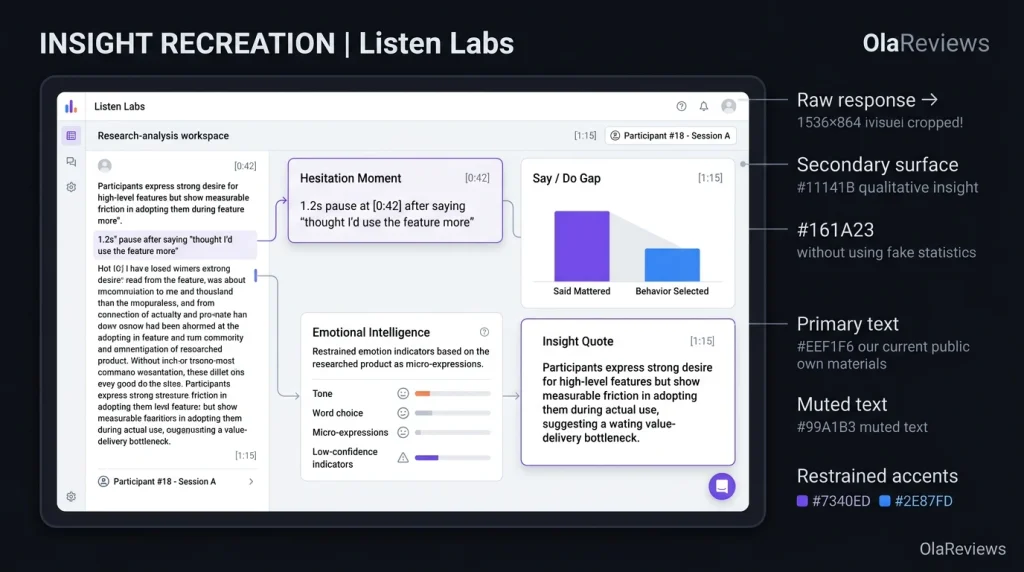
Detailed qualitative signals: The platform can surface themes, quotes, hesitation moments, and Say/Do Gaps.
Cons
Custom pricing: You don’t get a simple public self-serve pricing page with standard monthly tiers.
Human review is still important: AI can accelerate research, but important studies still require researchers to check questions and findings.
Pricing: Listen Labs currently uses a demo/custom-pricing approach instead of publishing standard Starter, Pro, and Enterprise tiers. Its pricing research notes that AI-moderated qualitative research across the market can commonly cost around $25–$50 per interview. However, this is a market benchmark and should not be treated as Listen Labs’ official rate.
What Makes Listen Labs Different?
Many AI customer research tools concentrate on one part of the research process. One product might handle surveys, another may recruit participants, while another turns interview transcripts into summaries. Listen Labs is designed to bring several of these stages together. This can reduce the number of separate handoffs between your research question and final findings. The platform can also identify details that may be easy to overlook when reviewing large numbers of transcripts.
For example, Listen showcases “Hesitation Moments” that highlight pauses in participant responses and “Say/Do Gaps” that reveal differences between what customers claim matters and what they actually choose. This type of analysis can be useful because customer feedback rarely arrives in neat categories. A customer may say price is the most important factor but choose a product because it is more convenient. Another person might describe a feature as useful but struggle to complete the workflow during a usability session.
Listen also positions its platform for research across multiple audiences and markets. Its current materials state that AI-moderated interviews can operate across 120+ languages, while its participant network provides access to more than 50 million potential respondents. These figures come from Listen’s own materials, so teams should validate audience availability for their specific market before planning a large study.
What Can You Use Listen Labs For?
Listen Labs goes beyond conventional one-on-one customer interviews. You can use the platform for concept testing, prototype research, usability studies, creative testing, customer insights, B2B research, and brand-related research. That range makes it relevant when you need to understand the reasoning behind customer behavior rather than simply collect yes-or-no responses.
For a product manager, you could test a new onboarding flow before development is complete. A marketer could investigate why a campaign resonates with one audience but not another. A founder could interview potential customers before committing to a new product direction.
Common Use Cases
Concept testing: Get reactions before investing heavily in development.
Usability testing: Observe customers interacting with products or prototypes.
Creative testing: Explore reactions to advertisements and messaging.
B2B research: Interview professional and specialized audiences.
Consumer research: Explore preferences, motivations, and purchasing behavior.
For SaaS teams, screen-based research can be especially valuable because it adds behavioral context to spoken feedback. Instead of asking someone whether a workflow feels simple, you can observe how they actually navigate it. That distinction matters because customers sometimes describe an experience as easy while hesitating, searching, or taking an unexpected route during the task.
Listen Labs and AI Interview Tools
The rise of AI interview tools is changing the economics and speed of qualitative research. A human moderator can ask nuanced questions, but conducting dozens or hundreds of interviews manually requires considerable time. AI moderation can allow multiple conversations to happen in parallel while maintaining a consistent research framework. However, that does not automatically make AI moderation suitable for every study.
Sensitive interviews, complex stakeholder research, or highly specialized research may still benefit from an experienced human moderator. Listen’s value is better understood as an additional research engine. It can help teams collect more conversations and identify patterns faster while researchers remain responsible for study design, context, validation, and interpretation.
Listen Labs vs. Traditional Customer Research
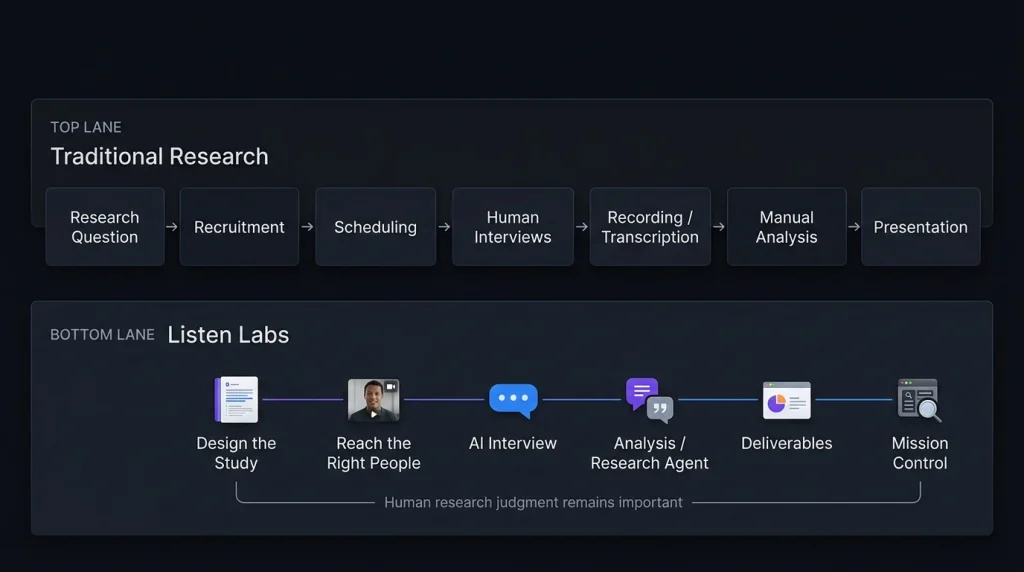
Traditional qualitative research can involve several separate stages. You define the study, recruit respondents, schedule interviews, moderate conversations, record sessions, transcribe them, organize themes, analyze findings, and eventually prepare a presentation. Each handoff can introduce delays or lost context. Listen Labs attempts to compress much of that workflow into one platform, covering study design, participant access, AI-moderated interviews, analysis, and research deliverables.
For teams that conduct customer research regularly, reducing these operational steps could be as important as any individual AI feature. The bigger question is what happens after the AI generates the findings. You still need to determine whether a theme is meaningful, whether the sample represents the audience you care about, and whether a customer statement reflects a broader pattern or an isolated opinion. Automation can shorten the path to evidence, but it does not remove the need for research judgment.
Why the $125M Series C Story Matters
Listen Labs’ financing story has become part of the company’s recent profile. TechCrunch reported that Listen had signed a term sheet for a $125 million Series C at a $1.5 billion valuation, with Menlo Ventures reportedly expected to lead the financing. The company subsequently walked away from the agreement amid reported discussions involving Salesforce. Business Insider separately reported that Salesforce had discussed acquiring Listen Labs for approximately $2 billion.
It also reported rapid company growth, including more than one million interviews conducted within a nine-month period. These figures are reported by the company or media outlets rather than independently verified product-performance measurements. They provide useful business context, but they should not be treated as evidence that the platform will deliver a specific research outcome for your team.
Final Thoughts on Listen Labs
Listen Labs sits at an interesting intersection of AI, customer research, and qualitative analysis. Its strongest proposition is not simply that AI can conduct an interview. Instead, recruitment, moderation, analysis, and research outputs can be connected within one workflow. If you are exploring more AI tools for productivity, marketing, research, and business workflows, you can discover additional options on Olareviews.
For product managers, marketers, founders, researchers, and SaaS teams, this approach can make large-scale qualitative research easier to organize. If you’re comparing AI customer research tools, the practical next step is to request a demo and test the workflow against one genuine research question. The real test is whether Listen can help you uncover customer insights that are difficult to identify from your existing data alone.
FAQ
Is Listen Labs an AI research tool?
Yes. Listen Labs is an AI-powered qualitative research platform for study design, participant recruitment, AI-moderated interviews, analysis, and research outputs.
Can Listen Labs replace researchers?
It can automate parts of the research process, but human judgment remains important. Researchers still need to define questions, review interviews, understand sample limitations, validate findings, and interpret results.
Are AI interviews safe to use?
Teams should obtain appropriate consent, explain recording and analysis practices, avoid collecting unnecessary sensitive information, and follow relevant privacy requirements.
Editorial disclosure:This article is an independent evaluation based on current public product information and available product materials as of September 2026.
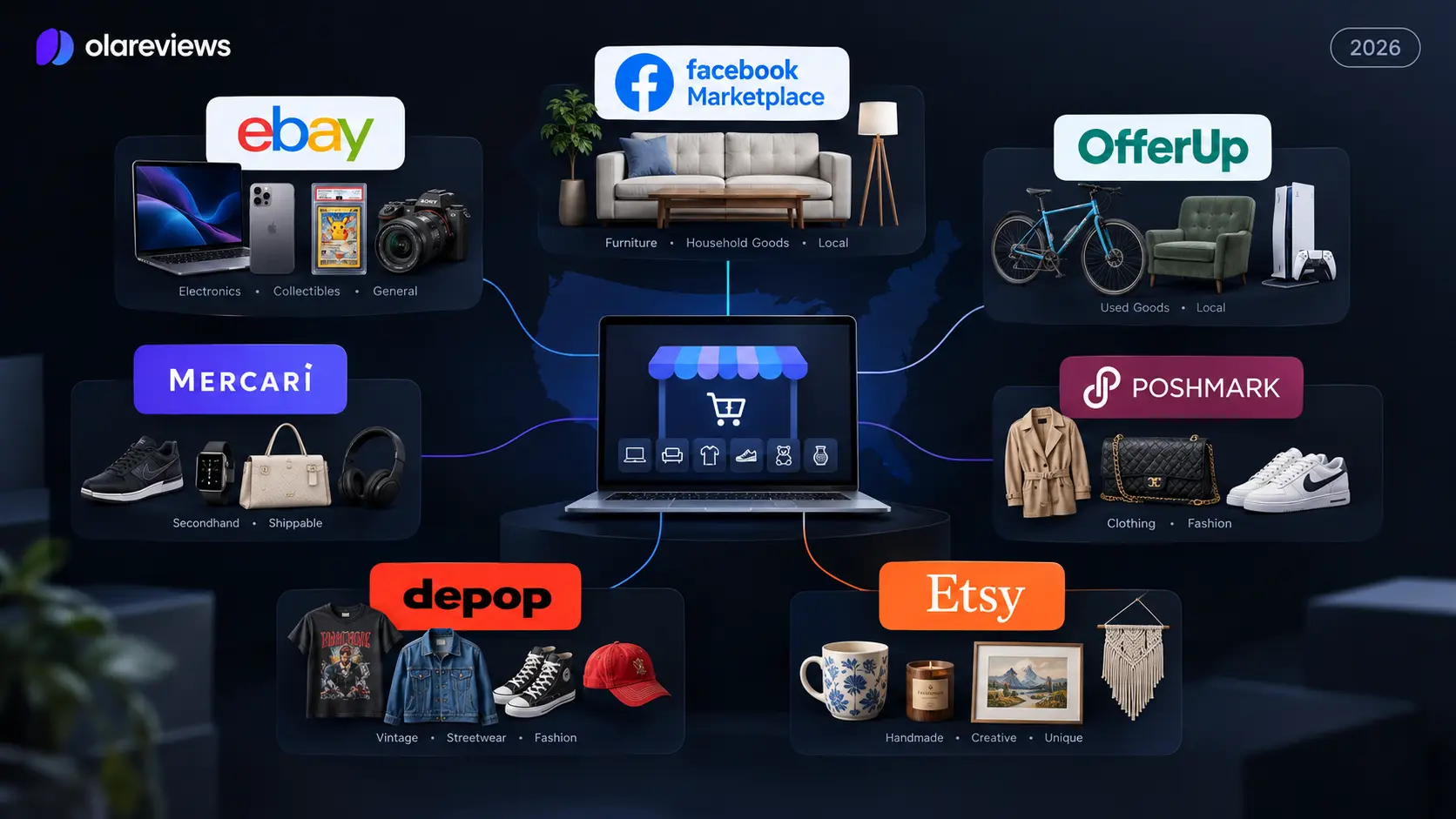
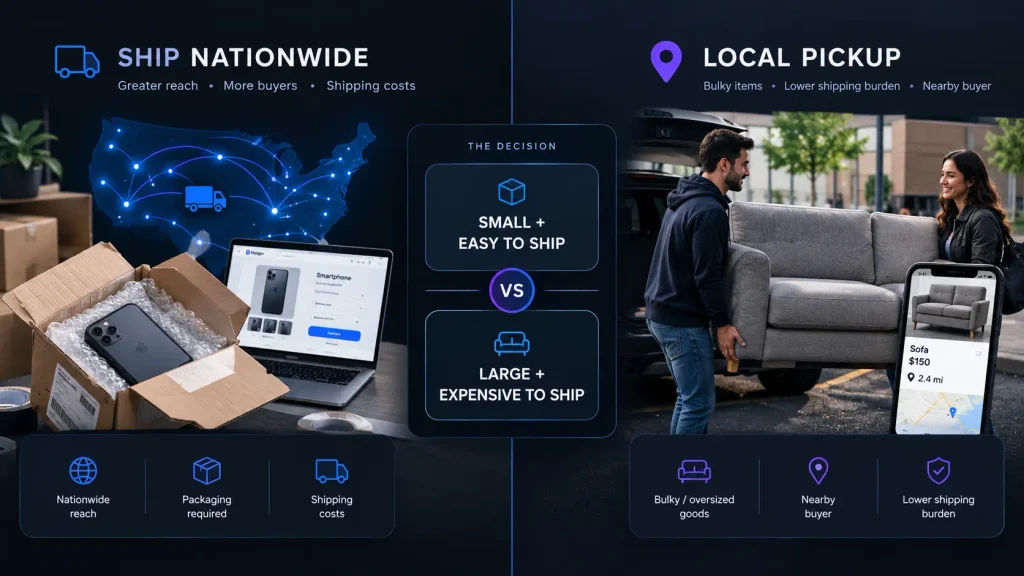
If you want to buy used products, sell unwanted items, start reselling, or grow a small ecommerce business, online marketplaces can give you access to established audiences without building your own store from the ground up. The right platform can make it easier to find buyers, process payments, arrange shipping, and manage listings.
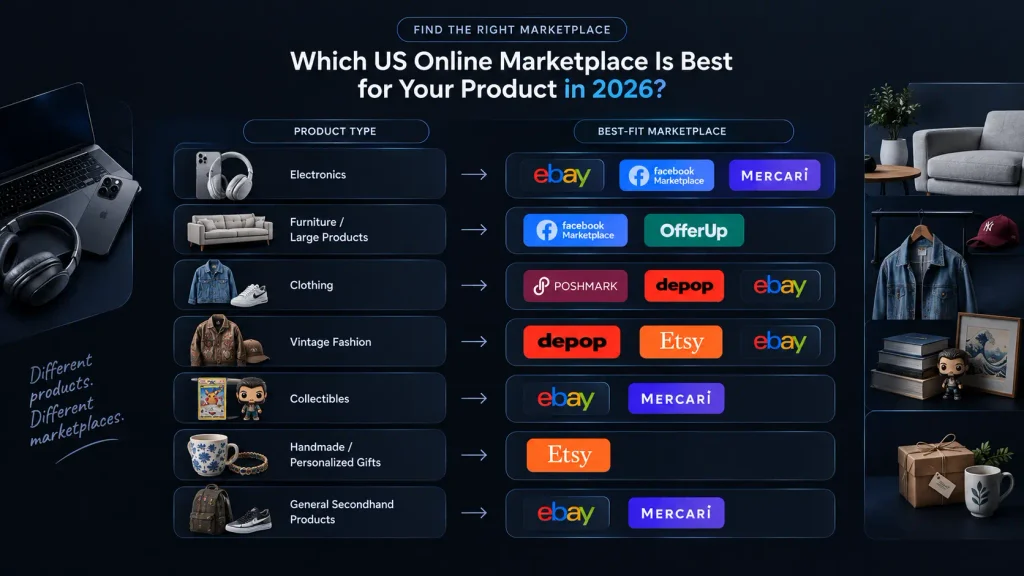
The challenge is that every marketplace works differently. Some are designed for local pickup, while others are better for nationwide shipping. Some specialize in fashion or handmade products, while others support almost every category. In this guide, we compare seven of the best online marketplaces in the US in 2026 and explain which platform makes the most sense for different products and sellers.
What Are Online Marketplaces?
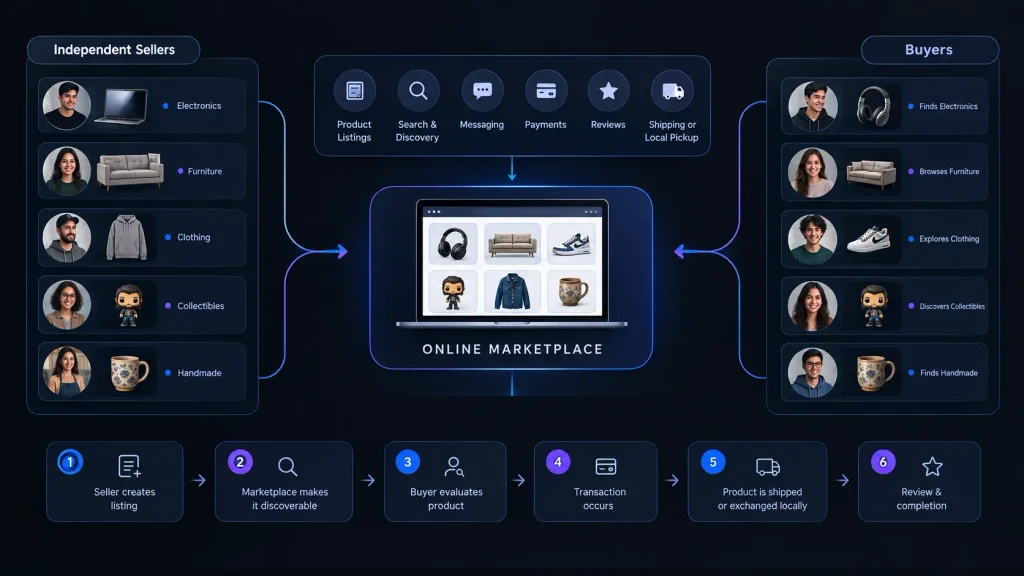
Online marketplaces are websites and apps where multiple independent sellers can offer products to buyers. Instead of creating a complete ecommerce website yourself, you use an established platform that already provides features such as product listings, search, messaging, payments, reviews, shipping, and buyer protection. After Olareviews research we have come up with the following products.
This model makes online selling easier for beginners because you do not need to build an audience from zero. A person selling an old sofa might use Facebook Marketplace, while someone selling collectible cards may choose eBay. A clothing reseller may prefer Poshmark or Depop, while a handmade-product business can build its shop around Etsy.
How Do Online Marketplaces Work?
Most marketplaces use a simple process where sellers create an account, list products with photos, descriptions, and prices, and choose shipping or local pickup. Platforms may charge listing, transaction, payment, or promotional fees, so sellers should understand these costs before listing to calculate their actual profit.
How We Evaluated These Online Marketplaces
We evaluated seven major platforms based on their current marketplace models, product categories, seller fees, buyer reach, fulfillment options, listing experience, and seller tools. The goal is to explain where each platform fits rather than simply ranking the biggest websites.
The main criteria included product suitability, selling costs, local versus nationwide reach, shipping options, seller tools, and ease of use. Current fee and policy information was checked against official marketplace documentation where available. Because these policies can change during 2026, sellers should always check the platform’s current fee page before making pricing decisions.
Best Online Marketplaces at a Glance
Marketplace
Best For
Starting Seller Cost
eBay
Electronics, collectibles, parts and general products
Free within monthly listing allowance
Facebook Marketplace
Furniture, household goods and local sales
Generally free for local selling
OfferUp
Local used goods and furniture
Free basic selling
Mercari
General secondhand products
Free listing, 10% selling fee
Poshmark
Clothing, shoes and accessories
Free listing
Depop
Vintage, streetwear and fashion
No standard selling fee for US sellers
Etsy
Handmade, crafts and vintage products
$0.20 listing fee
1. eBay | Best Online Marketplace for Broad Product Selection
eBay is one of the most versatile online marketplaces because it supports a very wide range of products. Sellers can list electronics, collectibles, clothing, automotive parts, books, cameras, toys, sporting goods, musical equipment, and many other categories.
This broad selection makes eBay especially useful for resellers whose inventory changes frequently. Instead of building a separate selling strategy for every type of product, you can use the same marketplace for different categories. eBay also gives sellers access to nationwide buyers, making it more suitable for products that may not have strong local demand.
eBay Fees and Selling Experience
For most casual sellers, eBay currently provides 250 zero-insertion-fee listings per month. After those listings are used, additional listings generally cost $0.35 each. Final value fees vary by category, with most categories currently listed at 13.6% on the total sale amount up to $7,500, plus a per-order fee.
The important point is that sellers should calculate the total cost before setting a price. eBay can be particularly useful for specialized products because a national audience may be willing to pay more for something that is difficult to find locally.
Best for: Electronics, collectibles, automotive parts, clothing, books, toys, and general merchandise.
2. Facebook Marketplace | Best Online Marketplace for Local Buying and Selling
Facebook Marketplace is particularly useful when you want to sell products to buyers in your local area. It is a natural option for furniture, appliances, desks, televisions, exercise equipment, tools, and other products that can be inconvenient or expensive to ship.
One of the biggest advantages is convenience. Many potential buyers already use Facebook, so they can discover products without visiting a separate classified website. Buyers and sellers can communicate through Facebook, discuss the condition of an item, negotiate a price, and arrange pickup.
Facebook Marketplace for Bulky Products
Local selling can make a major difference for large products. Shipping a sofa or dining table across the country may destroy your profit, while selling it to someone nearby can make the transaction much simpler.
Facebook Marketplace also requires more attention to transaction safety because many sales involve direct communication and local meetings. Sellers should provide accurate descriptions, avoid sharing unnecessary personal information, and use sensible meeting or pickup arrangements.
Best for: Furniture, appliances, electronics, household goods, tools, vehicles, and other bulky products.
3. OfferUp | Best Online Marketplace for Local Used Goods
OfferUp is focused heavily on local buying and selling. It can be useful when you want to sell used furniture, electronics, bicycles, tools, household products, video games, and similar items to nearby buyers.
OfferUp says its basic buying and selling features are free, including posting items, browsing listings, communicating with users, and arranging local exchanges. The platform does not charge a commission for in-person transactions, although paid promotional and additional listing options can involve fees.
Why Choose OfferUp?
The main advantage is simplicity for local transactions. If you have an item that is difficult to ship, finding someone nearby can be more practical than trying to package and send it.
The downside is that your potential audience depends heavily on local demand. A rare product may perform better on a nationwide platform such as eBay, while common household items can be a good fit for OfferUp. Sellers should also use sensible safety practices when arranging in-person transactions.
Best for: Furniture, electronics, bicycles, tools, household goods, video games, and other used local products.
4. Mercari | Best Online Marketplace for General Secondhand Products
Mercari is designed for a broad range of secondhand products and can be useful when you prefer shipping rather than local meetups. Clothing, electronics, toys, collectibles, accessories, home goods, and smaller household products can all fit naturally into the marketplace.
Listing an item is free on Mercari. For new and updated listings, Mercari currently charges sellers a 10% selling fee based on the item price plus buyer-paid shipping. Buyers are also charged a 3.6% Buyer Protection fee based on the item price plus buyer-paid shipping.
Mercari Fees and Selling Strategy
The 10% seller fee means pricing needs to be calculated carefully. A seller should consider product cost, marketplace fees, packaging, shipping, and any other expenses before deciding how much profit is acceptable.
Mercari can be particularly useful for sellers with many smaller items that are easy to photograph, package, and ship. The platform is less dependent on finding a buyer within driving distance, which makes it different from local-focused online selling platforms such as OfferUp.
Best for: Clothing, electronics, toys, collectibles, accessories, home goods, and general secondhand products.
5. Poshmark | Best Online Marketplace for Clothing and Fashion
Poshmark is one of the most recognizable fashion-focused marketplaces in the US. Instead of competing across every possible product category, sellers can focus on clothing, shoes, handbags, accessories, beauty, and related products.
Listing is free on Poshmark. The current US fee structure is $2.95 for sales under $15 and 20% for sales of $15 or more. Poshmark also provides seller tools such as pricing features, My Closet Insights, Bulk Actions, My Shoppers, and Posh Shows.
Poshmark for Fashion Resellers
The specialized audience is a major advantage. Someone browsing Poshmark is already interested in fashion, which can make the platform more relevant than a general classified marketplace for clothing sellers.
The main consideration is the commission. A 20% fee on sales of $15 or more can significantly affect profit, especially for low-margin products. Sellers should therefore price products with the fee structure in mind rather than copying prices from local marketplaces.
Best for: Clothing, shoes, handbags, accessories, designer fashion, and fashion resellers.
6. Depop | Best Online Marketplace for Vintage and Streetwear
Depop has a more fashion-driven identity than general-purpose marketplaces. It is particularly popular for vintage clothing, streetwear, secondhand fashion, unique pieces, and trend-focused products.
For sellers in the US, UK, and Australia, Depop currently charges no standard Depop selling fee. However, US sellers pay a 3.3% plus $0.45 payment-processing fee through Depop Payments. Depop also has a 12% Boosting fee for qualifying boosted listings for US sellers on new listings from March 23, 2026.
Depop Fees and Listing Strategy
This fee structure makes it important to distinguish between normal selling costs and optional promotion costs. A seller can avoid the standard Depop selling fee but may still pay payment processing and potentially boosting costs.
Depop works especially well when the product has strong visual appeal. Good photographs, accurate measurements, brand information, condition details, and relevant style terms can help buyers understand what makes an item worth purchasing.
Best for: Vintage fashion, streetwear, sneakers, accessories, Y2K clothing, and trend-focused products.
7. Etsy | Best Online Marketplace for Handmade Products
Etsy is designed around unique, creative, handmade, personalized, and qualifying vintage products. This makes it very different from general marketplaces where sellers may list almost anything.
Etsy can be especially useful for small businesses that want to build a recognizable product collection. A seller could create a shop around handmade jewelry, personalized gifts, artwork, craft supplies, wedding products, or digital downloads.
Etsy Fees and Seller Strategy
Etsy currently charges a $0.20 listing fee, while its transaction fee is 6.5% of the total order amount. Other fees, including payment processing and optional advertising-related charges, can also apply depending on the seller and transaction. Sellers should therefore calculate their full cost rather than looking only at the listing fee.
The biggest opportunity with Etsy is specialization. A focused shop can develop a consistent visual identity, product range, and customer base. The biggest challenge is competition, so product photography, descriptions, pricing, reviews, and marketplace search optimization all matter.
Best for: Handmade products, personalized gifts, crafts, digital products, vintage goods, and creative businesses.
Online Marketplaces Comparison by Product Type
The easiest way to choose between different online marketplaces in the US is to start with the product you want to sell. A platform that works extremely well for fashion may not be suitable for furniture, while a local marketplace may be excellent for bulky goods but weak for specialized collectibles.
The following table gives you a practical starting point. It does not mean that a product can only be sold on one marketplace. Instead, it shows where the product category naturally fits.
Product Type
Recommended Marketplaces
Electronics
eBay, Facebook Marketplace, Mercari
Furniture
Facebook Marketplace, OfferUp
Used household goods
Facebook Marketplace, OfferUp, Mercari
Clothing
Poshmark, Depop, eBay
Vintage fashion
Depop, Etsy, eBay
Collectibles
eBay, Mercari
Handmade products
Etsy
Personalized gifts
Etsy
Large products
Facebook Marketplace, OfferUp
General secondhand products
eBay, Mercari
Designer fashion
Poshmark, eBay, Depop
How to Choose the Best Marketplace for Sellers
The best marketplaces for sellers depend on your products, customers, profit margins, and preferred selling method. A casual seller with one sofa has completely different needs from a reseller with 500 collectible products.
If you sell many different categories, eBay is a strong starting point because it offers broad product coverage and nationwide reach. If your products are large or expensive to ship, Facebook Marketplace and OfferUp can make more sense because local pickup can remove shipping costs.
Fashion sellers should consider Poshmark and Depop, while handmade and creative businesses can benefit from Etsy’s specialized audience. Mercari is another practical option for general secondhand products that are easy to package and ship.
How to Price Products for Online Selling
Check the current market value: Price your product based on what similar items are selling for today, not what you originally paid. An item bought for $100 may now be worth $40, while rare collectibles can sometimes sell above their original price.
Calculate all selling costs: Include marketplace fees, shipping, packaging, advertising costs, and your original product cost before setting the final price.
Calculate your real profit: Subtract all expenses from the selling price to understand how much you will actually earn from each sale.
Track your results: If you sell regularly, use a spreadsheet to compare sales and profits across different platforms and identify which marketplaces provide the best returns.
How to Create Better Marketplace Listings
A strong listing starts with a clear title. Instead of writing something vague such as “Nice Shoes,” provide useful information such as brand, model, size, color, and product type.
Photos should show the actual condition of the product. Include close-ups of labels, model numbers, damage, wear, accessories, and packaging when relevant. For clothing, measurements can be especially useful because buyers cannot physically try the item before purchasing.
Shipping vs Local Pickup
Shipping is useful when your product has buyers across the country or when the item is small enough to package economically. It allows sellers to reach a much larger audience than local-only selling.
Local pickup makes more sense for heavy, oversized, fragile, or inexpensive products where shipping could consume a large percentage of the selling price. Before choosing a marketplace, think about the complete fulfillment process rather than just the listing fee.
How to Calculate Your Real Selling Profit
The selling price is not the same as profit. A marketplace may deduct a commission, while shipping and packaging can create additional expenses.
For example, if you sell a product for $100 but pay $15 in marketplace fees, $10 for shipping, $3 for packaging, and $40 for the product itself, your actual estimated profit is $32.
How to Make More Money on Online Selling Platforms
One of the easiest ways to improve sales is to improve the listing before spending more money on advertising. Better photos, stronger titles, accurate descriptions, competitive pricing, and complete product information can make a major difference.
You should also review listings that receive views but do not convert into sales. If buyers are looking at an item but not purchasing it, the price, shipping cost, photos, product condition, or description may need improvement. Testing small changes can be more useful than simply creating more listings.
Buying Safely on Online Marketplaces
Buyers should also understand that marketplace transactions involve risks. Before purchasing an expensive product, check the seller’s reviews, account history, product photographs, description, and return or protection policies.
For local transactions, use sensible safety practices and avoid unnecessary sharing of personal information. Be particularly cautious if someone pressures you to move the transaction outside the marketplace, asks for unusual payment methods, or sends suspicious payment links.
Which Marketplace Should You Choose?
Choose eBay if you want broad product coverage and access to nationwide buyers. It is particularly useful for electronics, collectibles, parts, and products that may have limited local demand.
Choose Facebook Marketplace or OfferUp if your priority is local selling. These platforms are particularly useful for furniture, appliances, tools, and other products that are difficult or expensive to ship.
Choose Mercari for general secondhand products that you are comfortable shipping. Choose Poshmark or Depop if fashion is your main category, and choose Etsy if you make handmade, personalized, creative, or qualifying vintage products.
Final Thoughts
The best online marketplaces are not necessarily the platforms with the largest audiences. The right marketplace is the one that matches your product, target buyer, selling costs, fulfillment method, and business goals. eBay is a strong all-purpose option, Facebook Marketplace and OfferUp work well for local sales, Mercari is useful for general secondhand products, Poshmark and Depop specialize in fashion, and Etsy is a natural choice for handmade and creative products. If you are just starting with online selling platforms, choose one marketplace that fits your product, calculate your real profit after every fee, and learn what your buyers respond to. Once you understand the process, expanding to additional marketplaces can help you reach more customers without depending on a single sales channel.
Frequently Asked Questions
Is eBay good for beginners?
Yes. eBay is a good option for beginners who want to sell electronics, collectibles, clothing, parts, and other products to buyers across the US. Its broad product categories make it easy to start with different types of inventory.
Is Facebook Marketplace good for local selling?
Yes. Facebook Marketplace is particularly useful for local sales because buyers and sellers can arrange pickup directly. It works especially well for furniture, appliances, electronics, and other bulky products that are expensive to ship.
Is Mercari good for selling used products?
Yes. Mercari is a practical choice for general secondhand products such as clothing, electronics, toys, collectibles, and accessories. Listing is free, while new and updated listings are subject to Mercari’s 10% selling fee.
Is Etsy good for small businesses?
Yes. Etsy can be a strong option for small businesses selling handmade, personalized, creative, and qualifying vintage products. Its specialized audience can help sellers reach shoppers who are specifically looking for unique products.
What are online marketplaces?
Online marketplaces are websites and apps where multiple sellers can list products for buyers to discover and purchase. Examples include eBay, Facebook Marketplace, Mercari, Poshmark, Depop, and Etsy, with each platform serving different types of products and buyers.
Editorial disclosure: This article is independently written for educational purposes. Marketplace fees, policies, seller features, and shipping options can change, so sellers should confirm the latest terms on the official marketplace before listing products.