Blog

  • Google Firebase Bug Caused Widespread iPhone App Crashes, and Google Has Fixed It

    Google Firebase Bug Caused Widespread iPhone App Crashes, and Google Has Fixed It

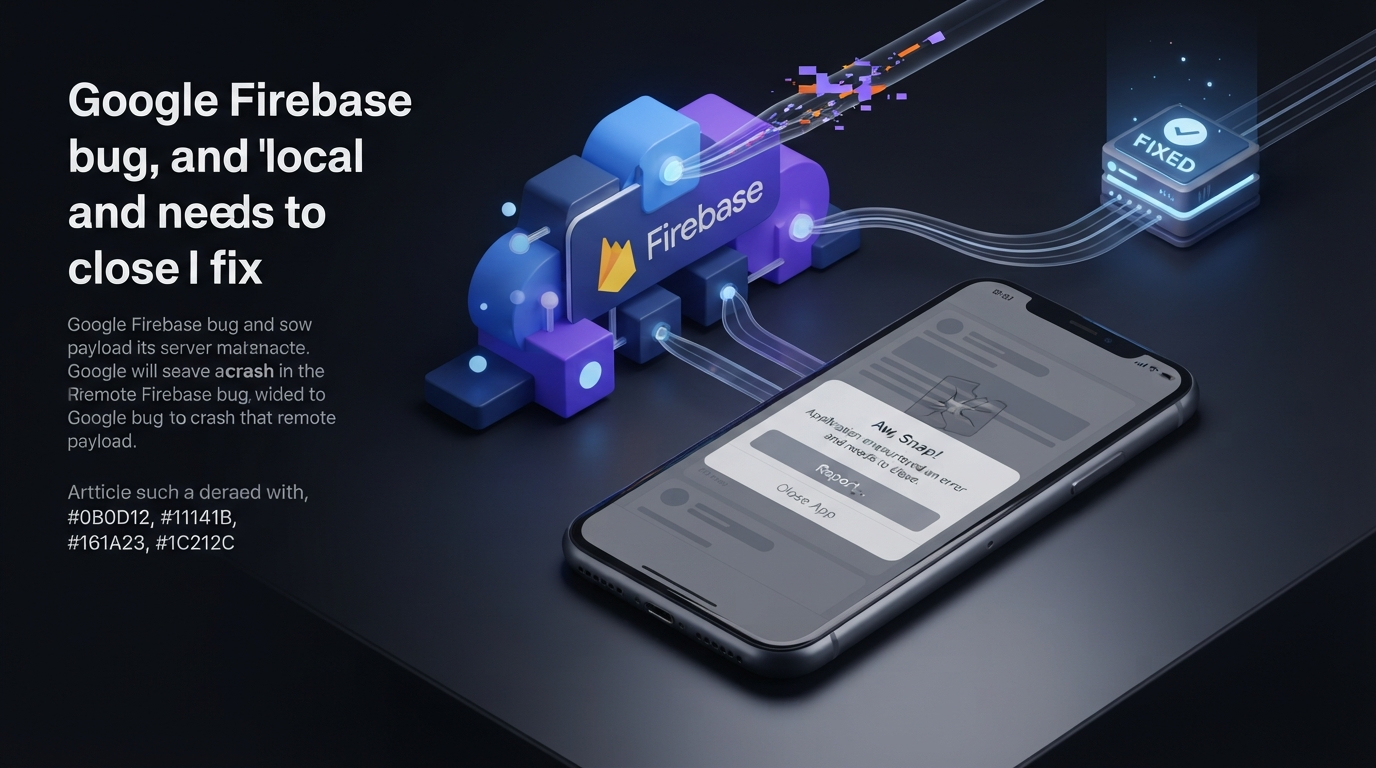
    Thousands of iPhone and iPad users reported apps crashing without installing a new app version on September 28, 2026. The problem was not a broad Apple software failure. Instead, a Google Firebase bug affecting Google Analytics for Firebase on iOS caused some apps to crash after receiving incorrectly formatted information from Google’s servers.

    The unusual part was that developers had not changed their apps. Existing applications suddenly began crashing because of data delivered to an already-installed Firebase Analytics SDK. Google later fixed the problem on its servers, so developers did not need to release emergency App Store updates.

    What Caused the Firebase iPhone App Crashes?

    Google said the incident began at 5:41 p.m. PDT on September 28. The problem involved an incorrectly formatted payload received by the Firebase Analytics SDK on iOS.

    A public Firebase iOS SDK GitHub issue shows how quickly developers noticed the problem. One developer reported 56 crashes affecting 56 users within the first 18 minutes. The same crash was also observed across four already-released app builds.

    The affected configuration used Firebase iOS SDK version 12.14.0 with Swift Package Manager.

    The reported crash occurred after the app received a response from a Firebase Analytics experiment endpoint. This meant the application itself had not necessarily changed. Instead, information delivered by the remote Firebase service triggered a failure inside the installed SDK.

    Google Fixed the Problem Without an App Update

    Google completed its fix rollout at 7:52 p.m. PDT, around two hours after the incident began.

    Developers did not need to update the Firebase SDK or submit a new application version to the App Store. Google corrected the problem on its own infrastructure.

    There was one important limitation. Google said caching could cause some app instances to continue crashing for up to four hours after the fix was deployed.

    This explains why some developers could still see elevated crash reports after Google had already announced that the fix was rolling out. Cached information needed time to expire before every affected instance returned to normal.

    Why Could iPhone Apps Crash Without a New Release?

    Firebase is a collection of development tools and cloud services that developers integrate into applications. Some Firebase components communicate with Google’s servers after an app has already been installed.

    This creates an important dependency between an installed application and external services.

    An app’s binary can remain unchanged while the information it receives from a remote service changes. In this incident, the Firebase Analytics SDK processed an incorrectly formatted response and crashed.

    For developers investigating sudden iPhone apps crashing reports, this provides an important troubleshooting clue. If several existing app versions begin failing at approximately the same time, the cause may be a third-party SDK or remote service rather than the latest application update.

    This Was Not a Complete Firebase Outage

    It is easy to describe the incident as a Google Firebase outage, but that would be too broad.

    The documented problem involved Google Analytics for Firebase on iOS. Firebase includes many different services, including authentication, databases, messaging, analytics and crash reporting.

    The incident therefore did not mean that every Firebase product stopped working.

    The timing also caused confusion because Apple had recently released iOS 27.0.1. However, developer reports showed that the Firebase-related crashes were not limited to Apple’s newest operating system version.

    The available evidence instead points toward the Firebase Analytics SDK and the remote response it processed.

    Developers Reported the Problem in Real Time

    Public developer reports provide a useful picture of how the Google Firebase issue spread.

    The Firebase GitHub discussion includes reports of crashes starting at nearly the same time across multiple existing app builds. Developers also reported sudden increases in crash activity and connected the failures to Firebase Analytics.

    Reports from iPhone users showed a similar pattern, with people describing multiple unrelated apps crashing or returning to the Home Screen during the same period.

    These user reports are useful as first-hand evidence, but they should not be treated as an official count of affected users or applications.

    What Developers Can Learn From the Firebase Bug

    The incident shows why third-party dependencies should be part of production monitoring.

    Developers can test their applications carefully before release, but installed apps may continue communicating with external services. A malformed response from one of those services can therefore cause problems after an app has already been published.

    Developers should investigate external dependencies when:

    • Several app versions begin crashing simultaneously.
    • Crash reports increase without a new release.
    • The stack trace points toward a third-party SDK.
    • Failures begin at a specific time across many users.

    These signals can help separate an application regression from a wider Firebase SDK bug or service-side incident.

    Teams using Firebase can also review Google’s official Firebase Analytics troubleshooting documentation when investigating Analytics-related problems.

    What Should Users Do If an App Still Crashes?

    For this incident, users did not need to reinstall affected apps or wait for developers to publish emergency updates.

    Google’s server-side fix was designed to resolve the problem automatically. Because cached information could remain for several hours, some users could continue seeing crashes after the main fix was deployed.

    If an affected app continues crashing beyond the expected recovery period, users can check the App Store for an available update and restart the device.

    Developers should review their crash reports to determine whether the failure matches the documented Firebase Analytics incident.

    Conclusion

    The September 28 incident was unusual because a Google Firebase bug caused crashes in some already-installed iPhone and iPad apps without requiring a new app release.

    The documented problem involved Google Analytics for Firebase on iOS and an incorrectly formatted response processed by the Firebase Analytics SDK. Google completed its server-side fix at 7:52 p.m. PDT, while warning that caching could cause some instances to continue crashing for up to four hours.

    The incident highlights an important lesson for developers: an application’s behavior can depend on third-party SDKs and cloud services even when its own code has not changed. When iOS app crashes suddenly increase across multiple existing builds, developers should investigate external services as well as their own application code.

    FAQ

    Did Google fix the Firebase bug?

    Yes. Google completed its fix rollout at 7:52 p.m. PDT on September 28, 2026. No emergency Firebase SDK update was required.

    Did Apple cause the iPhone app crashes?

    The available technical evidence points to Google Analytics for Firebase on iOS, rather than a broad Apple software problem.

    Do developers need to update Firebase?

    Not for this particular incident. Google corrected the problem on its server side.

    Why did some apps keep crashing after the fix?

    Google said caching could cause some app instances to continue using affected information for up to four hours after the fix rollout.
  • Aportio Review 2026: AI Email Triage for IT and MSP Service Desks

    Aportio Review 2026: AI Email Triage for IT and MSP Service Desks

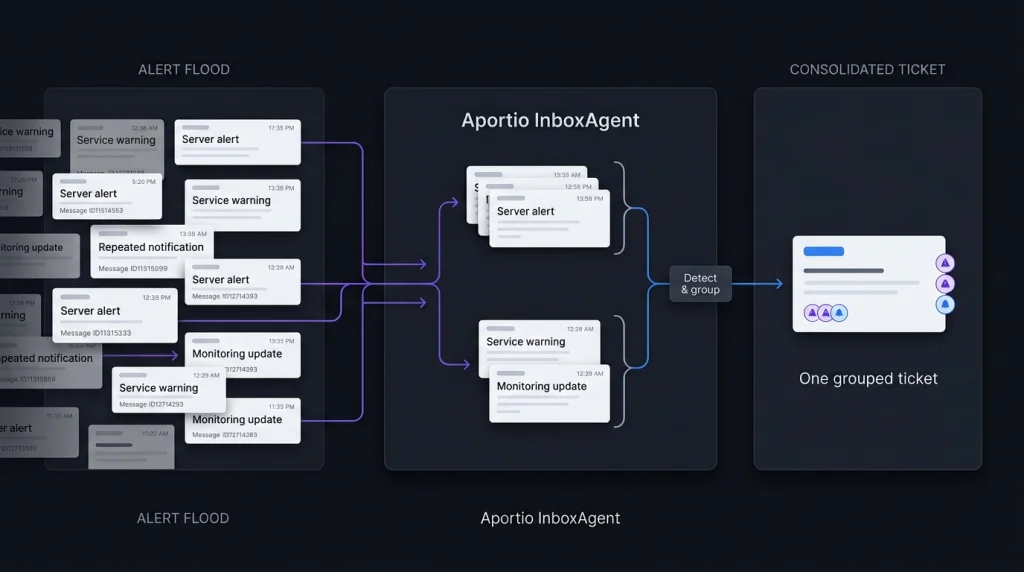
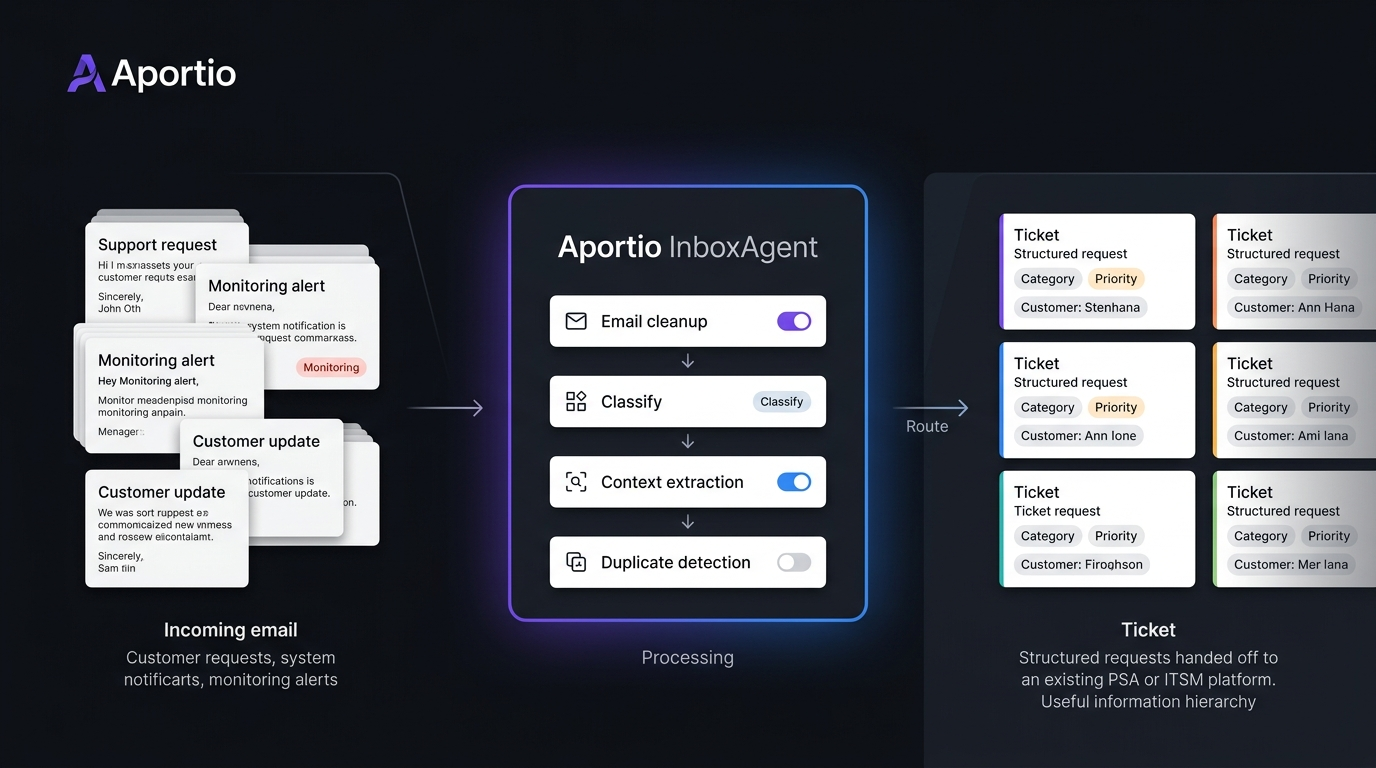
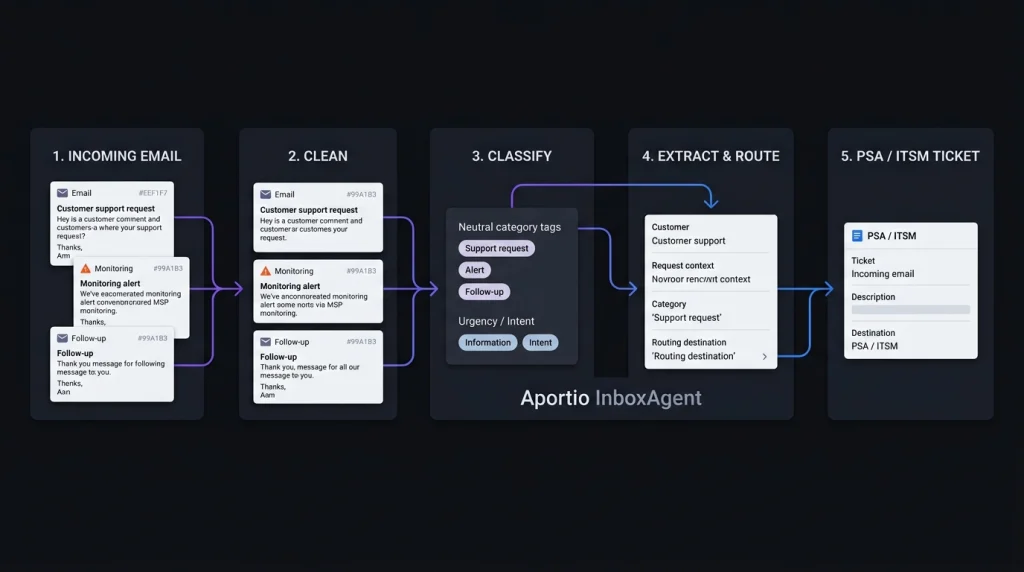
    Aportio stands out because it focuses on a part of the service desk that is easy to overlook: the work that happens before an engineer starts a ticket. Its InboxAgent reads incoming emails, cleans the content, classifies requests, identifies context, reduces duplicate tickets, and sends usable information into a PSA or ITSM system.

    That makes this Aportio review 2026 less about another AI chatbot and more about a practical question: can AI email triage reduce the manual work that builds up between a shared inbox and an engineer’s queue?

    What Is Aportio AI?

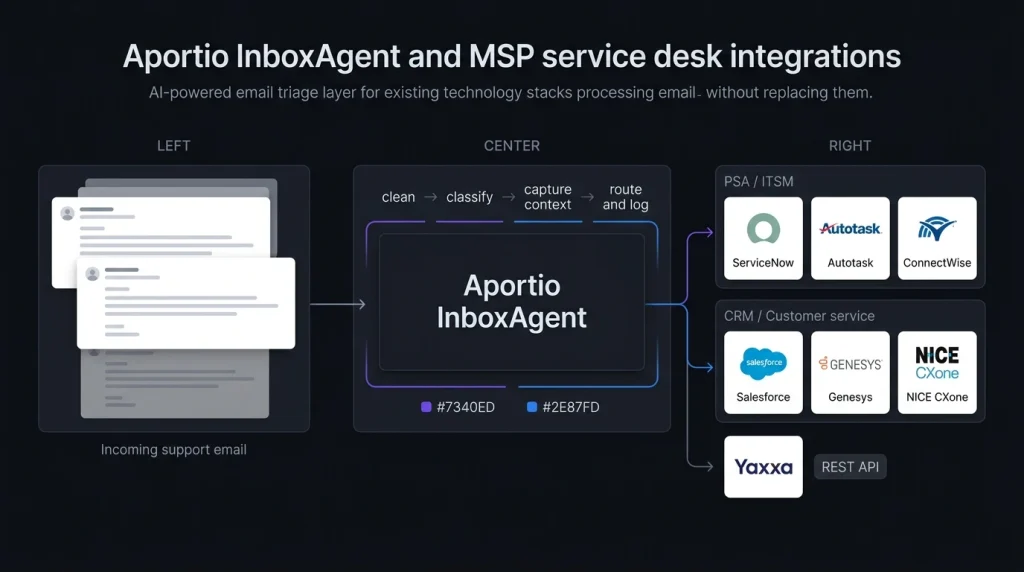
    Aportio AI is a group of AI products for IT service desks and customer service teams. Its main IT product, InboxAgent, is designed to automate email handling before and during ticket creation. Aportio says it can read the complete email, classify its intent, capture relevant information, route the message, and create or update the appropriate record.

    The product is not positioned as a replacement for an existing PSA or ITSM platform. Instead, it sits between incoming email and the system already used by the service team.

    This makes the product particularly relevant for teams that already rely heavily on email. Aportio says up to 70% of IT support tickets still arrive by email, although this is a vendor-stated figure rather than an independent industry measurement.

    For related service desk planning, see IT service desk automation guide.

    How Aportio Handles AI Email Triage

    Aportio Handles AI Email Triage

    The interesting part of Aportio’s AI email triage software is its focus on cleaning information before it reaches the engineer.

    InboxAgent can:

    • Read the full email instead of only the subject line
    • Classify incoming requests
    • Route messages to the appropriate workflow
    • Capture information for the PSA
    • Detect duplicate messages
    • Group related alerts
    • Correlate tickets between systems
    • Create or update records
    • Support automated email responses

    The alert feature is especially relevant to MSPs. A monitoring platform can generate many messages around one underlying event. Aportio says related alerts can be grouped into a single ticket, reducing the need for engineers to match and close tickets manually. That is a more specific use case than general AI help desk automation.

    Aportio for IT Service Desk Automation

    Aportio for IT Service Desk

    Aportio’s main strength is the pre-ticket layer. Consider an MSP receiving hundreds of emails and monitoring alerts each day. An engineer may need to identify the customer, understand the issue, remove duplicate messages, choose a category, and check whether another ticket already exists.

    InboxAgent is designed to automate those steps before the engineer handles the actual technical problem. Aportio says customers have achieved 50% to 70% less triage work, along with 70% fewer alert-driven tickets and 2 to 4 minutes saved per email. These are Aportio’s own reported results, so businesses should validate them with their own data before treating them as expected savings. For a broader comparison, see AI help desk automation tools.

    MSP Service Desk Software and Integrations

    MSP Service Desk Software

    Aportio is designed to work with an existing technology stack rather than replace it. Its current website lists integrations including ServiceNow, Autotask, ConnectWise, Yaxxa, NICE CXone, Genesys, and Salesforce. Aportio also advertises a REST API. ConnectWise’s current marketplace also lists Aportio: AI Email Agents as an integration partner.

    This matters for MSP service desk software because changing a PSA or ITSM platform can be far more disruptive than adding an automation layer around the existing system. Still, we would confirm the exact connector and supported workflow before purchasing. An integration being listed does not mean every PSA function is automatically supported.

    Aportio Pricing in 2026

    Aportio pricing is not publicly displayed. The current Aportio website directs visitors toward a demo or sales conversation instead of showing a standard price list. A September 28, 2026 pricing review also reports no public pricing page, per-seat price, per-ticket price, or self-service trial.

    That means buyers should ask how their quote is calculated.

    Before a demo, prepare:

    • Monthly email volume
    • Monitoring alert volume
    • Required PSA or ITSM integrations
    • Number of products required
    • Implementation costs
    • Support and onboarding terms
    • Contract length
    • Any usage limits

    For an MSP, Aportio pricing should be compared with the amount of manual triage currently being performed, not simply against another software subscription.

    Security and Trust

    Aportio currently states that it is ISO 27001:2022 certified and uses encryption in transit and at rest plus access controls. It also says its AI is used to classify, summarize, and analyze information rather than generate unsupported content. For an IT support environment, these claims should still be checked against your company’s security requirements.

    Teams handling sensitive customer information can also use the NIST AI Risk Management Framework as a reference for evaluating AI risks and controls. The key checks should include data handling, retention, access permissions, audit records, and how customer information is processed.

    Aportio Alternatives: What Should You Compare?

    Aportio alternatives should be compared by the job they perform, not simply by the word “AI.” If the main problem is email classification, duplicate alerts, routing, and ticket creation, a pre-ticket automation product is the relevant category. If the goal is for AI to answer customer questions and resolve tickets, a full AI support agent may be more relevant.

    We would compare:

    FeatureWhat to check
    AI email triageClassification and routing accuracy
    Email ticket automationTicket creation and updates
    Alert handlingDuplicate detection and grouping
    IT support automationReduction in manual work
    PSA integrationsCompatibility with your current system
    AI responsesWhether replies are generated automatically
    SecurityData handling and access controls
    PricingQuote-based or public pricing

    For teams considering wider automation, see customer support AI software comparison.

    How We Would Test Aportio

    A short pilot using real historical emails would provide more useful evidence than a standard product demo.

    Take a sample containing normal support requests, duplicate messages, monitoring alerts, unclear requests, and urgent issues. Then measure:

    1. Customer assignment accuracy
    2. Ticket classification accuracy
    3. Duplicate and alert grouping
    4. Engineer time saved
    5. Incorrect automation decisions

    This approach separates Aportio’s vendor-reported results from the results your own service desk can actually achieve.

    Conclusion

    Our Aportio review 2026 shows a focused product rather than a general-purpose AI help desk. Its main job is to make incoming email cleaner and more useful before engineers have to deal with it. That focus is important for teams dealing with large volumes of support emails and monitoring alerts. Aportio’s reported 50% to 70% reduction in triage work and 70% reduction in alert-driven tickets are promising, but they remain vendor-reported figures that should be tested against real service desk data. For an email-heavy IT or MSP operation, the most useful evaluation is therefore simple: measure how much manual work disappears between the inbox and the ticket queue.

    Aportio Review 2026: FAQ

    Is Aportio an AI email triage tool?

    Yes. InboxAgent is designed for AI email triage, including classification, routing, information capture, duplicate detection, and ticket handling.

    Is Aportio pricing public?

    No. Current public information does not provide a standard price list. Businesses need to contact Aportio for a quote.

    Can Aportio automate email tickets?

    Yes. InboxAgent can create or update PSA records and automate parts of the email-to-ticket workflow.

    Is Aportio suitable for MSPs?

    Its features are aimed at IT service desks and MSP workflows, particularly email triage and monitoring-alert management. ConnectWise also currently lists Aportio in its marketplace.

    What is the main thing to test before buying?

    Test classification, customer matching, duplicate detection, alert grouping, and ticket creation using your own historical emails. Vendor-reported savings are useful, but your own data should determine whether the automation delivers enough value.

  • Canny vs UserVoice: Which Customer Feedback Tool Is Better in 2026?

    Canny vs UserVoice: Which Customer Feedback Tool Is Better in 2026?

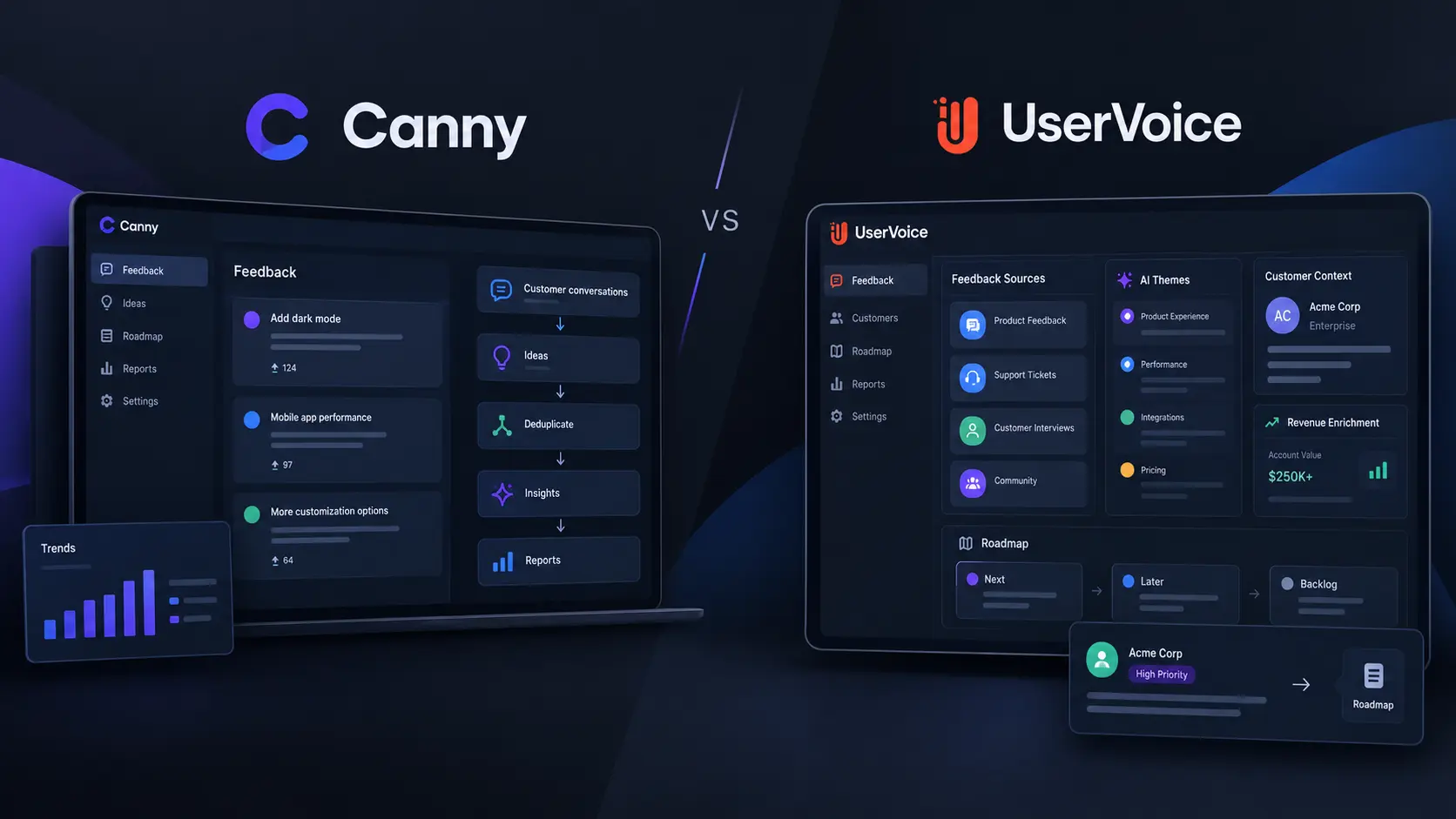
    The biggest change in Canny vs UserVoice 2026 is that both platforms are moving beyond simple feature-request boards. Canny now uses AI to capture feedback from customer conversations and connect it with revenue reporting. UserVoice is using AI to group feedback, add customer and account data, and help teams understand business impact.

    This makes the usual feature checklist less useful. The better question is how each platform handles feedback from the moment a customer mentions a problem to the point where a product team decides what to build.

    Canny vs UserVoice 2026: Both Are Moving Beyond Feedback Boards

    Canny and UserVoice both cover the main jobs expected from customer feedback tools. Teams can collect requests, organize ideas, track customer demand, and connect feedback with product work.

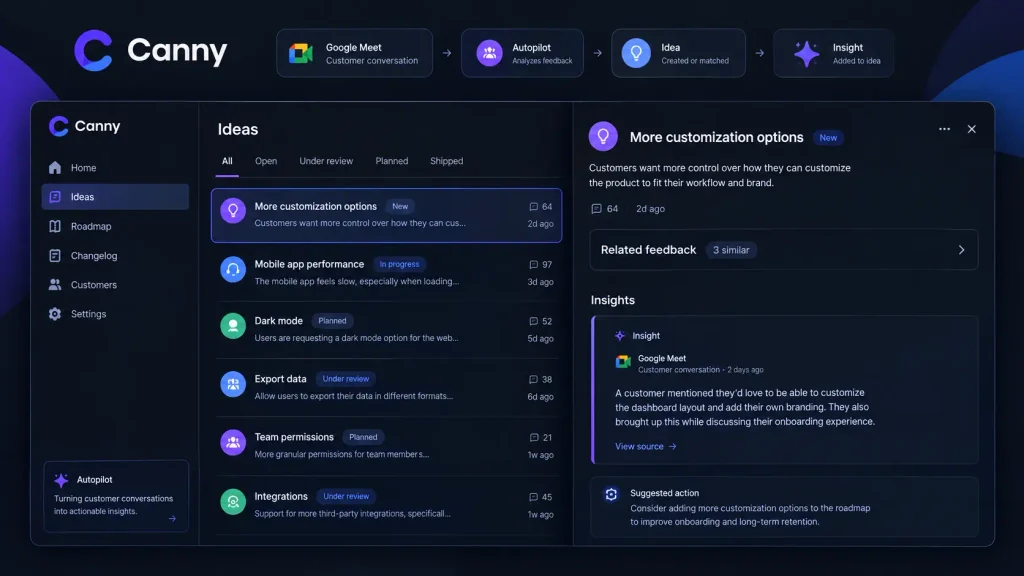
    Canny’s recent updates show how quickly this is changing. Its Autopilot can capture feedback from customer conversations, find duplicate requests, and add useful comments to existing ideas. Canny also added Google Meet as an Autopilot source in September 2026. It can process external calls from the previous 30 days and continue syncing new calls.

    UserVoice takes a similar multi-source approach but puts more emphasis on customer and business context. It can bring together feedback from tools such as Salesforce, Zendesk, Slack, and other systems, then connect that feedback with account and revenue information. The result is a closer race than older comparison articles suggest.

    Canny Review: Strong Automation With Clear Pricing

    Canny Review

    Canny is designed to reduce the manual work involved in customer feedback management.

    Its Autopilot can discover feedback in customer chats, sales calls, reviews, and other sources. It can also detect duplicates and create or update ideas automatically.

    A useful 2026 example is the Google Meet integration. After setup, Canny can process transcripts from selected Google Groups. Only calls with external participants and available transcripts are processed. New ideas created by Autopilot are internal by default, so teams can review them before publishing anything publicly.

    Canny has also expanded its reporting. Its July 2026 reporting update added Customer Requests, Sales Pipeline, Churned Revenue, Groups, and Theme Trends reports. This means Canny is no longer focused only on collecting requests. It can also help teams examine revenue and customer risk around those requests. For teams wanting a broader product workflow, see product management tools.

    Canny Pricing: Watch the Tracked User Limit

    Canny Pricing

    Canny has a clear public pricing structure.

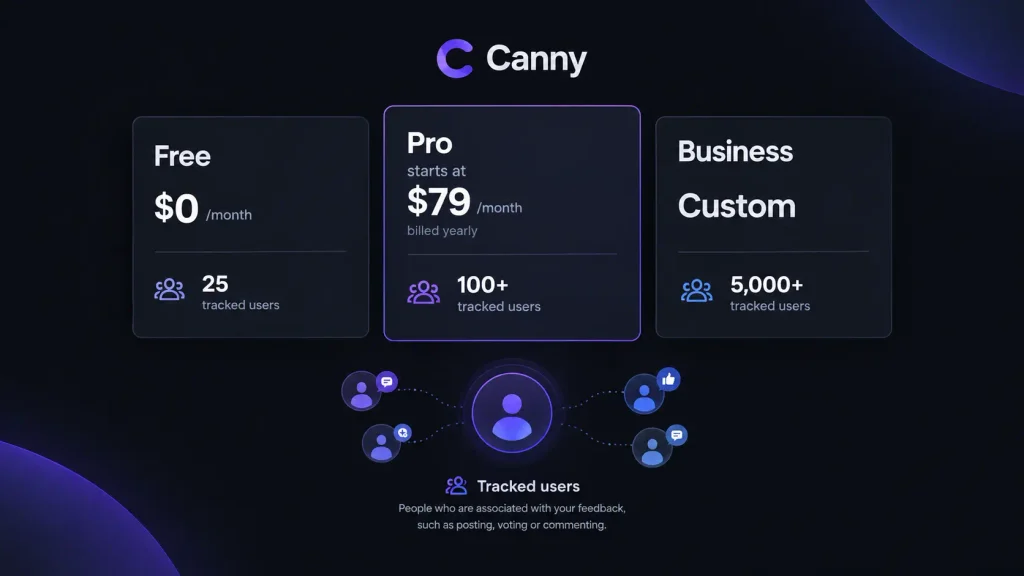
    Canny planCurrent pricingTracked users
    Free$0/month25
    ProStarts at $79/month yearly100+
    BusinessCustom5,000+

    The important detail is that Canny charges around tracked users, not every user of your product. Someone becomes a tracked user when they post, vote, or comment. Autopilot activity can also make a customer a tracked user.

    The Pro price increases as tracked-user volume rises. For example, 200 tracked users costs $129 per month on annual billing, while 500 costs $279.

    UserVoice Review: More Focus on Customer and Revenue Context

    UserVoice Review

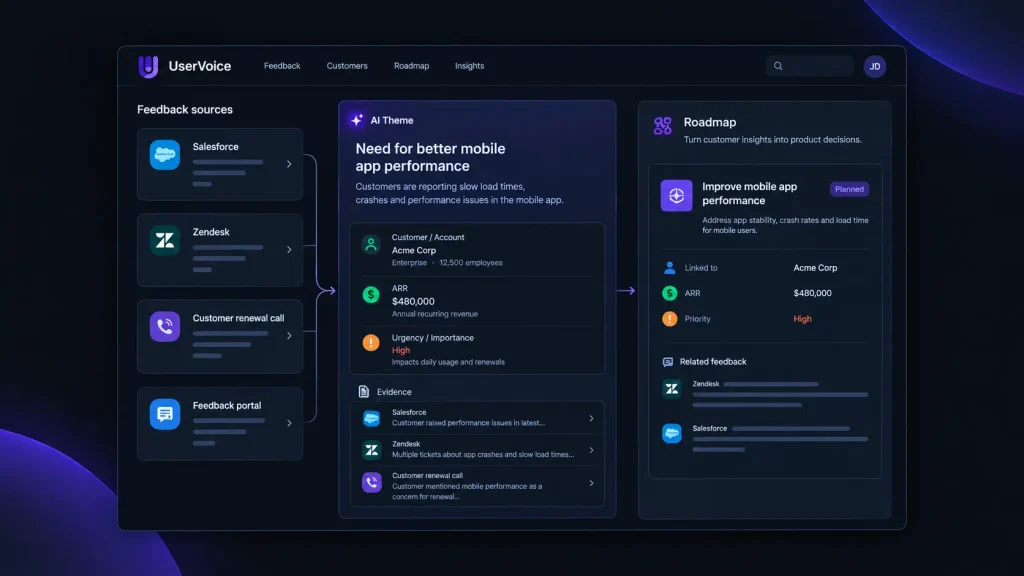
    UserVoice takes a deeper approach to product feedback software. Its current platform combines feedback with customer and account information. The system can group related feedback into themes and connect those themes to customer segments, revenue, urgency, and other business signals. This matters when vote totals do not tell the full story.

    For example, UserVoice can show that several requests around one need come from accounts representing significant annual recurring revenue. Teams can inspect the source feedback behind an AI-generated theme instead of treating the AI result as a final answer. UserVoice also supports integrations with Salesforce, Zendesk, Jira, Slack, Gainsight, Azure DevOps, and other systems. For more background, see [Link: customer feedback management guide].

    UserVoice Pricing: Based on Usage, Not Seats

    UserVoice does not publish a simple fixed monthly price like Canny’s $79 Pro entry point. Its current pricing model is based on feedback volume, tools used, and integrations, rather than the number of seats. UserVoice also offers a 30-day trial through its demo process.

    That model can matter for larger teams. Product, sales, customer success, and other teams can use the same system without adding a separate charge for every seat.

    Canny vs UserVoice: Which Workflow Fits Better?

    The key difference is now how each platform turns raw feedback into usable product evidence. Canny is particularly strong when a team wants automated feedback capture with a straightforward entry price. Its 2026 updates also show that it is expanding into revenue and churn reporting.

    UserVoice puts more emphasis on combining feedback with customer, account, and revenue context. Its AI tools are designed to find themes and let teams trace those findings back to the original feedback.

    That means neither platform should be judged only by its feedback portal. Test how each one handles your actual support tickets, sales calls, customer accounts, duplicate requests, and roadmap process.

    What to Test Before Buying

    Test real customer conversations

    Import real support and sales feedback instead of testing with made-up examples. Check whether the platform finds useful product signals without creating extra manual work.

    Check customer context

    Ask whether your team can see who is requesting a feature, which account they belong to, and what business impact may be attached to the request.

    Follow one request through the whole process

    Submit a request, merge a duplicate, connect customer information, prioritize it, move it into your product workflow, and communicate the outcome. This exposes workflow gaps much faster than comparing feature lists.

    For teams researching alternatives, Canny alternatives and UserVoice alternatives can help frame the wider comparison.

    Conclusion

    The 2026 Canny vs UserVoice comparison is more balanced than older reviews suggest. Canny has expanded from feedback collection into AI capture and revenue-aware reporting, while UserVoice continues to build around customer intelligence and evidence-linked analysis. The practical test is simple: take one real customer request and follow it from the original conversation through prioritization and product planning. The important difference is not which tool has the longer feature list. It is how much useful customer context your team keeps when turning feedback into a product decision.

    FAQ

    Is Canny free in 2026?

    Yes. Canny currently offers a Free plan with 25 tracked users and unlimited feedback.

    What is Canny pricing based on?

    Canny’s paid pricing is based mainly on tracked users. Its Pro plan starts at $79 per month when billed yearly for 100+ tracked users, with higher prices at larger tracked-user levels.

    How does UserVoice pricing work?

    UserVoice pricing scales with feedback volume, tools, and integrations, rather than seats. The company provides a tailored quote after a sales discussion.

    Are Canny and UserVoice customer feedback tools?

    Yes. Both are customer feedback software platforms, but their current products go beyond collecting votes. Canny emphasizes automated feedback capture and reporting, while UserVoice emphasizes customer intelligence, themes, and business context.

    What should we check in Canny alternatives and UserVoice alternatives?

    Compare feedback capture, duplicate handling, integrations, customer context, revenue data, prioritization, reporting, pricing, and roadmap workflows. The right comparison depends on where your feedback currently lives and how your product team makes decisions.

  • Mobi Streaming Service Guide to MUBI Streaming and Curated Movies

    Mobi Streaming Service Guide to MUBI Streaming and Curated Movies

    The biggest difference in MUBI streaming is not the size of its library. It is the way the service selects films. Instead of pushing viewers toward a huge mix of movies and shows, MUBI puts curated cinema, international films, independent releases, classics, documentaries, and director-focused collections at the center of the experience.

    That approach is becoming more important because MUBI is no longer only a streaming platform. It also produces films, distributes them theatrically, and runs the Notebook film publication. MUBI says it now has more than 15 million members across more than 190 countries.

    What Is MUBI Streaming Service?

    MUBI streaming service is a subscription platform built around carefully selected cinema. Its MUBI movies include independent films, international releases, documentaries, classics, shorts, and newer work from established and emerging filmmakers.

    The platform’s current catalog shows this mix clearly. Recent listings include Rosebush Pruning, Magic Farm, Amores Perros, Thelma, Saipan, and Pulp: What Do You Do for an Encore? alongside older and restored films.

    For readers comparing services, best streaming services can provide useful context before choosing a specialist platform.

    How MUBI Curated Movies Are Different

    The central idea behind MUBI curated movies is editorial selection. MUBI’s Now Showing page organizes films into sections such as MUBI Releases, Curator’s Spotlight, New on MUBI, and thematic collections.

    Collections Make Discovery Easier

    MUBI’s collection system lets viewers browse by director, awards and festivals, decade, region, and other themes. Current collections include focused selections around filmmakers and specific types of cinema.

    This is especially useful for people searching for independent movies on MUBI or arthouse films without already knowing which director or title to search for.

    The practical advantage is simple: instead of spending 30 minutes deciding what to watch, viewers can start with a collection that already has an editorial theme.

    MUBI Catalog Changes by Country

    One detail that many general guides miss is that the MUBI catalog is not identical in every country. Film licensing determines which titles are available in different territories.

    MUBI currently says its service is available across more than 190 countries, but the selection can differ from one market to another.

    That matters when using a global MUBI review or movie list. A film mentioned in a US-based article may not be available in another country.

    Our practical tip: search MUBI’s current catalog in your own country before subscribing. This gives a more accurate picture of the service you will actually receive.

    For more entertainment coverage, movie and streaming guides can help readers compare different platforms.

    MUBI Subscription and Free Trial

    The current US membership page lists the standard MUBI subscription at $14.99 per month, or $119.88 for an annual plan. MUBI also offers a 7-day free trial on the standard membership. The annual option is advertised as a 33% saving.

    Membership includes:

    • Ad-free movie streaming
    • Film downloads on iOS and Android
    • Monthly or annual billing
    • The ability to cancel anytime
    • Access to MUBI’s curated catalog

    Prices can differ by country, so viewers should check their local membership page before paying.

    MUBI GO Adds Cinema Tickets

    MUBI GO is separate from the basic MUBI experience. In selected cities, it combines streaming access with a hand-picked cinema ticket every week. The current US page lists MUBI GO at $19.99 per month and says availability is limited to select cities.

    MUBI selects a film each week, and subscribers choose an eligible theater and screening. This makes MUBI GO more relevant to regular cinema visitors than people who only want home streaming.

    Because availability depends on participating cinemas, checking the MUBI GO app for local theaters is important before choosing this plan.

    MUBI vs Netflix: A Different Streaming Model

    The main difference in MUBI vs Netflix is the viewing model.

    Netflix is designed as a broad entertainment platform with movies, television series, documentaries, originals, and other mainstream content. MUBI puts greater emphasis on curated cinema and film discovery.

    MUBI also operates outside traditional streaming. Its own FAQ says the company develops and produces original content, distributes MUBI Releases theatrically, and publishes Notebook.

    A recent 2026 example shows how far that role has expanded. Variety reported in June 2026 that MUBI was pursuing Luca Guadagnino’s Artificial, a reported $40 million film starring Andrew Garfield, after Amazon MGM dropped the project. Netflix and other distributors were also reported to have passed on the film.

    This does not mean every MUBI subscriber will see such films immediately. It shows, however, that MUBI increasingly operates across streaming, theatrical distribution, and film acquisition.

    How to Get More Value From MUBI Movie Streaming

    We recommend using MUBI as a curated cinema service, rather than expecting it to replace every general streaming platform.

    Start with the Now Showing page. Explore director collections, festival selections, regional cinema, and newly added films. If you find something interesting, add it to your watchlist instead of assuming it will remain available indefinitely.

    MUBI’s changing catalog is part of its model. The goal is not to maintain a huge permanent archive, but to keep presenting selected films to its audience.

    Readers interested in film culture can also explore film reviews and entertainment insights alongside MUBI’s Notebook coverage.

    MUBI Alternatives

    The best MUBI alternatives depend on what you want to watch.

    A broad service may be more suitable for viewers who want major studio films and long-running television series. Specialist cinema platforms may appeal more to viewers searching for classic, international, or independent films.

    MUBI’s strongest identity remains its human-curated selection, so comparing services by catalog size alone misses the main difference.

    MUBI Review: Who Should Subscribe?

    Our MUBI review is straightforward. MUBI is designed for viewers who actively enjoy independent movies, arthouse films, international cinema, documentaries, classics, and filmmaker-focused collections.

    It may be less useful for someone looking mainly for blockbuster movies or a large television library.

    The safest approach is to check the local catalog and use the MUBI free trial if it is available to you. The current official membership page confirms a 7-day trial.

    Conclusion

    The strongest reason to try MUBI streaming is its editorial filter. Rather than competing only through an enormous library, MUBI uses curated collections, selected releases, film writing, and theatrical distribution to build a more focused cinema service.

    That makes the platform particularly useful for viewers who want to discover independent and international films without endlessly searching through a massive catalog. Before subscribing, check the films available in your country, compare the current membership price, and use the trial when eligible.

    FAQ

    What is included with a MUBI subscription?

    A standard subscription provides access to MUBI’s curated streaming catalog, ad-free viewing, and downloads through supported iOS and Android apps.

    How often does the MUBI catalog change?

    MUBI regularly adds and removes films as licensing agreements change. The available selection also varies between countries.

    Can we watch MUBI films offline?

    Yes. MUBI’s current membership information lists film downloads for iOS and Android users.

    Is MUBI good for arthouse films?

    Yes. Its collections and editorial model specifically emphasize independent, international, classic, festival, and arthouse cinema.

    Does MUBI have a free trial?

    Yes. The current official US membership page offers a 7-day free trial for the standard membership.

  • What Is Xcancel? Twitter Frontend Features, Alternatives, and How It Works

    What Is Xcancel? Twitter Frontend Features, Alternatives, and How It Works

    Xcancel became popular because it offered a simpler way to read public X posts without using the full X website. But its most important story is no longer its interface. Xcancel’s 2026 shutdowns show how dependent third-party X frontends are on access to X data. X sent cease-and-desist letters to Nitter in August 2026, Xcancel briefly returned in September, and the service was suspended again on September 14. That makes Xcancel useful to understand not only as a Twitter frontend alternative, but also as an example of why privacy-focused social media viewers can be difficult to maintain.

    What Is Xcancel?

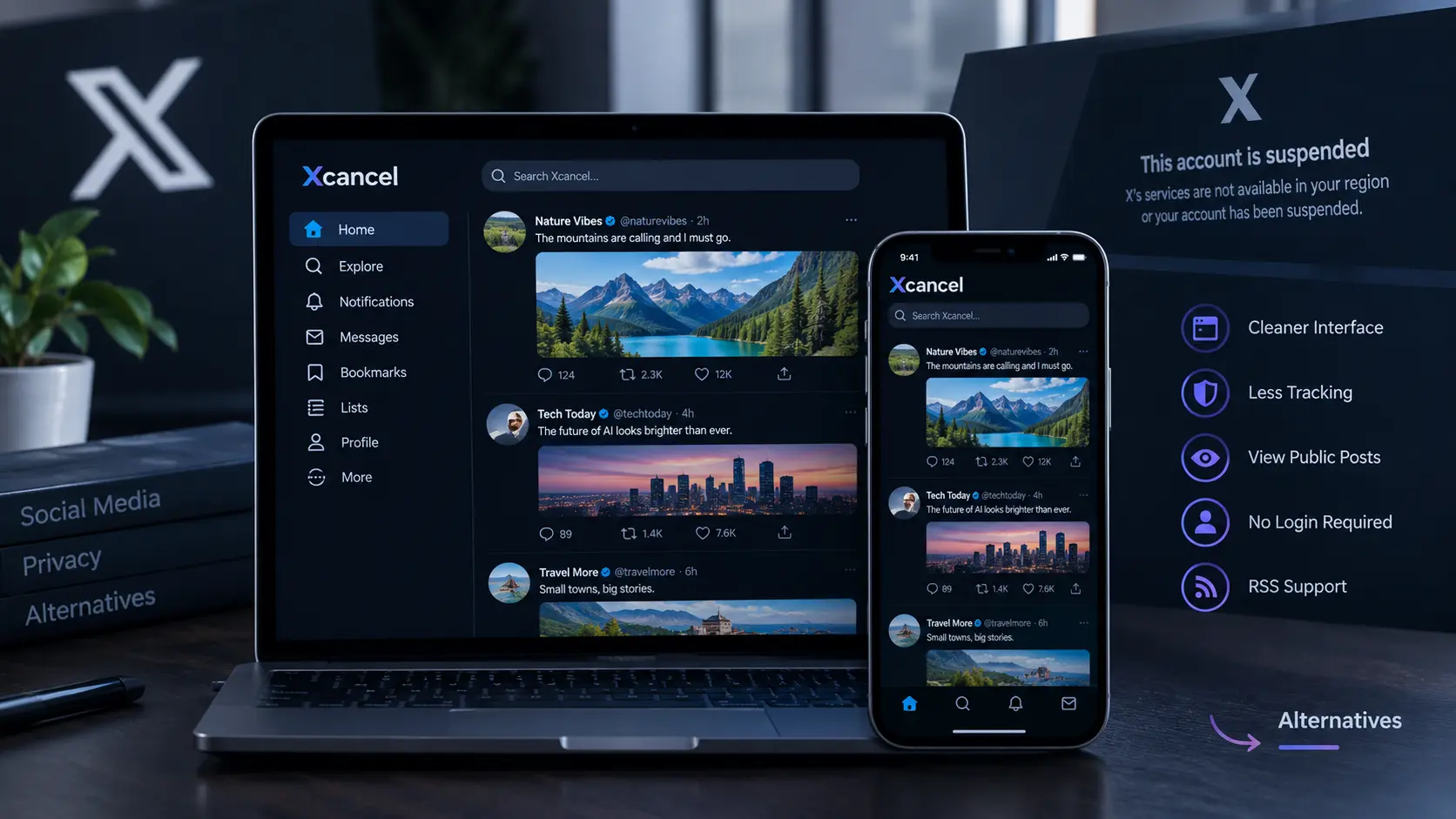
    Xcancel was an unofficial X/Twitter frontend that displayed public X content through a simpler interface. It was closely connected to Nitter, an open-source project created to provide a lightweight way to view X posts. Instead of using the standard X interface, users could access public profiles, posts, replies, threads, and media through a separate website.

    Nitter’s design focused on removing much of the advertising, tracking, and JavaScript used by the normal X experience. Xcancel used this type of frontend approach to provide a cleaner reading experience. The important distinction is that Xcancel was not a separate social network. It depended on access to X content.

    How Did Xcancel Work?

    The underlying idea was fairly simple. A third-party frontend obtained public X content and presented it through its own web pages.

    A Separate Reading Layer

    Nitter documentation describes a system that fetched X content and displayed it without requiring visitors to use the normal X website. This helped reduce direct exposure to X’s advertising, tracking cookies, and JavaScript. For users, this meant they could often view Twitter without login, follow public profiles, and read threads without opening the official X interface.

    Why This Model Became Difficult

    The system still depended on X’s data and access rules. In 2024, changes to X’s API access made operating Nitter instances harder. TechCrunch reported that operators later needed real X accounts to keep instances working.

    In August 2026, X took legal action against Nitter. X alleged that the project unlawfully used and circumvented its API and associated data. These are X’s allegations, not an independent finding that those claims were proven in court. This dependency is the biggest practical weakness of an Xcancel mirror.

    Xcancel Features Users Wanted

    Xcancel was mainly valuable because it changed how people consumed public X content.

    Common Xcancel features included:

    • Public profile and timeline viewing
    • Reading posts and replies
    • Thread browsing
    • Media viewing
    • A lightweight interface
    • Less advertising and JavaScript
    • Access to public content without a normal X login
    • Features associated with the Nitter ecosystem, including RSS support

    The goal was not to reproduce every X feature. It was to make public posts easier to read.

    That distinction matters. An Xcancel viewer was primarily a viewing tool, not a complete replacement for X’s posting, direct messaging, account management, and recommendation systems.

    Xcancel Privacy: What Did It Really Provide?

    The Xcancel privacy benefit came mainly from the frontend model. Nitter was designed to avoid sending the user’s browser directly through the standard X interface and to remove elements such as advertising, tracking cookies, and JavaScript. However, using a privacy-focused frontend did not guarantee complete anonymity.

    A third-party service still operates its own servers. Its operator may have access to technical information such as connection logs, depending on its infrastructure and policies. We should therefore treat Xcancel’s privacy advantage as reduced exposure to the normal X website, not as a promise of anonymous browsing.

    Why Did Xcancel Stop Working in 2026?

    The biggest recent development happened in August and September 2026. On August 24, 2026, X sent cease-and-desist letters demanding that Nitter and related instances shut down. Nitter’s main project went offline while its creator sought legal advice. Xcancel was also affected.

    The situation briefly changed in early September. After receiving legal advice, Nitter said the project would continue, and Xcancel came back online temporarily.

    That did not last.

    On September 11, 2026, the Nitter GitHub repository was archived and became read-only. On September 14, Xcancel announced another suspension because of a new development in the ongoing legal proceedings. TechCrunch reported the shutdown on September 15.

    This short return followed by another shutdown is the most useful current insight for people researching Xcancel alternatives. A third-party frontend can return technically and still remain unstable because its access to the underlying platform is uncertain.

    Xcancel Alternatives and Nitter Alternatives

    There is no single replacement that offers exactly the old Xcancel experience.

    Official X

    The official X website remains the direct source for current public posts. X’s own help documentation states that public posts can be viewed by anyone, whether or not they have an X account. Protected posts are different and are visible only to approved followers. This makes X the most direct option for checking current public content, although its interface is very different from a lightweight frontend.

    Nitter

    Nitter is the project that powered or influenced many Nitter alternatives and services such as Xcancel. Its GitHub repository is now archived and read-only as of September 11, 2026.

    That means older articles listing many Nitter instances should be treated carefully. A list published before the 2026 legal actions may no longer describe the current situation.

    Web Archives

    For older public posts and pages, web archives can sometimes be more useful than searching for another live X mirror. They do not provide a live social feed, but they can preserve pages that are no longer available through an alternative frontend.

    Can We View Twitter Without Login?

    Yes, public X posts can still be viewed without an X account, according to X’s current help documentation. Protected posts require approved follower access. The harder question is how much content can be accessed conveniently without signing in. This is where tools such as Xcancel were useful. They provided a dedicated reading interface rather than relying on the standard X experience.

    With Xcancel currently suspended, people searching for view Twitter without login should distinguish between what X officially makes public and what third-party viewers can technically display.

    Conclusion

    Xcancel was more than a simple Twitter frontend alternative. It showed how people could read public social media content through a lighter interface with less dependence on the standard website. Its 2026 history also exposes the main weakness of this model. Xcancel went from shutdown, to a short return, to another suspension within weeks. Nitter’s repository was also archived in September. For anyone researching an Xcancel alternative, the practical lesson is clear: do not judge a third-party X viewer only by its features. Its long-term usefulness also depends on whether it can legally and technically maintain access to the platform it mirrors.

    FAQ

    Is Xcancel still working?

    As of September 2026, Xcancel is suspended again following further developments in its legal proceedings with X.

    Was Xcancel the same as Nitter?

    No. Nitter was the open-source project, while Xcancel was a service associated with the Nitter frontend approach.

    Is there a reliable Xcancel alternative?

    There is no single service that currently provides every old Xcancel feature. Official X is the direct source for current public posts, while archives can help with historical content.

    Is Xcancel completely private?

    No. Its design reduced exposure to X’s normal scripts and advertising, but using a third-party service does not guarantee anonymity.

    Can an Xcancel viewer access protected posts?

    No. X states that protected posts are visible only to approved followers.

  • Enterprise Software News and ERP Updates From the Business Technology Market

    Enterprise Software News and ERP Updates From the Business Technology Market

    Enterprise software is the set of tools that run a modern organisation. It handles the payroll, the invoices, the stock counts and the customer records. When these systems change, people feel it, from the finance team closing the books to the council worker approving a permit. That is why we track enterprise software news closely. In 2026 the market is moving faster than it has in years, and Australian businesses need to understand the trends if they want to make good buying decisions.

    Global Spending on Business Software Hits New Highs

    Organisations are spending more on software, even with interest rates and cost pressures in the headlines. In July 2026, Gartner raised its forecast and now expects worldwide IT spending to reach US$6.37 trillion in 2026, up 14.2% on last year. Software alone is tipped to reach about US$1.47 trillion, growing 15.5%, according to the Gartner forecast.

    Much of that growth comes from artificial intelligence. Gartner analyst John-David Lovelock said organisations are spending more on “AI-ready software” and the computing power behind it. For a business owner, this means vendors are shifting budgets and staff towards smart features, and older products may get less attention.

    Key takeaway: when a vendor’s roadmap has little to say about automation, we treat that as a warning sign rather than a neutral detail.

    ERP Updates: Business Systems Learn to Act on Their Own

    ERP, short for enterprise resource planning, is the central system that links finance, purchasing, staff and supply chains in one place. The biggest ERP story this year is the move from software that records work to software that does work.

    SAP bets on digital “agents”

    At its Sapphire conference in May 2026, SAP unveiled what it calls an Autonomous Suite. It has 224 AI agents and 51 assistants spread across finance, purchasing, supply chain and HR. An agent is a small program that can check data, suggest a decision and then carry it out, such as matching a supplier invoice to an order. SAP chief executive Christian Klein added a caution that we think every buyer should keep in mind: “No AI agent can compensate for a bad data landscape.”

    An Australian success story

    Brisbane-based Technology One shows what a local player can do. In its half-year results to 31 March 2026, the company reported annual recurring revenue (the yearly value of its subscriptions) of A$598 million, up 17%. Profit before tax rose 9% to A$89.1 million. It also launched new AI tools called Plus and Guide for councils, universities and government agencies, and its UK business grew 23%. Those figures come from its ASX release. For Australian public sector buyers, this means a homegrown option is growing well and investing heavily. Readers weighing platforms can explore our guide to choosing an ERP system for Australian businesses.

    The Clock Is Ticking on Older Systems

    Deadlines are as much a part of enterprise news as new product launches. SAP will end mainstream maintenance for its long-running ECC system on 31 December 2027. Some customers can pay for extended support until 2030. Advisers have noted that very few Australian and New Zealand customers have finished moving to the newer S/4HANA platform. For large organisations, the move can cost tens of millions of dollars and take several years.

    Government agencies face the same pressures. In January 2026, reports showed the federal Department of Industry, Science and Resources was reviewing its ERP setup ahead of a contract renewal. Its finance and HR work ran across six different vendors. The likely outcome was a push to reduce the number of add-on systems rather than replace the core platform. We think this is a sensible model for many mid-sized firms: fix the clutter around the edges before starting a risky rebuild.

    Practical tip: list every system that touches your finance and staff data. If you count more than four or five, bringing them together may save more money than any new feature. Our team covers this process in ERP migration and consolidation services.

    Enterprise Funding: Bigger Cheques, Fewer Deals

    Enterprise funding tells us where investors think the next wave of business tools will come from. The Australian picture in 2026 is mixed.

    What the Australian numbers show

    According to Cut Through Venture’s quarterly report, Australian startups raised about A$1.7 billion in the June quarter across 64 venture rounds. The first half of 2026 totalled roughly A3.5billion,thesecondstrongestfirsthalfonrecord. Yet the June quarter was the slowest for the number of deals since before 2020. Small rounds under A5 million fell to 31, down from an average of 56 per quarter in 2025. Two deals, AI infrastructure firm Firmus (A725million) and payments company Airwallex (A460 million), made up around 70% of the capital raised.

    AI-first companies received 51% of the money. Within software, vertical products built for one industry, such as construction or healthcare, took 94% of the capital.

    Why funding news matters to buyers

    Global deals show where products are heading. In September 2026, US-based Ema raised US$77 million to grow its teams of AI agents, which handle work across HR, IT and finance. Its chief executive said some customers plan to stop using certain large software packages altogether. Funding like this puts pressure on established vendors to cut prices or add features. That can benefit Australian buyers when their contracts come up for renewal.

    Key takeaway: a well-funded startup can be a strong partner, but we always check how long its cash will last before we trust it with core business data.

    How Australian Leaders Can Use This News

    Reading headlines is only useful if it leads to better decisions. We suggest three habits:

    • Match news to your contract dates. A vendor launch matters most in the six to twelve months before your renewal, when you have the most bargaining power.
    • Ask about data before features. New agents only work when customer, supplier and product records are clean and consistent.
    • Check local fit. Make sure any new tool supports Australian payroll rules, Single Touch Payroll reporting and local data storage. See our overview of Australian data privacy requirements for business software.

    Conclusion

    The business technology market in 2026 rewards organisations that pay attention. Spending is rising, ERP platforms are becoming more automated, and investors are concentrating their money in fewer, larger bets. For Australian organisations, the opportunity lies in timing: understanding which deadlines are fixed, which vendors are growing, and which claims still need proof. The companies that treat enterprise software news as input for planning, and not only background noise, will be best placed to take advantage of these changes.

    Frequently Asked Questions About Enterprise News

    Where can Australians find reliable enterprise news?

    ASX announcements are the best source for listed local vendors, because companies must disclose results there by law. For the wider market, industry analysts and venture reports publish free summaries each quarter.

    Are funding figures reported in Australian or US dollars?

    Both, so always check. Australian venture reports usually use AUD, while global forecasts and US startup rounds use USD. One US dollar is currently worth well over one Australian dollar, which changes how large a deal looks.

    How often do ERP vendors release major updates?

    Most cloud ERP vendors push small updates every few weeks and bigger releases two to four times a year. Their annual conferences, often held between May and October, are where they announce major new directions.

    Does a large funding round mean a product is safe to buy?

    Not on its own. Funding shows investor confidence, but you should also check the vendor’s customer references, local support and exit terms that let you retrieve your data.

  • Data Privacy Laws in Australia for Business Software: A Practical Guide to APP 11 Compliance

    Data Privacy Laws in Australia for Business Software: A Practical Guide to APP 11 Compliance

    Every day, Australian businesses store customer names, addresses, health details and payment records inside the software they use. That software might be a booking system, an accounting platform or a customer database. Whatever it is, Australian data privacy laws set clear rules for how it must protect that information. At the centre of those rules is APP 11 compliance, the part of the law that deals with security. It has become one of the most closely watched areas of business regulation in Australia, and the cost of getting it wrong has never been higher.

    What APP 11 Asks of Your Business

    The Privacy Act 1988 includes thirteen Australian Privacy Principles, or APPs. Principle 11 covers the security of personal information, and it has two parts.

    The first part says you must take reasonable steps to protect the personal information you hold from misuse, interference, loss, unauthorised access, change or disclosure. The second part is often forgotten. Once you no longer need the information, you must take reasonable steps to destroy it or de-identify it, unless another law says you have to keep it.

    Who has to follow these rules

    The law mainly covers businesses with an annual turnover above $3 million, plus Australian Government agencies. Some smaller businesses are covered no matter their size. These include health service providers, businesses that trade in personal information, and businesses that choose to opt in. If you run a physio clinic with two staff, APP 11 still applies to you.

    What “reasonable steps” means now

    In December 2024, Parliament passed the Privacy and Other Legislation Amendment Act 2024. It made clear that reasonable steps include both technical measures and organisational measures. Technical measures include safeguards such as encryption and access controls. Organisational measures are things like staff training, written policies and a tested incident response plan. Buying good software is not enough on its own. Your people and processes must protect the information too.

    Why Business Software Is Where Most Risk Sits

    Software makes collecting data simple, but it can also make it easy to lose track of it. Old customer records often sit in legacy systems for years. Staff who left long ago may still have logins. Backups may be copied to places nobody tracks.

    The numbers show just how serious this risk can be. The Office of the Australian Information Commissioner received 532 data breach notifications between January and June 2025, according to its latest published statistics. Malicious or criminal attacks caused 59 per cent of them. Human error caused 37 per cent, up sharply from 29 per cent in the previous period. Health providers reported the most breaches, followed by finance.

    The same report pointed to a breach where a software developer’s unauthorised script exposed private documents. The Commissioner’s message was simple. You are responsible for the actions of your third-party providers.

    Choosing and Managing Software Vendors

    Many Australian businesses now run on cloud platforms hosted by outside companies. That does not move your legal duty onto the vendor. If your cloud provider suffers a breach, the Commissioner will still ask what you did to check that provider.

    Before signing a contract, we suggest asking a vendor these questions:

    • Where is our data stored? If it sits overseas, APP 8 adds extra duties. You can often remain accountable for how an overseas provider handles the data.
    • What security certifications do you hold? The Commissioner’s office points to the ISO 27000 series as one useful benchmark.
    • How quickly will you notify us if a data breach occurs? Put a firm timeframe in the contract.
    • Can we delete data completely when we leave? This supports your destruction duty under APP 11.

    For a deeper checklist, see evaluating cloud software vendors for privacy compliance.

    Building APP 11 Compliance Into Daily Operations

    The Commissioner’s Guide to securing personal information sets out what good practice looks like. We have grouped its key ideas into three habits.

    Limit who can see what

    Give staff access only to the data required for their role. Turn on multi-factor sign-in, which asks for a second check such as a phone code, especially for accounts that can view sensitive records. Keep audit logs that show who opened which file and when. Remove access on the same day an employee leaves.

    Protect the data itself

    Encrypt databases, backups and information moving between systems. Store your encryption keys somewhere separate and secure. Review these settings every year, because methods that were strong five years ago may now be weak.

    Plan for the bad day

    Write a data breach response plan, train staff on it and run practice drills. A plan that sits unread in a shared drive will not help you at 2 am during a ransomware attack. Our guide to creating a data breach response plan walks through each step.

    What Happens When Businesses Fall Short

    Penalties are now serious. For the most serious privacy breaches, a company can face the greater of $50 million, three times the benefit it gained, or 30 per cent of its adjusted turnover for the relevant period. The Commissioner can also now issue infringement notices for less serious breaches without going to court.

    A real case shows how APP 11 plays out. In October 2025, the Federal Court ordered Australian Clinical Labs to pay $5.8 million after a 2022 cyber attack, as reported by Hamilton Locke. The court found weak security controls in a business the company had bought, along with poor incident response plans and training. That penalty was set under the old, lower maximum. The same failures today could cost far more.

    People can also take action themselves. Since June 2025, individuals have been able to sue for serious invasions of privacy under a new statutory tort.

    Preparing for Changes Still Ahead

    More change is coming. From 10 December 2026, businesses must explain in their privacy policies when they use computer programs to make decisions that significantly affect people. If your software scores loan applicants or screens job seekers automatically, that rule applies to you.

    A second round of reforms is still under discussion. The Government supports removing the small business exemption in principle, but no bill has passed and no start date is set. Smaller businesses that build good security habits now will be well placed whatever happens. Learn more in [Link: upcoming Privacy Act reforms for small business].

    Conclusion

    Privacy protection in Australia has moved from a box-ticking exercise to a core business duty with real consequences. Security under APP 11 depends on three things working together: the software you choose, the vendors you trust and the habits your team follows every day. The businesses that do well treat personal information as something borrowed from their customers. They keep only what they need, guard it carefully and let it go when its purpose ends. That mindset protects people, and it also protects the long-term trust every Australian business relies on.

    Frequently Asked Questions

    Does APP 11 require specific software or tools?

    No. The law does not name any product. It judges whether your steps were reasonable given the sensitivity of the data, your size and the risk of harm. A hospital needs stronger controls than a local café.

    How quickly must we report a breach?

    If you suspect an eligible breach, you have up to 30 days to assess it. Once you confirm it is likely to cause serious harm, you must notify the Commissioner and affected people as soon as practicable.

    Is de-identified data still covered?

    Properly de-identified data generally falls outside the Act. However, if it can be re-identified by combining it with other data, it may count as personal information again.

    Do the rules apply to staff records?

    Private sector employee records are partly exempt when used for employment purposes. Customer and supplier data gets no such exemption.

  • Fathom AI: The AI Meeting Assistant That Records, Transcribes, and Summarizes Your Calls

    Fathom AI: The AI Meeting Assistant That Records, Transcribes, and Summarizes Your Calls

    Fathom is changing how an AI meeting assistant fits into a workday. Its newer 3.0 experience separates meeting capture from the traditional meeting bot, with options for bot-free transcript or audio capture on supported Mac setups. At the same time, Fathom is adding cross-meeting search, live summaries, and stronger consent controls. That shift matters because the useful part of a meeting does not end when the call ends. A transcript can become AI meeting notes, searchable customer feedback, sales insights, action items, and CRM information. Fathom is increasingly designed around that full workflow.

    What Is the Fathom AI Meeting Assistant?

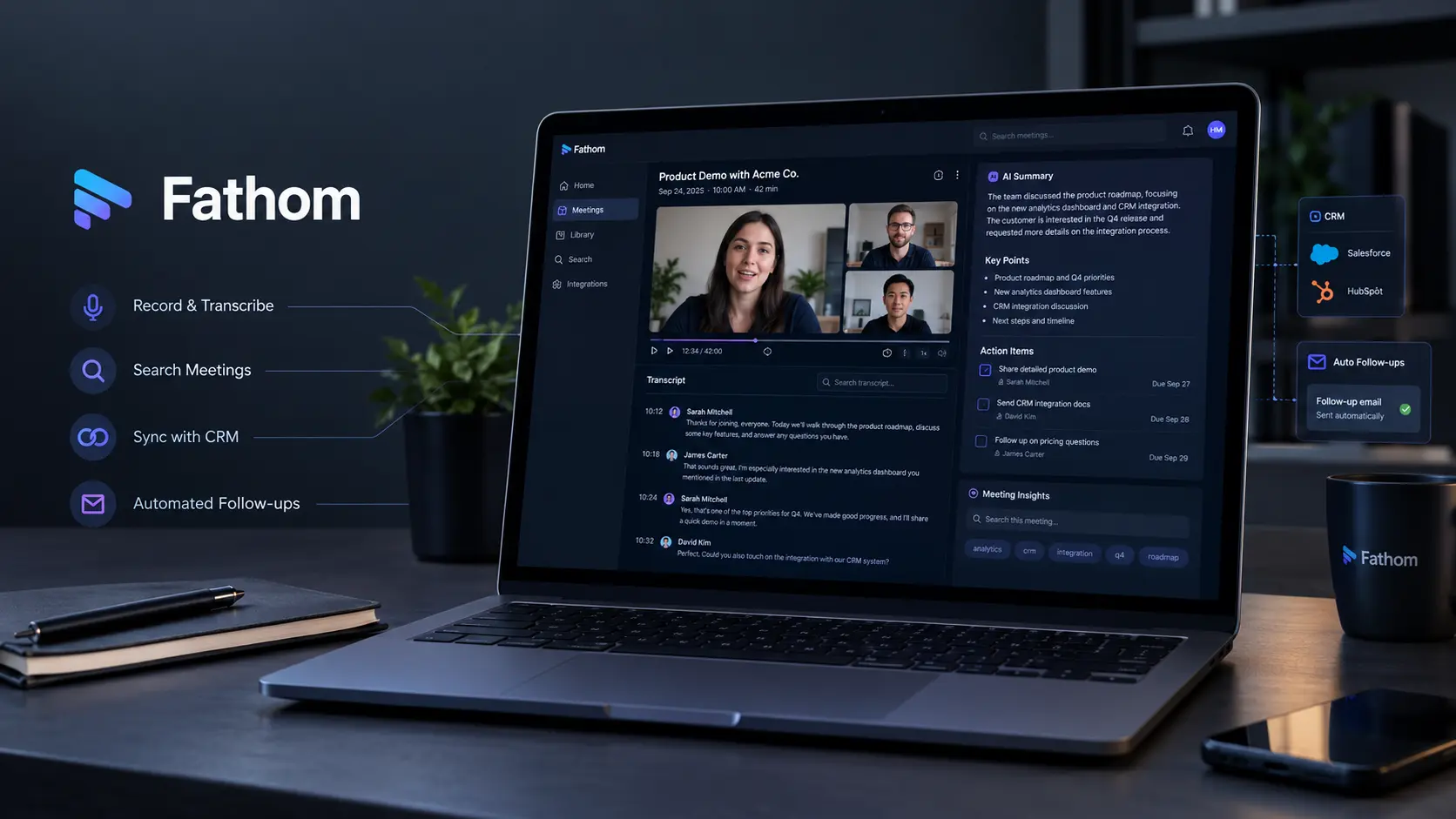
    Fathom combines meeting recording software, AI transcription, automated meeting summaries, and follow-up tools in one platform. It supports popular meeting services, including Zoom, Google Meet, and Microsoft Teams, although the recording method differs by platform.

    The biggest recent change is Fathom 3.0. As of August 2026, the new experience is available to eligible Mac users for English-language meetings. It offers three capture choices:

    • Transcript Only, which captures a transcript without saving a recording
    • Audio Only, which captures audio locally
    • Audio & Video, which uses the traditional Fathom bot to record the meeting

    Fathom also provides a live summary during supported meetings and produces a final summary after the call. Windows support for the new 3.0 experience is still being developed.

    Fathom AI Transcription Does More Than Store Conversations

    The main job of AI meeting transcription is to turn spoken conversations into searchable text. Fathom currently offers unlimited transcription in 38 languages on its individual Free and Premium plans.

    After a call, users can work with the transcript alongside the summary. This is useful for sales calls, interviews, customer research, product meetings, and internal discussions where important details can easily get lost. The difference is especially clear when a team needs to check what someone actually said rather than relying only on an AI-generated summary.

    The Overlooked Feature: Fathom Becomes Searchable Meeting Memory

    Fathom’s most interesting development is its move beyond individual meeting summaries.

    Its AI Search can search across recorded meetings for topics such as pricing objections, competitor mentions, customer feedback, internal concerns, and recurring problems. Since August 2026, AI Search has been available across all Teams pricing plans. Users can also filter searches by date, team access, meeting type, and speaker.

    This changes the role of an AI call summarizer.

    Instead of asking:

    “What happened in yesterday’s meeting?”

    A product team can search for repeated customer complaints across many calls. A sales team can look for common pricing objections. A manager can search for mentions of a specific competitor.

    Fathom can also turn saved searches into trackers with email or Slack alerts. That means a team can monitor recurring topics without manually reviewing every new recording. This makes Fathom closer to a searchable meeting knowledge base than a simple video meeting assistant.

    Fathom and CRM Integrations

    Fathom can connect meeting information with business tools instead of leaving every transcript inside the meeting platform.

    Current CRM integrations include HubSpot, Salesforce, and Close. The Free and Premium individual plans support CRM syncing for up to three users per email domain, along with personal-use Zapier integration.

    For sales teams, this can reduce manual note-taking. A recorded conversation can become part of a customer’s existing CRM record, making meeting history easier to review later.

    Fathom Pricing and Free Plan

    Fathom offers a Free plan with unlimited recordings, storage, and transcription. Individual users also receive unlimited transcription across 38 languages. However, the Free plan limits advanced AI summaries to the first five calls each month after the free preview period.

    The Premium plan adds unlimited advanced AI summaries and features such as:

    • AI Action Items
    • AI Follow-Up Emails
    • Custom AI summaries
    • Ask Fathom
    • Additional customization options

    Fathom’s current documentation also shows that account-wide Ask Fathom limits changed on September 1, 2026. Free users can search only their previous two weeks of calls, while Premium users have unlimited access to their meeting history. Team and Business plans have different limits for personal and team calls.

    Platform Support Has Some Important Limits

    Fathom’s features are not identical across every meeting platform.

    The new bot-free Fathom 3.0 experience is currently limited to Mac users with English-language meetings. Windows users continue to use the previous experience while broader rollout is in progress.

    Microsoft Teams also still uses the Fathom Notetaker bot rather than the new bot-free capture system. Teams administrators may need to allow anonymous participants, manage lobby settings, and review third-party bot restrictions for Fathom to join successfully. 

    This distinction matters. We should not describe Fathom as completely bot-free across every platform.

    Recording Consent Is Now a Bigger Part of the Workflow

    Recording calls requires clear consent practices. Fathom’s current system can automatically request recording consent from eligible external attendees before scheduled meetings.

    As of September 2026, Fathom sends consent emails when specific conditions are met. If an attendee declines, automatic recording is disabled for that meeting. The host can still manually start recording later if the participant provides consent during the call. This makes consent an important part of choosing an AI meeting recorder, especially for customer interviews, sales calls, and meetings involving people from different jurisdictions.

    Conclusion

    Fathom is moving beyond the basic job of recording a call and writing a summary. Its recent development points toward a more useful model: capture conversations, turn them into structured information, then search that information across meetings.

    The new bot-free experience is still limited by platform and language requirements, while Microsoft Teams continues to rely on the Fathom Notetaker. But features such as AI Search, meeting trackers, automated summaries, and CRM integrations show where Fathom is heading.

    For teams with large numbers of customer, sales, research, or internal calls, the bigger value may not be the recording itself. It is being able to find what was said weeks or months later and turn those conversations into useful work.

    FAQs About Fathom AI

    Is Fathom an AI meeting assistant?

    Yes. Fathom combines recording, transcription, summaries, action items, follow-up tools, and meeting search.

    Does Fathom provide AI meeting notes?

    Yes. Fathom generates automated summaries and can create AI action items, follow-up emails, and custom summaries on eligible plans.

    Does Fathom record Microsoft Teams meetings without a bot?

    No. Microsoft Teams currently uses the Fathom Notetaker, which joins the meeting as a bot. The Teams integration is not yet part of Fathom’s bot-free recording experience.

    Can Fathom search old meetings?

    Yes, but access depends on the plan. Since September 1, 2026, Free users can search only the previous two weeks through account-wide Ask Fathom, while Premium users have unlimited access to their meeting history.

    Does Fathom support multiple languages?

    Yes. Individual Free and Premium plans currently support unlimited transcription in 38 languages.

  • Beautiful.ai: Create Professional Presentations Faster With AI-Powered Design

    Beautiful.ai: Create Professional Presentations Faster With AI-Powered Design

    Beautiful.ai has made an important change to its AI presentation workflow in 2026. Instead of asking AI to jump from one prompt straight to finished slides, its Create with AI workflow now lets users build the presentation in stages. We can provide a prompt, outline, document, PDF, or link, review a text-based outline, adjust the story, choose visual preferences, and only then generate the designed slides. That change is easy to overlook, but it addresses one of the biggest problems with AI presentations: a deck can look polished while still having the wrong structure or message.

    Beautiful.ai’s 2026 AI Workflow Gives Users More Control

    The current Beautiful.ai presentation maker separates content planning from visual design. After we enter a prompt, Beautiful.ai creates a slide-by-slide outline before generating the actual presentation. We can then reorder slides, remove sections, change text, add content, or use the AI chat panel to make changes in plain language. We can also choose a theme, image source, image style, and presentation language before generating the deck.

    This makes the tool more useful for professional work because we can fix the story before spending time reviewing the design.

    A practical workflow is:

    1. Add the topic and source material.
    2. Review the AI-generated outline.
    3. Remove weak or unnecessary slides.
    4. Set the visual style and image preferences.
    5. Generate the presentation.
    6. Refine individual slides with AI and Smart Slides.

    For readers learning how AI systems create content, [Link: AI model guide] can provide useful background.

    Smart Slides Are Still the Core Design Advantage

    Beautiful.ai is not only an AI presentation maker. Its main design system is based on Smart Slides, which automatically adjust layout as content changes. The platform currently lists more than 300 Smart Slide layouts. These include layouts for charts, diagrams, timelines, funnels, maps, comparisons, and other common business presentations.

    This matters because traditional presentation software often leaves users responsible for every spacing and alignment decision. With Smart Slides, adding or removing content can trigger automatic layout changes. We can spend more time improving the message and less time moving boxes around. The platform also supports Classic Slides when we need more manual control. That gives users a choice between automated design rules and a more open canvas.

    Five New Smart Slides Arrived in April 2026

    Beautiful.ai expanded its design system on April 25, 2026, with five new Smart Slides: sequence slides, connection diagrams, horizontal funnels, ROI slides, and map slides. The ROI slide is particularly useful for business presentations because it supports variables, calculations, and sliders that can update results during playback.

    The new map slides can zoom between a broad view and specific regions, while connection diagrams can show relationships such as inputs and outputs. These additions show that AI-powered presentation design is moving beyond simple text-to-slide generation. The value is increasingly in helping users present structured business information without manually designing every visual.

    Real-World Results Show Where Beautiful.ai Saves Time

    A useful example comes from Cvent. Its product management organization has 125 people, more than 170 users across departments use Beautiful.ai daily, and the team creates more than 1,000 presentations each year. Cvent says Beautiful.ai reduced its presentation design time by 75%.

    This is a company-reported case study, so we should not treat the 75% figure as a universal result. However, the example shows where a professional presentation maker can provide measurable value: organizations producing large numbers of presentations.

    Cvent also highlights content reuse through its shared libraries. Instead of rebuilding slides for every presentation, teams can reuse previous content and combine it into new decks. For businesses creating frequent sales decks, reports, proposals, or internal updates, this reuse can matter as much as AI generation. A related resource such as can help teams evaluate other parts of an AI-assisted workflow.

    Beautiful.ai Pricing in 2026

    Beautiful.ai currently lists its Pro plan at $12 per month when billed annually. The Team plan costs $40 per user per month when billed annually, or $50 per user per month when billed monthly. Team supports 2 to 20 seats.

    The Pro plan includes unlimited AI content generation, AI image generation, AI writing assistance, AI translation, Smart Slides, more than 300 Smart Slide layouts, custom branding, PowerPoint import and export, and other presentation features.

    Team adds real-time collaboration, shared slide and template libraries, version control, engagement analytics, and centralized brand controls. Beautiful.ai also offers a 14-day free trial for Pro and Team. A single-presentation option is listed at $45 for users who need the platform for a one-time project. For teams, the important calculation is not only the subscription price. We should also consider how much time the platform removes from repeated formatting, brand updates, and slide production.

    How Beautiful.ai Fits Into a Professional Workflow

    The strongest use case for this AI presentation software is not creating a deck and publishing it without review. A better workflow is to use AI for the first draft, Smart Slides for layout, and human review for the final message.

    For example, a marketing team could upload a campaign brief, let AI create the initial outline, change the structure before slide generation, apply its brand theme, and then reuse approved slides in future presentations.

    The platform also supports integrations and tools for sharing, collaboration, PowerPoint workflows, and engagement tracking. Beautiful.ai says it is used by teams in sales, marketing, consulting, product, operations, and learning and development. For another useful presentation resource, see [Link: presentation design tools].

    Beautiful.ai Review: What We Should Watch

    Our Beautiful.ai review shows that its biggest strength is the combination of AI generation and automated design. The March 2026 Create with AI update is especially important because it gives users more control over the outline before visual generation.

    The main limitation is that automation does not replace judgment. AI can create a structure and generate content, but we still need to verify facts, remove unnecessary claims, and make sure the presentation fits its audience. That makes Beautiful.ai most useful when we want to create presentations with AI without giving up control over the final story.

    Conclusion

    Beautiful.ai’s most useful 2026 development is not simply faster AI slide generation. It is the move toward a controlled presentation workflow where we can shape the story first and design it second. The combination of Create with AI, Smart Slides, slide-level editing, reusable content, and brand controls makes presentation automation more practical for repeated professional work. The Cvent case also shows how this approach can reduce design time at high presentation volumes. The real advantage is therefore not creating a presentation with one click. It is removing repetitive design work while keeping people in control of the message.

    FAQ

    Is Beautiful.ai an AI presentation maker?

    Yes. Beautiful.ai can create presentations from prompts and supporting material, then lets users refine the outline and visual design before generating the final deck.

    How many Smart Slide layouts does Beautiful.ai have?

    Beautiful.ai currently lists more than 300 Smart Slide layouts for different presentation needs.

    Can Beautiful.ai use documents and PDFs?

    Yes. The current Create with AI workflow accepts supporting documents, PDFs, and links as additional context.

    Does Beautiful.ai support PowerPoint?

    Yes. Current plans include PowerPoint import and editable PowerPoint export.

    Does Beautiful.ai offer a free trial?

    Yes. Beautiful.ai currently offers a 14-day trial for Pro and Team plans.

  • Pika AI: How This AI Video Generator Turns Ideas and Images Into Videos

    Pika AI: How This AI Video Generator Turns Ideas and Images Into Videos

    Pika AI is more than a simple AI video generator. Its current platform brings several video, image, and audio models into one place, while also offering creative tools for turning ideas, images, and existing content into videos. The biggest change to understand in 2026 is that Pika is now a multi-model generative media platform. Its current platform features Pika’s own models alongside models from other AI companies. Pika also offers dedicated apps for video, image, audio, and creative editing workflows.

    What Is Pika AI?

    Pika AI is a generative media platform designed for AI-powered video creation and other creative tasks. You can use text, images, keyframes, or existing videos as starting points to create and transform visual content with AI. For anyone researching a Pika AI review, this wider model selection is important. Pika is no longer just a single video-generation tool. Its current platform includes Pika 2.5 as well as models such as Seedance 2.5, Veo 3.1, GPT Image 2.5, and Nano Banana.

    How the Pika AI Video Generator Works

    The basic workflow is simple:

    1. Start with an idea, prompt, or image.
    2. Select an available model or creative feature.
    3. Set the video options.
    4. Generate the clip.
    5. Review the result and create another version if needed.

    This makes AI video creation useful for social media posts, advertisements, concept videos, product visuals, and other short-form projects. The important point is that AI video generation often works best as an iterative process. Instead of expecting one prompt to create the final video, creators can generate several versions and improve the result.

    Pika AI Features to Know

    Pika offers several creative tools alongside its video models. Its current platform includes Pika 2.5, Pikadditions, Pikaffects, Pikaswaps, and Pikaframes. Pika also offers dedicated audio models and creative applications.

    Pikaframes is particularly useful when you want more control over how a video moves between images. Pika 2.5 can animate between two to five still images, with a prompt guiding the transitions.

    Pikadditions and Pikaswaps are designed for modifying existing video content, while Pikaffects can be used for visual effects.

    This means Pika can be useful for more than simply typing a prompt and waiting for a video.

    Text to Video and Image to Video

    The two main approaches most users look for are text to video AI and image to video AI. With text-to-video, you describe the scene you want the AI to create. Pika 2.5 can generate a video from a text prompt at 720p or 1080p.

    With image-to-video, you provide an existing image and use AI to bring it to life with movement. Pika 2.5 supports 720p and 1080p image-to-video generation, with five- or ten-second duration options. Image-to-video can be especially useful for product visuals, artwork, character concepts, and social media content because the starting image gives the model a strong visual reference.

    Pika AI Pricing in 2026

    Pika’s current official pricing page shows the following plans:

    PlanMonthly priceMonthly creditsCommercial license
    Free$00No
    Starter$10900No
    Creator$353,150Yes
    Fancy$958,550Yes

    Annual billing reduces the listed prices to $8 for Starter, $28 for Creator, and $76 for Fancy. The Free plan currently provides access to models but has 0 monthly credits, with credit packs available separately.

    Pika also sells one-time credit packs. The current pricing page lists packs starting at 1,500 credits for $25. This is important because some older Pika pages still show previous credit amounts. For current Pika AI pricing, the latest official pricing page is the better reference.

    Pika 2.5 and Current Video Models

    Pika 2.5 remains an important part of the platform. It supports text-to-video, image-to-video, and keyframe-based workflows.

    For example, Pika’s current Pika 2.5 documentation says users can provide a prompt alone, attach a reference image, or use two to five still images as ordered keyframes.

    At the same time, Pika’s current platform features other video models. Its apps page currently highlights Seedance 2.5 and Veo 3.1, among other models.

    So it is more accurate to describe Pika as a multi-model AI video platform rather than calling Pika 2.5 the platform’s only or overall flagship model.

    How to Use Pika AI for Better Results

    If you want to learn how to use Pika AI, start with a clear visual idea rather than writing a very long prompt.

    Describe:

    • The main subject
    • The movement
    • The camera action
    • The environment
    • The visual style
    • The mood

    For image-to-video projects, start with a clear image and describe the specific movement you want to create.

    For example, instead of writing a general prompt such as “make this cinematic,” describe the subject’s movement, camera motion, lighting, background action, and overall style.

    Generate several versions and compare them. Even small changes to a prompt can lead to noticeably different results.

    Pika AI API

    Pika also offers an API for developers and businesses that want to add generative media to their own applications.

    Pika’s current API documentation lists Pika 2.5 text-to-video and image-to-video from $0.04 per second, with charges applied only to successful runs.

    The API also provides other models and tools, including Pikadditions, Pikaswaps, Pikaffects, and audio-generation models.

    This API pricing should not be confused with Pika’s consumer subscription plans, which use monthly credits.

    Who Should Use Pika AI?

    Pika can be useful for content creators, marketers, designers, social media teams, and people experimenting with AI video.

    It is especially useful when you need short visual clips, image animation, creative effects, or quick video concepts.

    However, AI-generated video can still have problems with consistency, motion, objects, faces, and detailed instructions. For professional work, review every generated clip before publishing.

    Final Thoughts

    Pika AI has developed from a straightforward AI video generator into a broader generative media platform.

    Its current platform combines Pika’s own models with access to other video, image, and audio models. Pika 2.5 remains useful for text-to-video, image-to-video, and keyframe workflows, while newer models such as Seedance 2.5 and Veo 3.1 are also featured on the platform.

    For users interested in Pika AI, Pika AI review, AI video generator, text to video AI, image to video AI, and AI video creation, the main advantage is flexibility. You can start with an idea, image, or existing content and choose a workflow that fits the project.

    For the latest Pika AI pricing, always check the official Pika pricing page, because plans, credits, models, and generation costs can change.

    Frequently Asked Questions

    Is Pika AI an AI video generator?

    Yes. Pika provides AI video generation from text, images, and keyframes, along with tools for modifying and enhancing video content.

    What is Pika AI used for?

    Pika AI can be used for short videos, social media content, marketing visuals, image-to-video projects, creative effects, and AI-powered media production.

    How much does Pika AI cost?

    Pika currently lists a Free plan at $0, Starter at $10 per month, Creator at $35 per month, and Fancy at $95 per month. Annual billing offers lower listed prices.

    Does Pika AI have a free plan?

    Yes. Pika currently lists a Free plan with 0 monthly credits. Users can purchase additional credit packs separately.

    Does Pika AI offer an API?

    Yes. Pika provides API access to its video and generative media models. Pika 2.5 API generation currently starts from $0.04 per second for supported video generation.