Author: Hamza Tech

  • CCPA vs GDPR Explained: California’s Data Privacy Law vs EU Regulation

    CCPA vs GDPR Explained: California’s Data Privacy Law vs EU Regulation

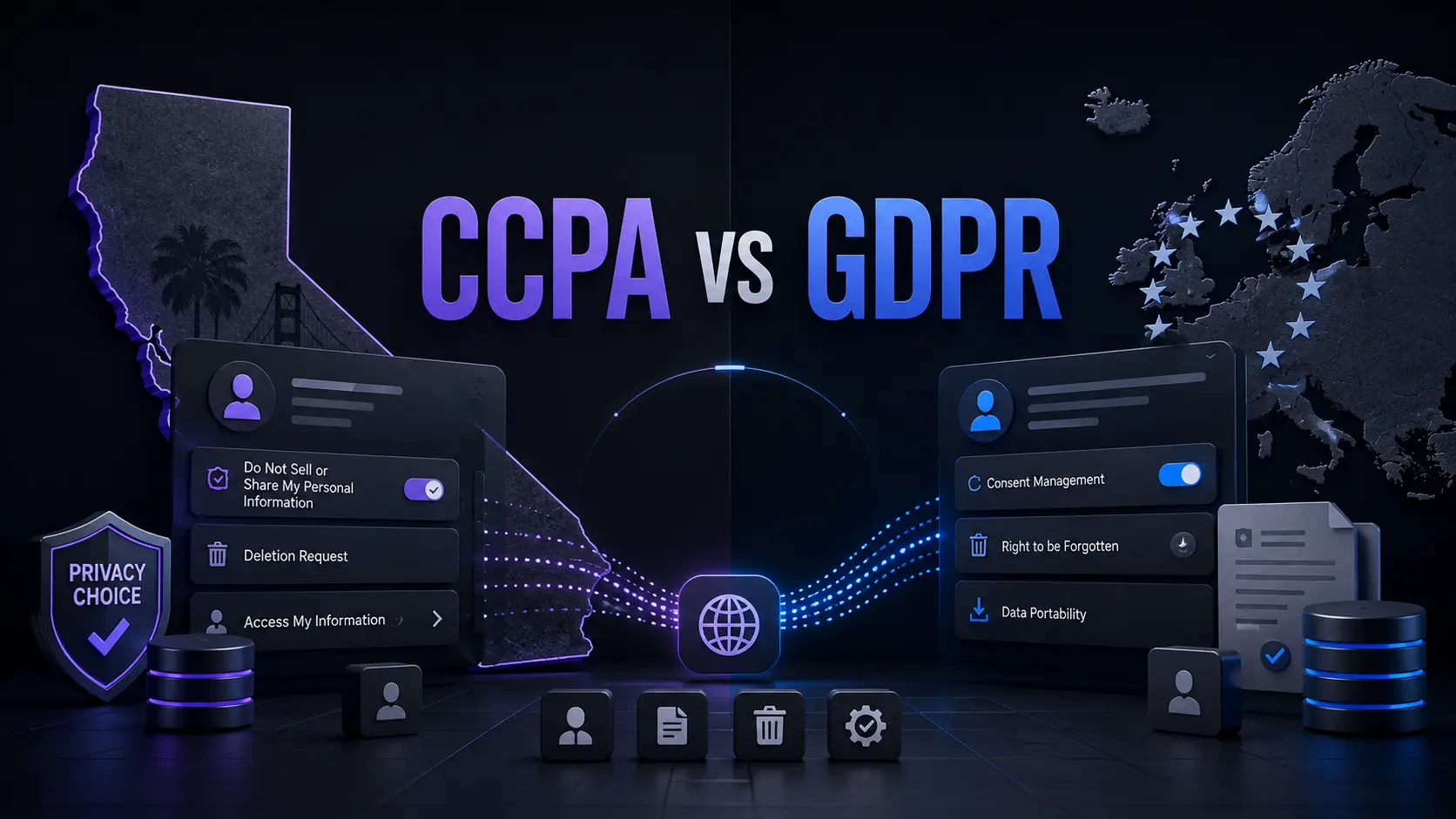
    A major difference between the CCPA and GDPR is becoming clearer in 2026: privacy compliance is moving beyond privacy policies and into the technology businesses use to collect, share, delete, and profile personal data. California’s rules now include stronger requirements around opt-out signals, automated decision-making, risk assessments, cybersecurity audits, and data brokers. At the same time, the GDPR continues to apply to businesses outside Europe when they offer services to people in the EU or monitor their behaviour. That means a business can no longer assume that having a privacy policy and cookie banner is enough. The practical question is whether its systems actually respect a person’s privacy choice.

    CCPA vs GDPR: The Core Difference

    The CCPA, formally the California Consumer Privacy Act as amended by the California Privacy Rights Act, is California’s broad consumer privacy law. The CPRA did not create a separate law. It changed the CCPA and added new rights and obligations.  The GDPR is an EU regulation that applies across the European Economic Area and can also reach organisations outside Europe.

    The biggest difference is how each law approaches scope.

    AreaCCPAGDPR
    Main focusConsumer privacy and control over personal informationProtection of personal data and individual rights
    Geographic reachCalifornia-focused, with rules that can affect businesses outside CaliforniaCan apply to organisations outside the EU
    Opt-outStrong rights to opt out of sale and sharingDifferent legal bases and consent rules apply
    Sensitive dataRight to limit certain usesStronger special-category data rules
    Automated decisionsNew requirements are being phased inExisting rules cover certain automated decision-making
    Maximum administrative fineGenerally up to $2,663 per violation, or $7,988 for intentional violations under current California amountsUp to €20 million or 4% of the company’s total annual global turnover, depending on the type of violation.

    California’s monetary thresholds were adjusted for inflation in 2025. 

    Who Does the CCPA Apply To?

    The CCPA does not apply to every business simply because someone from California visits its website. Coverage depends on factors such as the business’s activities and statutory thresholds. One threshold tied to annual gross revenue was adjusted to $26.625 million from January 1, 2025. Other CCPA tests can apply based on the amount of personal information handled or the business’s role in selling or sharing personal information. This differs from the GDPR.

    The GDPR can apply to a small business outside the EU if it offers goods or services to people in the EU or monitors their behaviour there. Company size alone does not remove a business from GDPR coverage.  For example, a small Australian software company that specifically sells subscriptions to customers in Germany may need to assess GDPR obligations even though it has no European office. A business targeting California customers may instead need to determine whether it meets the CCPA definition of a covered business.

    The Rights Consumers Get Under CCPA and GDPR

    The laws overlap, but they give people different forms of control.

    Under the CCPA, California consumers are entitled to several privacy rights, including:

    • Know what personal information a business collects, uses, and shares.
    • Delete personal information, subject to exceptions
    • Correct inaccurate information
    • Opt out of the sale or sharing of personal information
    • Limit certain uses and disclosures of sensitive personal information
    • Receive equal treatment when exercising privacy rights 

    The GDPR provides a different rights framework. Depending on the circumstances, individuals can request access, correction, deletion, restriction of processing, data portability, and objection to certain processing. Consent can also be withdrawn where consent is the legal basis. This creates an important practical difference: CCPA often gives consumers a direct opt-out from certain commercial data uses, while GDPR compliance depends heavily on why the organisation is processing the data in the first place.

    The Overlooked CCPA Detail: Your Privacy Choice Must Reach the Technology

    One of the most important CCPA developments is not simply another consumer right. It is the growing requirement for businesses to make privacy choices work across their technical systems. California already requires covered businesses to honour qualifying opt-out preference signals, such as Global Privacy Control, for sale and sharing. In September 2025, California, Colorado, and Connecticut announced a joint investigation into businesses that may have failed to honour these signals.

    California then went further. In October 2025, the Governor signed the California Opt Me Out Act, requiring browsers operating in California to offer users a simple built-in way to send opt-out preference signals. For businesses, this changes the technical question.

    It is not enough to place a “Your Privacy Choices” link in a footer. The signal must affect what happens behind the page. If a visitor sends an opt-out signal, businesses need to consider whether their advertising tools, analytics systems, customer databases, and third-party vendors actually stop the relevant sale or sharing. That makes privacy engineering part of CCPA compliance, not just legal drafting.

    CCPA Data Brokers Are Facing a New Practical Test

    Another major 2026 development is California’s Delete Request and Opt-Out Platform, or DROP. Beginning January 1, 2026, California residents can use DROP to submit a single request to participating data brokers. Starting August 1, 2026, data brokers must access the mechanism at least once every 45 days and process qualifying deletion requests. The system matters because it changes deletion from a company-by-company process into a centralized request. California is also actively enforcing data broker rules.

    In January 2026, CalPrivacy announced a $45,000 fine against Datamasters for failing to register as a data broker and ordered it to stop selling Californians’ personal information. The same announcement described a separate $62,600 fine against S&P Global for a registration failure.

    These cases show why businesses should examine whether their marketing, audience-building, enrichment, or data-resale activities could make them subject to California’s data broker rules.

    How the GDPR Differs on International Reach

    The GDPR’s reach is broader than many businesses expect. An organisation outside the EU can fall under the GDPR if it offers goods or services to individuals in the EU or monitors their behaviour there. Simply having a website that happens to be accessible from Europe does not automatically establish GDPR coverage. The business’s actual activities matter. The GDPR also has a strong focus on the legal basis for processing.

    A business generally needs a lawful reason to process personal data. Depending on the activity, that can include consent, contract, legal obligation, legitimate interests, or other recognised grounds. This is different from treating privacy mainly as a consumer opt-out system. For businesses operating internationally, CCPA and GDPR should therefore be assessed separately, even when the same customer data is involved.

    New CCPA Rules Matter for AI and Automated Decisions

    California’s privacy rules are also moving into artificial intelligence and automated decision-making. Regulations adopted in 2025 became effective January 1, 2026. They introduced requirements covering risk assessments, cybersecurity audits, and automated decision-making technology. Some automated decision-making requirements begin in 2027, while certain cybersecurity audit reporting deadlines extend into 2028, 2029, and 2030 depending on business revenue.

    This is an important difference from older CCPA comparisons.

    A privacy review should now ask more than, “What information do we collect?”

    It should also ask:

    What decisions does our technology make using personal information, and can a consumer exercise the rights that California provides?

    Businesses using profiling, recommendation systems, advertising technology, or automated eligibility decisions should map those systems before assuming their existing CCPA controls are sufficient.

    CCPA vs GDPR: What Businesses Should Do

    Businesses dealing with both California and EU users should build a single data map first, then test it against each law.

    We should identify:

    1. What personal information is collected
    2. Where it comes from
    3. Why it is processed
    4. Which vendors receive it
    5. Whether it is sold or shared
    6. How deletion and correction requests move through systems
    7. How opt-out signals are detected
    8. Whether sensitive information receives additional controls
    9. Whether profiling or automated decisions are involved
    10. How privacy choices are recorded and enforced

    The goal should not be to copy one law’s policy wording into another jurisdiction. The stronger approach is to make the underlying data systems capable of enforcing each person’s applicable rights.

    Conclusion

    CCPA vs GDPR is not simply a comparison between two privacy policies. The more useful distinction is how each law makes businesses give people control over personal data. The CCPA has developed into a system where opt-out signals, data brokers, automated decision-making, risk assessments, and technical controls matter alongside traditional privacy notices. The GDPR remains broader in its territorial reach and places strong emphasis on the legal basis and conditions for processing personal data. For organisations operating across California and Europe, the practical lesson is clear: map the data, map the technology, and then test each processing activity against the law that applies to the people involved.

    CCPA vs GDPR FAQs

    Does GDPR automatically apply to every business with European visitors?

    No. A business outside the EU can fall under the GDPR when it offers goods or services to people in the EU or monitors their behaviour there. Mere accessibility from Europe does not automatically establish coverage. 

    Does CCPA apply to small businesses?

    Not necessarily. CCPA coverage depends on the statutory tests, rather than simply whether a company is large or small. A business should check its revenue, data-processing activities, and other applicable criteria.

    Is CCPA compliance the same as having a privacy policy?

    No. A privacy policy is only one part of compliance. CCPA obligations can affect website controls, opt-out signals, advertising systems, vendor contracts, data deletion processes, and automated technologies. 

    What is the biggest practical CCPA change in 2026?

    For many businesses, the important shift is that privacy choices increasingly need to work through technology rather than remain on paper. Opt-out signals, centralized data-broker deletion through DROP, risk assessments, and new automated decision-making rules all reinforce this direction.


  • GDPR Countries 2026: Does GDPR Apply Outside the EU and UK?

    GDPR Countries 2026: Does GDPR Apply Outside the EU and UK?

    If you run a website, SaaS product, online store, or marketing platform, understanding GDPR Countries is important when you serve people across borders. The EU General Data Protection Regulation does not simply apply based on where a company is registered. Its territorial scope can also cover businesses outside the European Union. The UK has its own UK GDPR framework, which can also apply to organizations outside the UK. In 2026, businesses also need to consider changes introduced by the UK’s Data (Use and Access) Act 2025.

    GDPR Countries: Where Does the GDPR Apply?

    The EU GDPR does not create a fixed list of “GDPR countries.” Instead, Article 3 defines its territorial scope. The EU GDPR applies to qualifying personal-data processing carried out in the context of an establishment in the EU. It can also apply to organizations outside the EU when their processing relates to offering goods or services to people in the EU or monitoring their behavior there.

    Business situationCan EU GDPR apply?
    Business established in the EUYes, where the processing falls within its scope
    Business outside the EU targeting people in the EUPotentially
    Business outside the EU monitoring people in the EUPotentially
    Business outside the EU with no relevant EU activityNot necessarily
    UK-based businessEU GDPR and UK GDPR may need to be considered separately

    The key point is that GDPR compliance depends on the processing activity and territorial connection, not simply the country where the company has an office.

    Does GDPR Apply Outside the EU?

    Yes. This is one of the most important parts of the GDPR’s territorial scope. For example, imagine a SaaS company based in Pakistan that deliberately markets its software to customers in France and Germany. If its processing falls within Article 3 because it is offering services to people in the EU, the company may have EU GDPR obligations even though it has no European office.

    However, simply having a website that can technically be accessed from Europe does not automatically mean the GDPR applies to every activity. The circumstances of the processing, including whether goods or services are actually being offered to people in the EU or their behavior is being monitored, matter. The GDPR therefore has extraterritorial reach, but it is not a worldwide law that automatically applies to every company in every country.

    What About the UK?

    The UK is no longer part of the EU, so businesses should distinguish the UK GDPR from the EU GDPR. The UK GDPR applies to processing carried out by organizations operating in the UK. It can also apply to organizations outside the UK when they offer goods or services to individuals in the UK or monitor their behavior.

    For example, a US e-commerce company selling directly to customers in the UK may need to assess its obligations under the UK GDPR. A company can therefore potentially have both EU GDPR and UK GDPR responsibilities when it serves customers in both markets.

    UK Data Protection Changes in 2026

    One of the most important 2026 updates is the Data (Use and Access) Act 2025 (DUAA). The Information Commissioner’s Office confirmed on 19 June 2026 that all data-protection provisions of the DUAA are now in force. The Act changes parts of the UK’s existing data-protection framework, including the UK GDPR and Data Protection Act 2018 framework.

    This means businesses handling UK personal data should not rely only on older UK GDPR guidance. They should also review the current requirements introduced by the DUAA. For businesses operating internationally, this is particularly relevant when their privacy policies, data-processing procedures, complaint processes, or compliance documentation cover UK users.

    EU, EEA and UK Are Different

    The European Economic Area (EEA) consists of the 27 EU countries plus Iceland, Liechtenstein and Norway. The UK is not an EEA member. This distinction matters because people sometimes use “Europe,” “EU,” “EEA,” and “GDPR countries” as if they mean exactly the same thing.

    They do not. The EU GDPR has relevance across the EU and also applies in certain circumstances to organizations outside the EU. The UK has its separate UK GDPR framework. The EU has also renewed its adequacy decision for the UK, with the current decision running until 27 December 2031, subject to its conditions.

    How International Businesses Should Prepare

    If your business serves customers internationally, start by mapping your data flows. Identify where customers are located, what personal information you collect, which legal frameworks may apply, and where that information is transferred or accessed.

    You should also keep privacy notices, processor agreements, security measures, international-transfer arrangements, and data-retention practices under regular review. Because privacy laws can change, checking current guidance from the relevant regulator is important before making compliance decisions.

    Conclusion

    Understanding GDPR Countries is really about understanding territorial scope rather than memorizing a list of countries. The EU GDPR can apply to businesses outside the EU when specific Article 3 conditions are met, while the UK has a separate UK GDPR framework. For international businesses, GDPR compliance should therefore be based on actual customers, processing activities, monitoring, and data flows. In 2026, UK businesses and organizations serving UK users should also account for the Data (Use and Access) Act 2025, whose data-protection provisions are now in force.

    Frequently Asked Questions

    Does GDPR apply to companies outside Europe?

    It can. The EU GDPR may apply to organizations outside the EU when their processing falls within Article 3, including certain activities involving offering goods or services to people in the EU or monitoring their behavior.

    Is the UK still covered by the EU GDPR?

    The UK has its own UK GDPR framework. Depending on the organization’s activities, the EU GDPR may also apply when it processes personal data within the EU GDPR’s territorial scope.

    Does every country follow GDPR?

    No. GDPR is an EU regulation with specific territorial reach. Other countries have their own privacy laws and frameworks.

    What changed for UK data protection in 2026?

    As of 19 June 2026, all data-protection provisions of the Data (Use and Access) Act 2025 are in force. Businesses handling UK personal data should consider these changes alongside the existing UK GDPR framework.

  • GDPR in 2026: What It Means for AI Applications and Data Privacy

    GDPR in 2026: What It Means for AI Applications and Data Privacy

    If your website, SaaS product, marketing platform, or AI application collects personal information, privacy cannot be treated as a simple checkbox. Understanding the GDPR Meaning is especially important in 2026 because AI systems can collect, analyze, profile, and process personal data at scale.

    The GDPR is technology-neutral, so its requirements can apply when personal data is processed through AI systems as well as other technologies. For businesses using AI applications, the key questions are what data is processed, why it is processed, how long it is retained, and whether appropriate safeguards are in place.

    What Does GDPR Mean in 2026?

    GDPR stands for the General Data Protection Regulation, the EU’s main framework for protecting personal data. It applies to organizations established in the EU and can also apply to organizations outside the EU when they offer goods or services to individuals in the EU or monitor their behaviour there.

    The GDPR covers activities such as collecting, storing, using, sharing, and deleting personal data. The European Commission identifies seven core principles:

    • Lawfulness, fairness, and transparency
    • Purpose limitation
    • Data minimization
    • Storage limitation
    • Accuracy
    • Integrity and confidentiality
    • Accountability

    These principles are particularly important for AI applications because automated systems can process large amounts of information and connect data from different sources.

    At-a-Glance Comparison

    Tool NameBest ForStarting Price
    OneTrustEnterprise GDPR compliance and privacy managementCustom quote

    Best GDPR Compliance Platform for Enterprise Privacy Management

    OneTrust

    OneTrust provides tools for consent management, privacy automation, data discovery, and AI governance. Its Consent Management Platform can detect cookies, tags, trackers, pixels, and beacons across websites. Its scanning capabilities can also handle pages behind logins and other less visible website content. OneTrust says its platform uses a database containing more than 45 million pre-categorized cookies. It also provides consent banners, consent records, automated scanning, and cookie auto-blocking features.

    For businesses running multiple websites or digital products, centralized consent management can help maintain consistent privacy controls. OneTrust also offers privacy automation for data mapping, privacy assessments, vendor risk, data-subject requests, and related workflows. Its AI governance capabilities can help organizations manage AI initiatives, models, agents, datasets, risks, vendors, assessments, and documentation.

    Pros

    • Broad consent and privacy management capabilities
    • Cookie and tracker discovery
    • Data-subject request workflows
    • AI governance functionality

    Cons

    • No simple public self-service monthly price
    • Configuration can require technical and privacy expertise

    Pricing: OneTrust uses customized pricing based on solution-specific usage metrics. Depending on the product, pricing can consider factors such as users, inventory, data profiles, visitors, or data volume. A custom quote is required.

    What GDPR Compliance Means for AI Applications

    AI can make privacy management more complicated because personal data may enter a system through prompts, uploaded documents, customer records, analytics, support conversations, or connected applications.

    GDPR requires organizations to process personal data lawfully and transparently and use it for defined purposes. Data should be limited to what is necessary, retained only as long as required, and protected with appropriate technical and organizational measures.

    For an AI application, organizations should ask:

    • What personal data enters the system?
    • Why is it being processed?
    • What is the legal basis?
    • Where is the data stored?
    • Who receives or accesses it?
    • How long is it retained?
    • Is it transferred outside the EU?
    • Is it used for profiling or automated decision-making?

    Privacy platforms can help document and manage these processes, but using one does not automatically make an AI application GDPR compliant.

    DPIAs and AI Privacy Risk in 2026

    A Data Protection Impact Assessment (DPIA) may be required when processing is likely to create a high risk to individuals’ rights and freedoms. A DPIA helps organizations describe processing activities, evaluate risks, and identify measures to reduce those risks.

    There is also an important 2026 development. In April 2026, the European Data Protection Board adopted a DPIA template intended to help organizations structure and document DPIAs more consistently. For businesses developing higher-risk AI applications, this provides another useful reference for organizing privacy risk assessments.

    GDPR and Automated Decision-Making

    AI can also raise questions about profiling and automated decision-making. GDPR includes protections for decisions based solely on automated processing when those decisions produce legal effects or similarly significant effects for an individual. Specific conditions, exceptions, and safeguards apply.

    Not every AI recommendation or prediction automatically falls under these rules. Organizations need to consider how the system operates and whether its decisions have the type of significant effect covered by GDPR.

    GDPR Data-Subject Requests

    GDPR gives individuals rights concerning their personal data, including access, rectification, erasure, restriction of processing, data portability, and objection. Additional protections apply to certain automated decision-making and profiling activities.

    Organizations generally need to respond to a valid rights request without undue delay and within one month. In certain circumstances, the response period can be extended by up to two additional months, with the individual informed about the extension.

    For AI businesses, fulfilling these requests can be challenging when personal data is spread across databases, analytics systems, cloud platforms, AI services, and third-party processors.

    Final Thoughts on GDPR Meaning in 2026

    The GDPR Meaning in 2026 goes beyond adding a privacy notice or cookie banner to a website. GDPR can apply to AI applications that process personal data, making data mapping, lawful processing, minimization, retention, security, transparency, and user rights important parts of privacy management.

    OneTrust can help organizations centralize consent, privacy workflows, data-subject requests, and AI governance. However, technology should support a compliance program rather than replace legal and technical review.

    For businesses using AI, a practical starting point is to map personal data, define processing purposes, review legal bases, assess third-party providers, establish retention rules, and evaluate whether higher-risk processing requires a DPIA.

    FAQ

    Does GDPR apply to AI applications?

    Potentially, yes. GDPR is technology-neutral and can apply when an AI application processes personal data. The applicable requirements depend on the data, purpose, legal basis, and processing circumstances.

    Is a cookie banner enough for GDPR compliance?

    No. A cookie banner covers only part of privacy management. GDPR can also involve transparency, lawful processing, data minimization, security, retention, user rights, processor management, and accountability.

    How quickly must a company respond to a GDPR request?

    Generally, within one month. Certain complex or numerous requests may qualify for an extension of up to two additional months.

    Is a DPIA always required for AI?

    No. A DPIA is required when processing is likely to result in a high risk to individuals’ rights and freedoms. The specific AI use case and processing activities determine whether one is required.

    Editorial disclosure: This article is independently written for educational purposes and uses current official European Commission, European Data Protection Board, and OneTrust sources reviewed in September 2026. It is not legal advice.

  • iPhone Duo: Key Advantages, Drawbacks, Features and $1,999 Price

    iPhone Duo: Key Advantages, Drawbacks, Features and $1,999 Price

    Buying a foldable phone usually means accepting a few compromises: a thicker body, a visible crease, unfamiliar software, or a price that makes your wallet nervous. Apple has now entered this category with the iPhone Duo, its first foldable iPhone. The device combines a 5.4-inch outer display with a much larger 7.6-inch inner screen, giving you a compact phone when closed and a tablet-like workspace when opened.

    That makes the iPhone Duo advantages particularly interesting for people who want more screen space without carrying a separate tablet. But there are also important compromises, including its $1,999 starting price and some features found on the iPhone 18 Pro that are absent here.

    How We Evaluate the iPhone Duo

    Because the iPhone Duo is a single product rather than a collection of tools, this guide evaluates the phone itself across its announced specifications and practical use cases.

    The evaluation focuses on:

    • Display and foldable design: screen size, brightness, crease treatment, and usability.
    • Performance: A20 Pro chip and thermal management.
    • Cameras: rear cameras, selfie cameras, and foldable-specific features.
    • Battery: claimed video playback and charging performance.
    • Durability: materials, hinge construction, and IP68 resistance.
    • Value: price, storage options, and missing features.

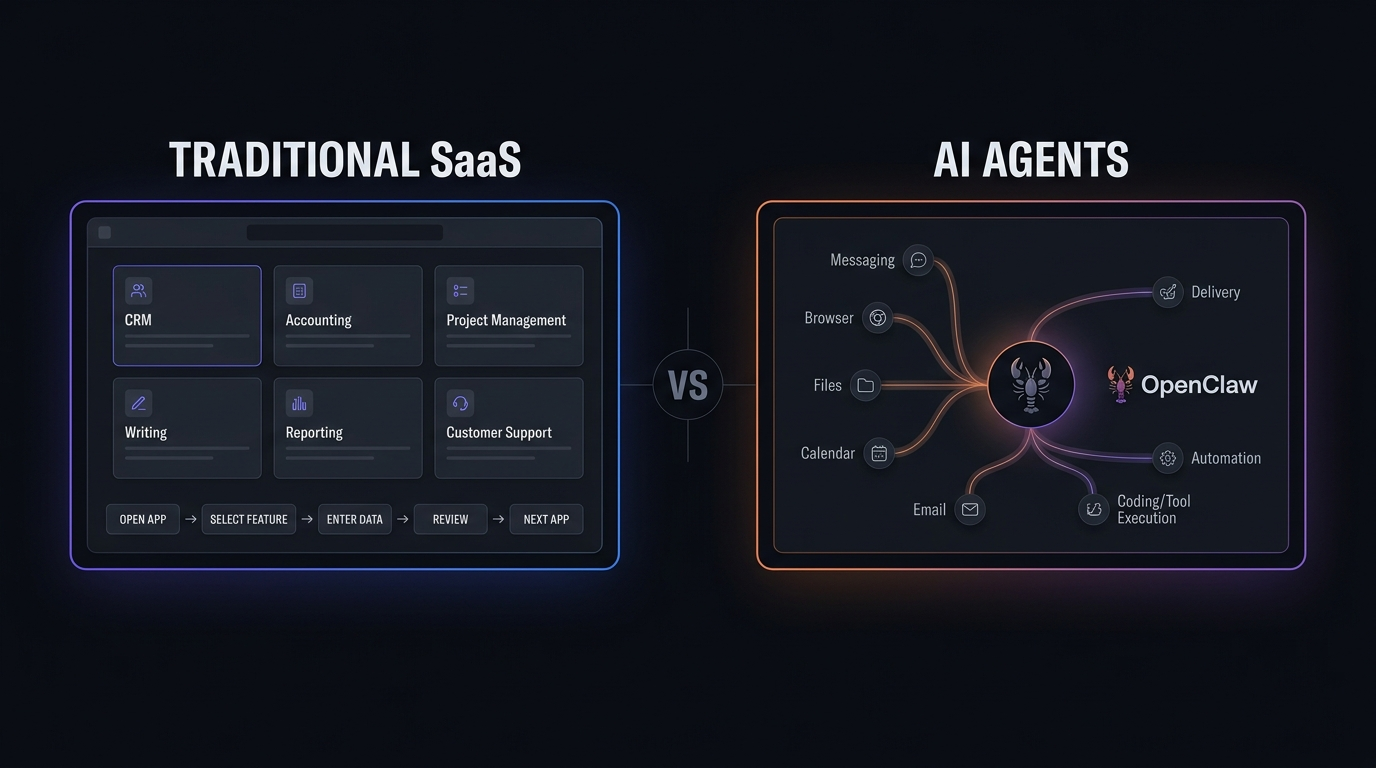
    The analysis is aimed at helping you understand what the phone actually changes rather than simply repeating launch messaging. If you also follow developments in AI and emerging technology, see the AI Agents and Traditional SaaS analysis.

    At-a-Glance Comparison

    DeviceBest ForStarting Price
    iPhone DuoFoldable iPhone users, multitasking, large-screen mobile use$1,999

    iPhone Duo: Best for Foldable iPhone and Large-Screen Multitasking

    The biggest reason to consider the iPhone Duo is its two-screen design. Closed, you get a 5.4-inch outer Super Retina XDR display. Open it and the phone expands into a 7.6-inch inner display. The practical advantage is obvious. You can check messages, make calls, or perform quick tasks without opening the phone. For longer sessions, opening it gives you considerably more room for reading, video, gaming, and multitasking.

    Apple also redesigned iOS around the foldable format. When opened, Split View lets you run two apps side by side, while app pairs can be saved for later. One unusual detail is the nano-textured inner display. Apple says it reduces glare and reflections while also minimizing the visibility of the crease. The phone can also support Apple Pencil with USB-C later in 2026.

    Pros

    • Large 7.6-inch display without carrying a separate tablet.
    • Foldable-specific multitasking and app layouts.

    Cons

    • $1,999 starting price is considerably higher than a conventional iPhone.
    • Some Pro-level features are missing.

    Pricing: iPhone Duo starts at $1,999 for 256GB and goes up to $3,199 for 2TB.

    iPhone Duo Advantages: Display, Performance and Camera Flexibility

    The iPhone Duo’s hardware is built around Apple’s A20 Pro chip. The processor provides high-end performance for demanding apps, gaming, photography, and on-device AI tasks. The camera system is also designed around the foldable form factor. You get a 48MP Fusion Main camera with optical-quality 2x zoom and a 48MP Fusion Ultra Wide camera.

    That creates a useful advantage: you can use the rear cameras while seeing the framing on the external display. Apple has also added camera and FaceTime functions that use both screens in ways a traditional iPhone cannot.

    Pros

    • A20 Pro provides high-end processing and on-device AI capability.
    • Foldable design creates new camera and video-call possibilities.

    Cons

    • The camera system does not match a triple-camera Pro setup.
    • Buyers wanting dedicated long-range telephoto photography may find the 2x option limiting.

    iPhone Duo Disadvantages: Price and Feature Compromises

    The most obvious iPhone Duo disadvantages start with the price. At $1,999 for 256GB, the Duo costs substantially more than a conventional iPhone. You are also making some trade-offs for the foldable design. The iPhone Duo uses Touch ID integrated into the side button instead of Face ID. It also lacks some controls found on other recent iPhone models.

    The camera setup is another consideration. The Duo has two rear 48MP cameras, while the Pro models offer a more traditional multi-camera system with additional photography hardware. Then there is the fundamental question of whether you actually need a foldable display. If your daily use is mostly messaging, social media, calls, maps, and occasional photos, the extra screen may not justify the additional cost. For comparison-focused technology readers, you can find more product and software comparisons in the OLAReviews comparison archive.

    Key iPhone Duo Features at a Glance

    FeatureiPhone Duo
    Outer Display5.4-inch Super Retina XDR
    Inner Display7.6-inch Super Retina XDR
    ProcessorA20 Pro
    Rear Cameras48MP Fusion Main + 48MP Fusion Ultra Wide
    BiometricsTouch ID in side button
    Water/Dust ResistanceIP68
    ConnectivityWi-Fi 7, Bluetooth 6, Thread
    Storage256GB to 2TB
    Starting Price$1,999
    Operating SystemiOS 27

    The Duo’s battery, display, and processor combination is aimed at users who want a large-screen experience without carrying another device.

    Final Thoughts

    The iPhone Duo is more than an iPhone that happens to fold. Its large inner display, foldable-focused software, powerful processor, and dual-screen camera features make the form factor central to how the phone works. At the same time, the high starting price and feature compromises make it important to look beyond the novelty of a folding screen. If you are considering upgrading, compare the features with how you actually use your phone every day. Will a foldable iPhone change the way you work, watch, read, and create, or would a traditional iPhone still make more sense for you?

    FAQ

    Is the iPhone Duo worth the $1,999 starting price?

    That depends heavily on how much you value the foldable design. The Duo gives you a large internal display, foldable-specific software features, and a high-end processor. However, its starting price is significantly higher than a conventional Pro iPhone.

    What are the biggest iPhone Duo advantages?

    The largest advantages are the large inner display, compact outer screen, multitasking features, high-end processing, and camera functions that take advantage of the foldable design.

    What are the main iPhone Duo disadvantages?

    The price is the biggest concern. You also give up some features compared with conventional Pro models. The Duo’s value therefore depends on whether its foldable format is genuinely useful in your daily routine.

    Editorial disclosure: This article is based on Apple’s official specifications and current reporting available in September 2026; hands-on availability is limited before the October 23 launch.

  • AI SEO Tools: Distribb Review 2026, Features and Pricing

    AI SEO Tools: Distribb Review 2026, Features and Pricing

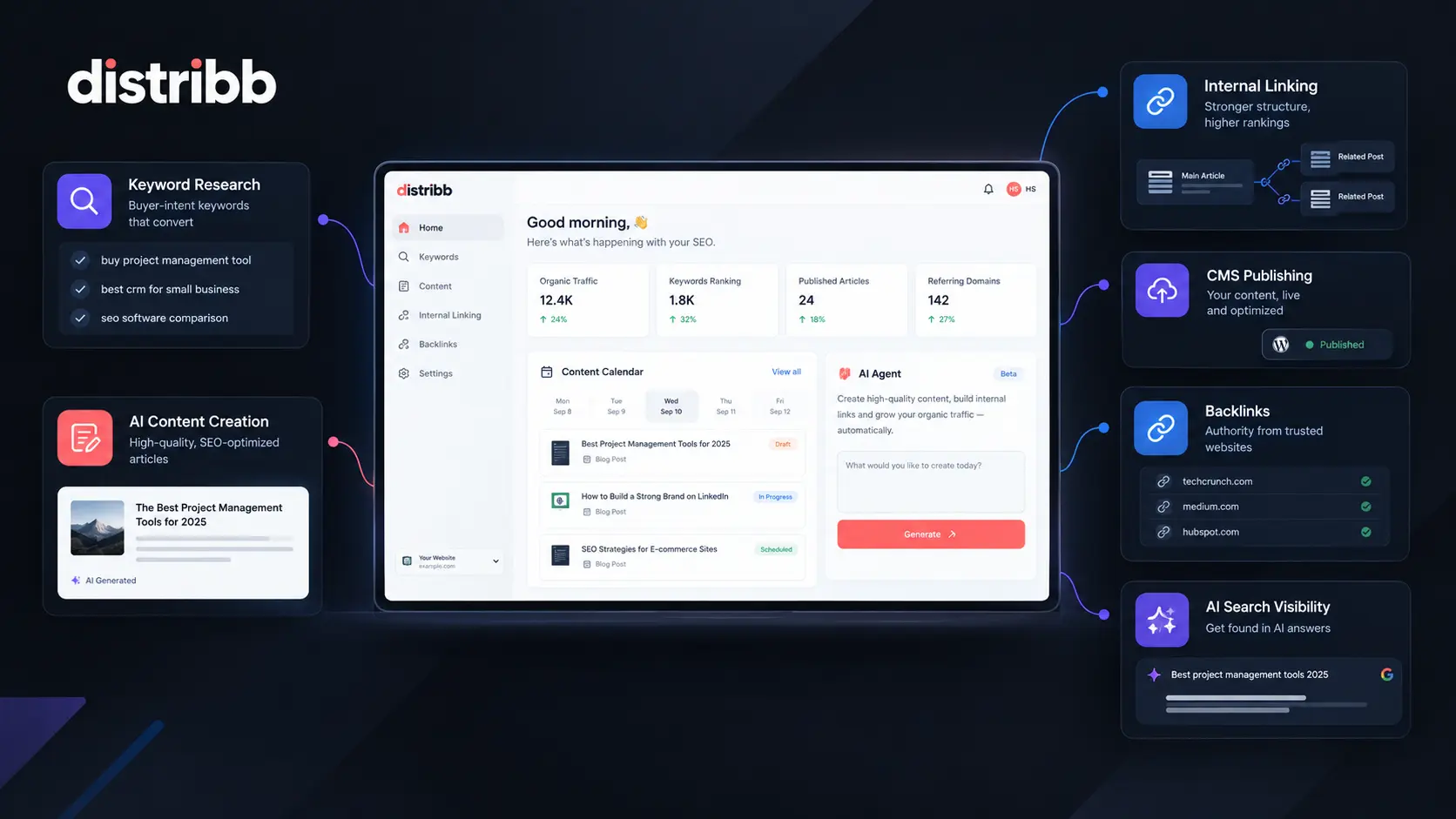
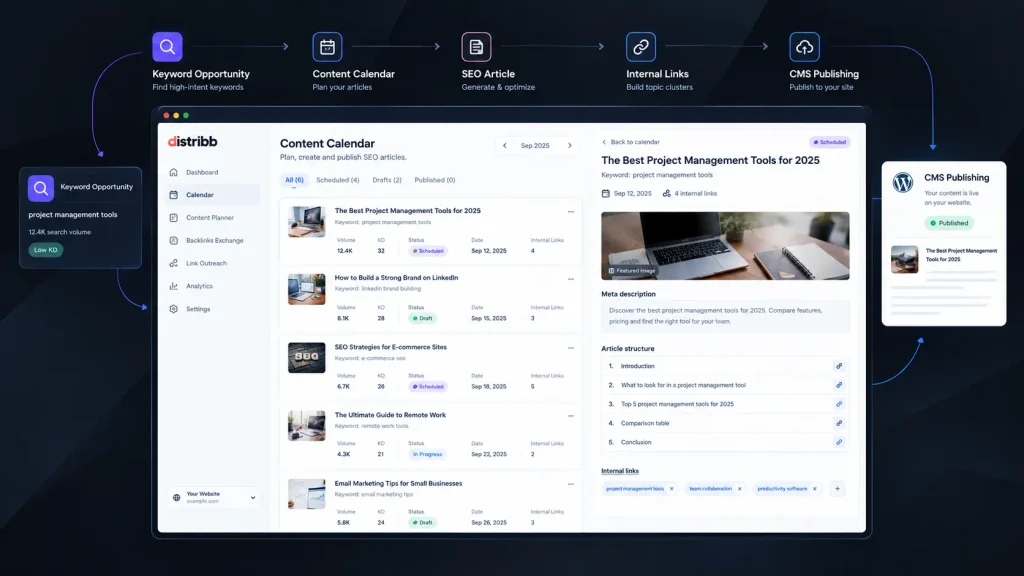
    Creating SEO content can become a repetitive cycle. You research keywords, check competitors, plan topics, write articles, add internal links, upload everything to your CMS, and then start over again. That is where AI SEO Tools can make a practical difference. Instead of using separate platforms for research, writing, publishing, and tracking, newer tools aim to connect those steps into one workflow. Distribb takes that approach further by combining keyword research, AI-generated content, CMS publishing, backlinks, content scheduling, and AI-search visibility tracking. It is designed for SEO professionals, content marketers, SaaS businesses, bloggers, and website owners who want more of the process automated.

    How We Evaluate AI SEO Tools

    For this review, we evaluated Distribb’s current workflow, published feature set, supported integrations, pricing structure, and the practical steps involved in turning a keyword idea into published SEO content. The evaluation focuses on what matters when you are considering an AI SEO platform for an active website rather than simply testing an AI writing demo.

    We looked at:

    • Keyword and buyer-intent research
    • SEO article generation and original research
    • Internal linking and content clustering
    • CMS integrations and publishing controls
    • Backlink and AI-search visibility features
    • Monthly limits, pricing, and scalability

    The review is written from an SEO-focused perspective, with particular attention to whether the platform can reduce repetitive work without removing editorial control.

    At-a-Glance Comparison

    Tool NameBest ForStarting Price
    DistribbAutomated SEO content and organic growth workflows$97/month

    Distribb Review: Best AI SEO Tool for Automated Content Growth

    Automated Content

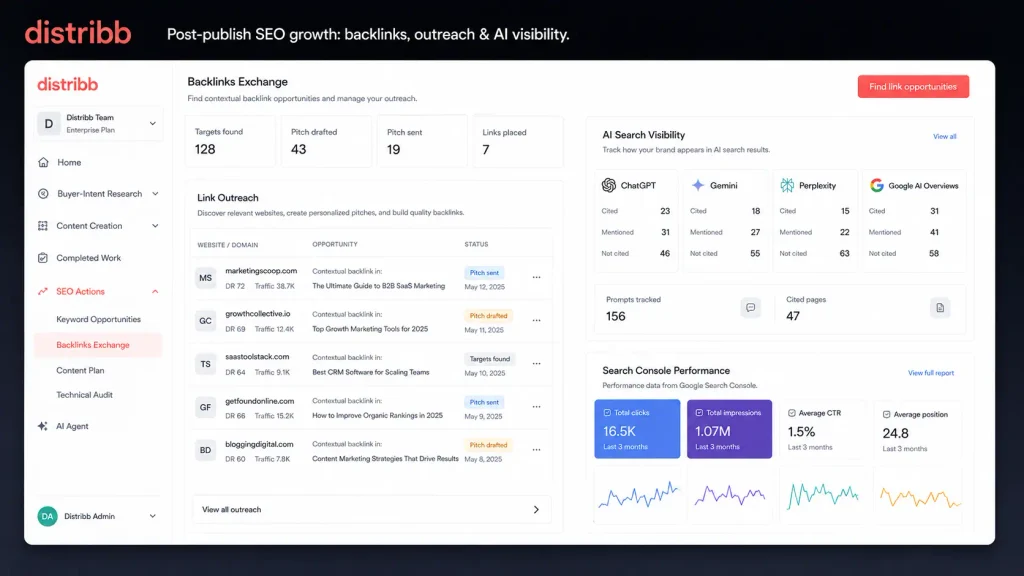
    Distribb is built around a simple idea: you should not have to move between five different dashboards just to publish one optimized article. The setup starts with connecting your website and CMS. Distribb currently supports WordPress, Webflow, Shopify, Wix, Ghost, Notion, Framer, GoHighLevel, and custom webhooks. Its site says the initial connection can take about two minutes. Once connected, the platform researches your niche and competitors, identifies buyer-intent keywords, and builds a content calendar.

    One useful detail is that the platform does not treat publishing as the final step. Its workflow can include the article, generated images, internal links, metadata, schema, and CMS publishing. You can also choose whether to review content before publication or allow scheduled publishing. The Distribb AI Content Writer page details this publishing workflow. That makes Distribb different from many AI SEO writing tools that mainly help you produce a draft. Here, content creation is connected to the rest of the SEO workflow.

    Original Research Is a Major Differentiator

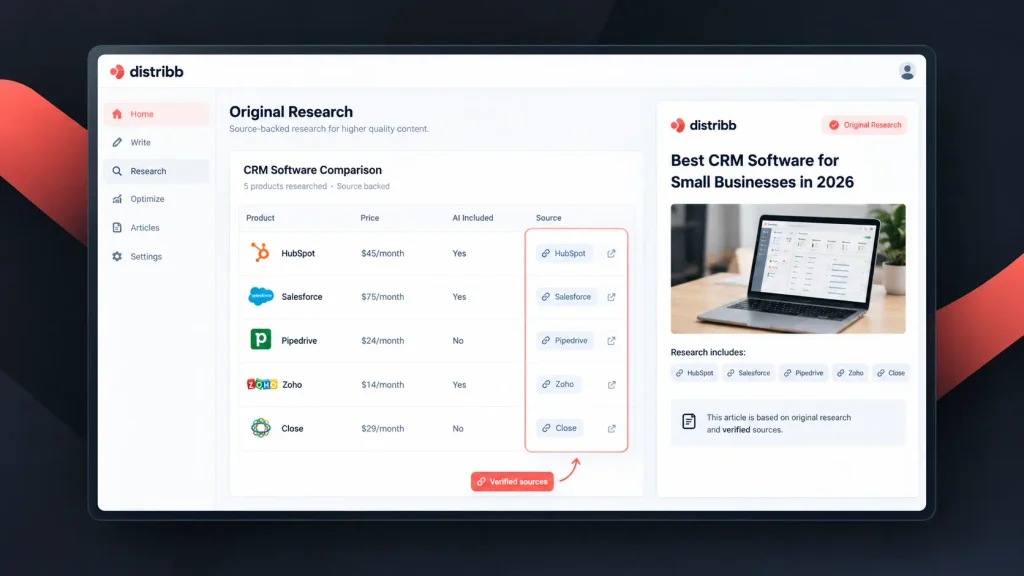
    A particularly interesting feature is Distribb’s original research workflow. According to its product documentation, the system collects real data and can build source-backed tables inside articles. One example shown by the company compares pricing and AI availability across 12 CRM products, with individual sources attached to the data. That matters because generic AI-written articles often repeat information that already exists everywhere. Adding sourced comparisons, pricing information, or other original findings can give your article something more useful to say. Distribb also supports more than 150 languages, making it relevant if your website publishes beyond English. The company says keyword research, internal linking, and publishing can operate in the project’s selected language.

    Pros

    • Combines keyword research, content creation, internal linking, scheduling, and CMS publishing in one workflow.
    • Includes original research, cited data, backlink features, and AI-search visibility tracking.

    Cons

    • The $97/month entry price is higher than basic AI writing subscriptions.
    • Automatic publishing still requires editorial judgment if your site covers sensitive, technical, or highly regulated topics.

    AI Agent and Content Workflow

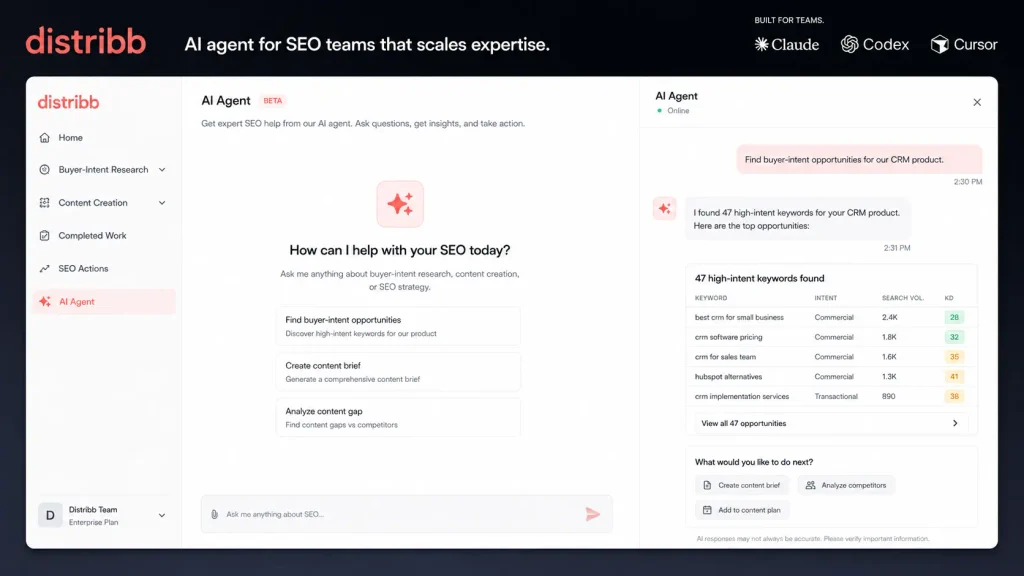
    Distribb also includes a built-in AI agent that you can interact with using plain-English instructions. For example, the product demonstrates requests such as finding buyer-intent opportunities or creating and improving an article. The agent can then show the completed work rather than simply returning a block of generated text. Another unusual option is connecting your own AI assistant. Distribb says its skill can work with Claude, Codex, Cursor, and other AI agents, allowing those assistants to research, write, publish, and perform SEO tasks through Distribb. For someone already using AI SEO software, this could be useful because you do not necessarily have to abandon your preferred AI environment.

    Content Optimization and Internal Linking

    Distribb positions its system as more than an article generator. Its AI content writer can create a complete SEO article with headings, a table of contents, internal links, a featured image, meta description, and schema markup. It also reads your existing website to help match the project’s brand voice and writing instructions. The internal-linking component is especially relevant for larger websites. Instead of manually searching through old posts every time you publish something new, the system can connect new content to existing pages as part of the publishing workflow. That makes it closer to a group of SEO content optimization tools combined into one platform rather than a standalone writing assistant. 

    Backlinks and AI Search Visibility

    Content is only one part of organic growth. Distribb also offers a backlink exchange designed to provide contextual links from other business websites. The platform says its Pro plan includes 3–5 backlink-exchange links per month.

    It also provides AI-search visibility tracking. According to the current product information, you can monitor visibility across AI engines, see which prompts trigger mentions, identify pages receiving citations, and compare your visibility against competitors.

    This is increasingly relevant because SEO is no longer limited to traditional blue-link rankings. If your customers use ChatGPT, Gemini, Perplexity, or AI-generated search answers to research products, being mentioned there can become another visibility goal.

    Publishing Control

    You do not have to hand everything over to automation. Distribb provides a review workflow where you can edit or rewrite an article before publication. You can also choose approval-first publishing or allow your content calendar to publish automatically. That distinction is important. Automation works well for predictable content, but you may want a human review for product comparisons, pricing pages, financial topics, medical information, or content that represents your company’s expertise.

    Pricing

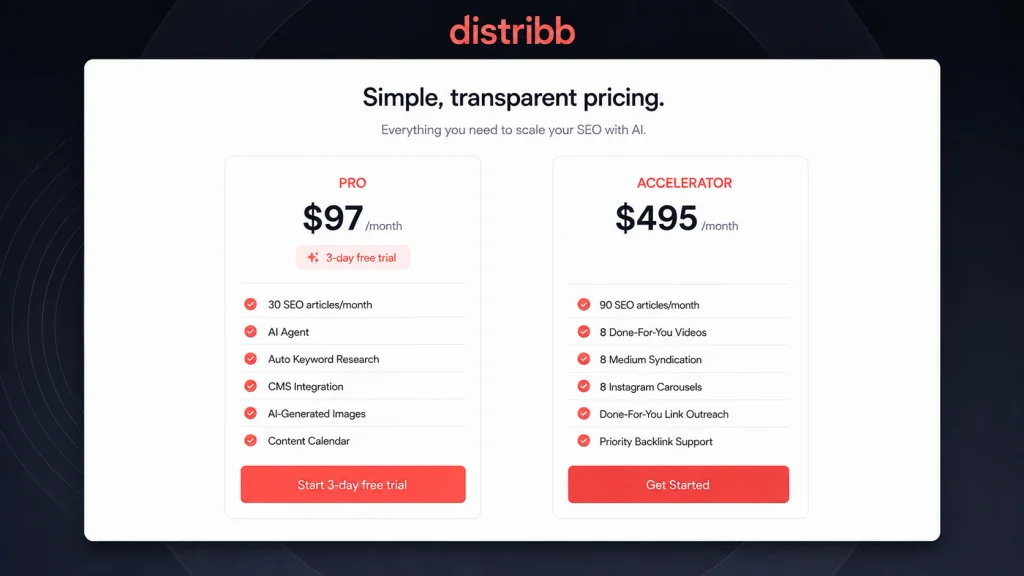
    Distribb’s current Pro plan is listed at $97/month and includes a 3-day free trial, 30 SEO-optimized articles per month, automatic keyword research, the AI agent, high-DR backlinks, link-outreach research, CMS integration, AI-generated images, content scheduling, and support. The Accelerator plan is listed at $495/month and increases the article allowance to 90 per month. It also adds eight done-for-you videos, eight Medium syndication placements, eight Instagram carousels, done-for-you link outreach campaigns, and priority backlink support. For agencies, Distribb also lists volume discounts, beginning with 10% off for 2–5 client sites and increasing for larger site counts.

    Distribb Features at a Glance

    FeatureDistribb
    AI keyword researchYes
    Buyer-intent researchYes
    SEO article generationYes
    Original cited researchYes
    Internal linkingYes
    Content calendarYes
    Automatic publishingYes
    CMS integrationsWordPress, Webflow, Shopify, Wix, Ghost, Notion, Framer, GoHighLevel and webhook
    Languages150+
    AI agentYes
    Backlink networkYes
    AI-search visibility trackingYes
    AI-generated imagesYes
    Free trial3 days

    Who Should Use Distribb?

    Distribb makes the most sense if you want to automate a meaningful portion of your organic-growth workflow. For a SaaS business, the buyer-intent research and content calendar can help turn commercial searches into a structured publishing plan. Distribb also provides a SaaS-focused workflow around original research and organic growth. For content marketers, the combination of research, writing, internal linking, images, scheduling, and CMS publishing can remove many repetitive production steps. For bloggers and website owners, the biggest advantage is consolidation. Instead of paying for separate AI writing, content planning, internal-linking, and publishing tools, you can put much of that workflow into one platform. However, if you only need an occasional AI-generated article, $97/month may be difficult to justify. The platform becomes more interesting when you intend to publish consistently and actually use its wider SEO features.

    Final Verdict

    Distribb is aimed at a specific problem: reducing the amount of manual work between finding an SEO opportunity and getting useful content in front of potential customers. Its combination of keyword research, AI writing, original research, internal linking, CMS publishing, backlinks, and AI-search tracking makes it broader than a typical AI writing application. If you publish frequently, the 3-day trial gives you a practical way to see whether the workflow fits your site before committing. Among modern AI SEO Tools, Distribb is particularly interesting if your goal is not just to write more content, but to automate more of the organic-growth process. The bigger question is whether you want SEO to remain a collection of separate tasks or become one connected workflow?

    FAQ

    Is Distribb one of the best AI SEO Tools for automatic publishing?

    It can be a strong option if your priority is automation rather than simply generating text. Distribb combines keyword research, content creation, internal links, images, scheduling, and CMS publishing. You can review content manually or allow the platform to publish according to your calendar.

    Can Distribb replace traditional SEO software?

    Not necessarily for every SEO team. Traditional SEO suites can provide very deep keyword databases, competitor research, technical auditing, and reporting. Distribb focuses more heavily on turning SEO opportunities into published content and supporting organic growth afterward. For teams that want a more automated workflow, that distinction matters.

    Is AI-generated SEO content safe to publish automatically?

    You should still review important content before it goes live. AI can misunderstand facts, pricing, product details, or industry-specific claims. Distribb gives you the option to approve articles before publication, so automatic publishing does not have to mean completely removing human oversight.

    Editorial disclosure: This review is independently researched using Distribb’s current product documentation and pricing information available in September 2026.

  • AI Content Creation: Solo Content Studio Review 2026, Features and Pricing

    AI Content Creation: Solo Content Studio Review 2026, Features and Pricing

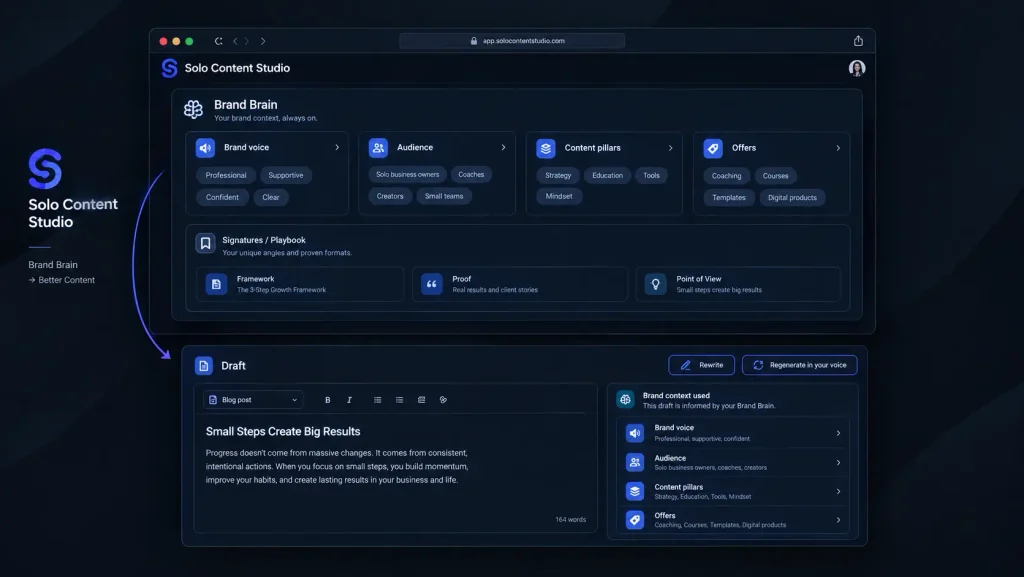
    Creating enough content to stay visible can quickly become a second full-time job. AI Content Creation tools promise to reduce that workload, but many still leave you jumping between prompts, chats, templates, and editing windows. Solo Content Studio takes a different approach. Instead of presenting itself as a general-purpose AI chatbot, it organizes content creation around a virtual team of specialized writers and marketers. You can train the system around your brand voice, choose a content format, and generate drafts for blogs, newsletters, social posts, videos, emails, and more. We looked at its workflow, available formats, credit system, projects, automation features, and pricing to see where it fits among modern AI content writing tools.

    How We Evaluate AI Content Creation Tools

    We evaluated Solo Content Studio during September 2026, focusing on how practical it is for someone who needs to produce regular marketing content rather than simply experiment with AI.

    Our evaluation focused on:

    • Content workflow: How quickly you can move from an idea to a usable draft.
    • Brand voice: How the platform collects and applies your writing preferences.
    • Content formats: Blogs, social posts, newsletters, videos, emails, and other outputs.
    • Automation: Whether recurring content can be prepared without starting from scratch.
    • Usage limits: Credits, projects, regenerations, and plan restrictions.
    • Pricing: What you actually receive at each subscription level.

    Our perspective is based on evaluating AI writing software and content platforms from a practical publishing and SEO perspective, where consistency matters as much as raw generation speed.

    At-a-Glance Comparison

    ToolBest ForStarting Price
    Solo Content StudioCoaches and solo businesses building consistent branded content$0 for 7 days, then $99/month

    Solo Content Studio: Best AI Content Creation Tool for Coaches and Solo Brands

    Composer

    Solo Content Studio is designed around a fairly specific customer: a coach or solo business owner who needs a lot of content but does not want every post to sound machine-written. That focus is both its biggest strength and its biggest limitation.

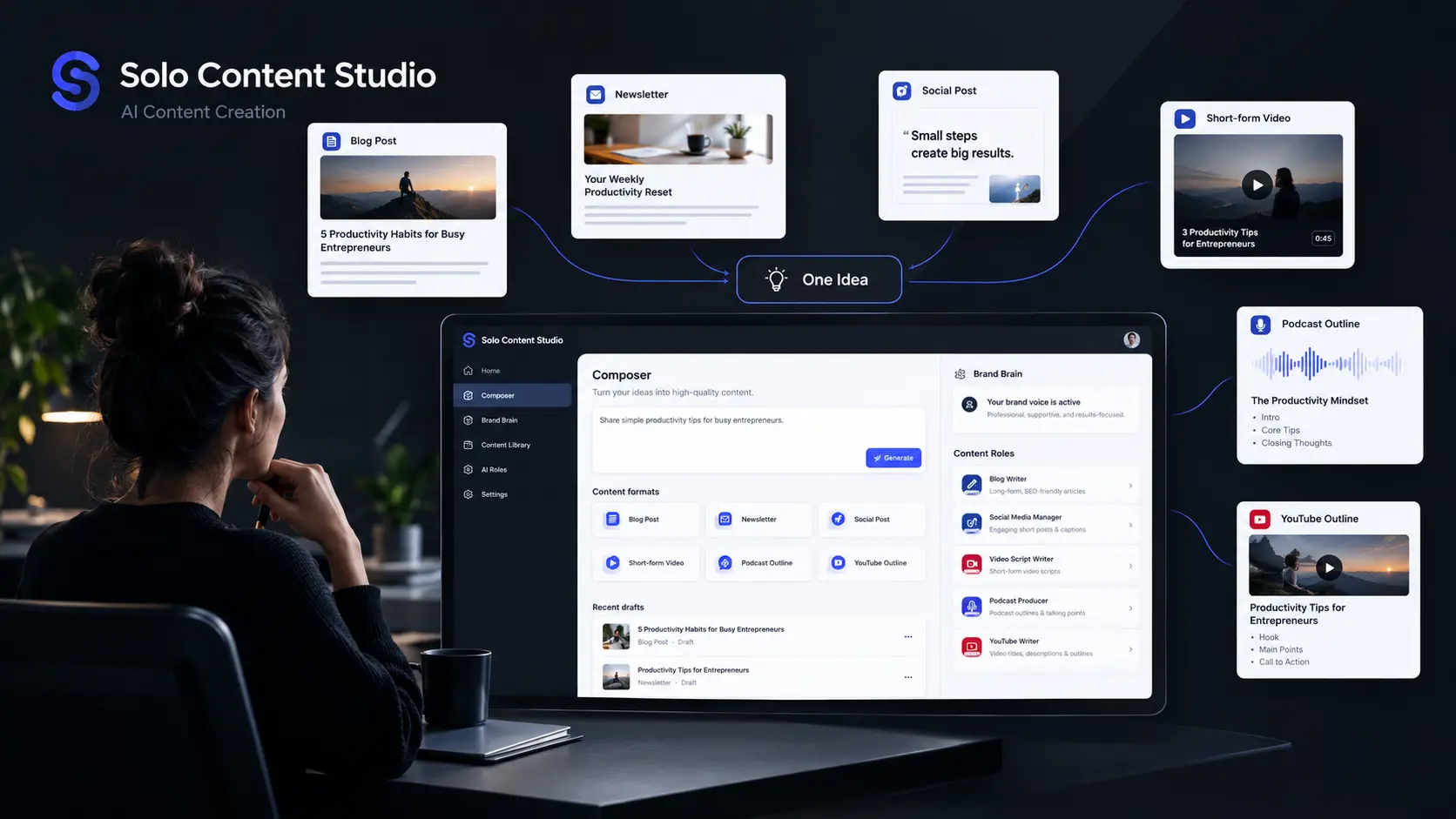
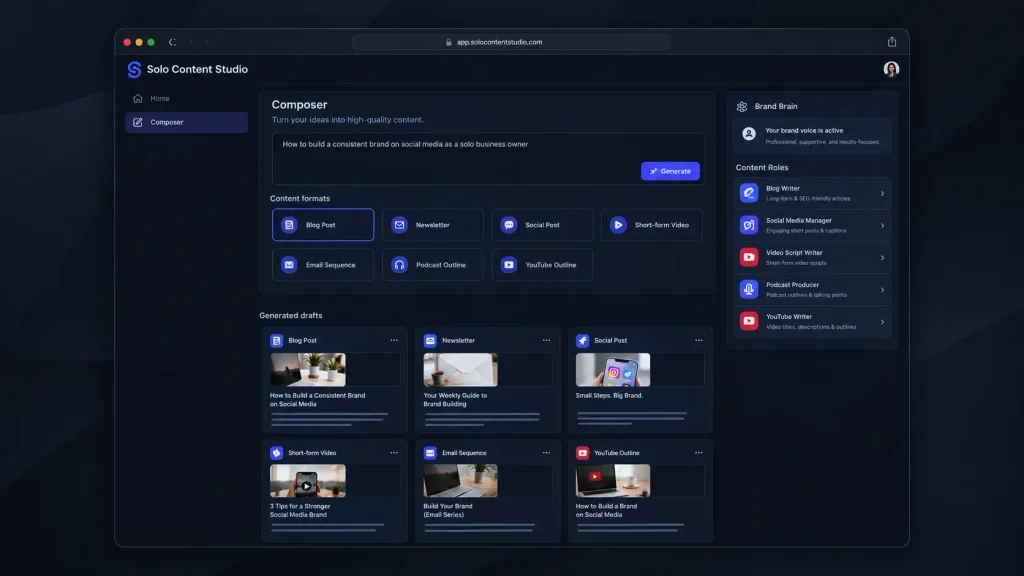
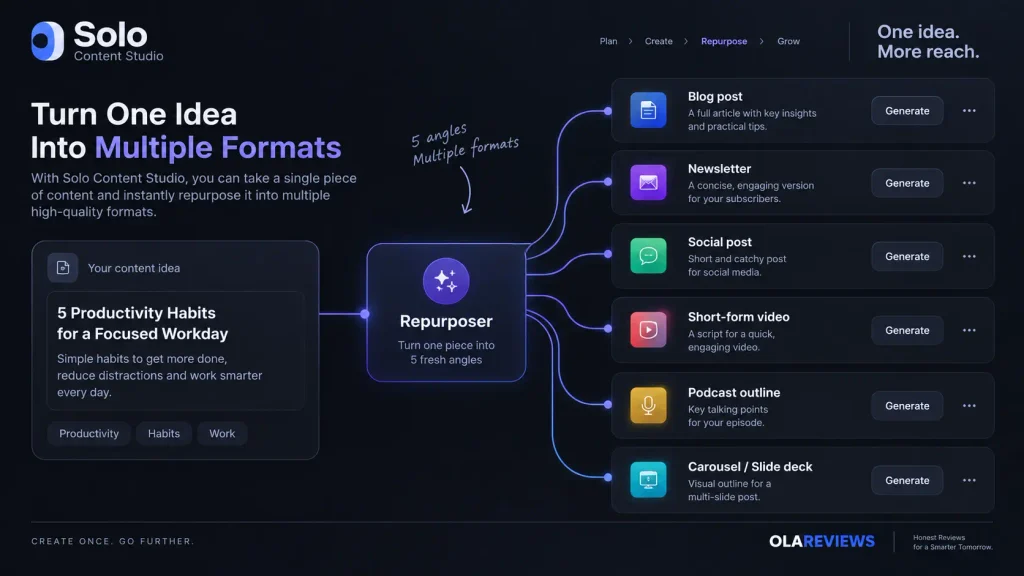
    The workflow starts with your brand information and writing samples. You then train individual specialists around your voice. The platform currently presents ten specialists covering areas such as blog writing, newsletters, social content, video, podcasts, email sequences, sales pages, and repurposing. One particularly useful workflow is the Composer. You enter a topic and can select formats such as newsletter, text post, short video, blog post, podcast, or YouTube outline. Rather than manually asking for each piece, the system can create different drafts from the same underlying idea.

    The Repurposer is another practical feature. It can take an existing piece and turn it into five fresh angles across selected formats. That makes more sense for a busy creator than simply generating another version of the same paragraph. You also get Autopilot, where you choose a publishing cadence and queue topics for future drafts. The platform says the system can prepare content on a schedule for review rather than automatically publishing it for you.

    Pros

    • Strong focus on maintaining a consistent brand voice across different content formats.
    • Includes ten specialized content roles plus Composer, Repurposer, Idea Generator, and Autopilot.

    Cons

    • The product is heavily focused on coaches rather than general-purpose content teams.
    • The paid plans are considerably more expensive than many basic AI writing tools.

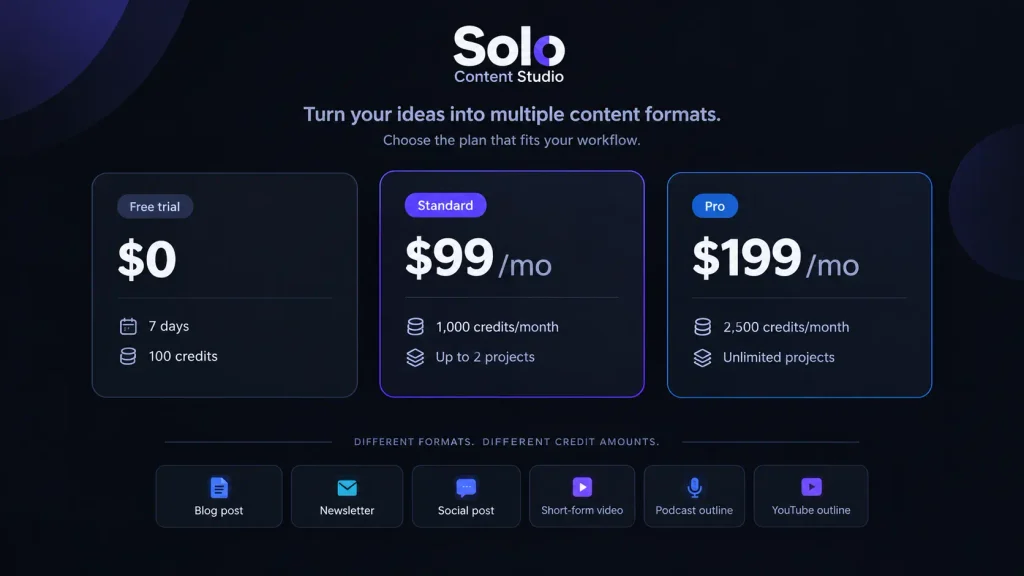
    Pricing: Solo Content Studio has a 7-day free trial with 100 credits, up to two projects, and access to all ten specialists and Autopilot. Standard costs $99/month with 1,000 monthly credits and up to two projects. Pro costs $199/month with 2,500 credits, unlimited projects, and unlimited regenerations. Annual billing saves 20%.

    What Makes Solo Content Studio Different?

    Brand Brain

    The interesting part of Solo Content Studio is not simply that it uses AI to write. Plenty of content creation tools already do that. Its approach is closer to building a repeatable content operation around your existing voice. Instead of repeatedly explaining your audience and preferred style inside a chatbot, Solo Content Studio stores brand information and specialist training inside the platform. The current product identifies Claude Opus 4.7 as the model powering the Studio, while the subscription includes the model usage rather than requiring you to purchase a separate Claude subscription.

    That distinction matters if you are producing content every week. A general chatbot can produce an excellent article, but you may still spend time explaining what your company does, who the audience is, what tone you want, and which formats you need. Solo Content Studio tries to turn those instructions into a reusable system. The platform also supports separate projects. Standard is limited to two projects, while Pro allows unlimited projects. Switching between projects is designed for businesses handling different brands, with each project keeping its own brand context.

    Solo Content Studio Content Formats

    Multiple Content Formats

    You are not limited to conventional blog writing.

    The current platform supports formats including:

    Content TypeAvailable
    Blog postsYes
    NewslettersYes
    Social postsYes
    Short-form video scriptsYes
    YouTube outlines/scriptsYes
    Podcast outlinesYes
    Email sequencesYes
    Sales pagesYes
    CarouselsYes
    Slide decksYes
    Content ideasYes
    Content repurposingYes

    That breadth is important because the real time savings come from turning one idea into multiple assets.

    For example, instead of writing a blog post and then separately creating social content around it, you can use the platform’s repurposing workflow to create multiple angles from an existing draft.

    Solo Content Studio Credits and Output Limits

    Pricing

    The credit system deserves attention before you subscribe. Standard provides 1,000 credits per month, while Pro provides 2,500 credits. Different formats consume different amounts, so a credit does not represent one universal piece of content. Solo Content Studio gives an example of what 1,000 credits can represent: around six newsletters, four blog posts, three email sequences, 40 tweets, ten LinkedIn posts, four podcast episodes, four YouTube videos, and 20 Reels. These are illustrative usage levels rather than a fixed monthly quota because actual consumption depends on the formats you generate. 

    That means you should think about your actual publishing schedule before choosing a plan. If you mostly create short social posts, 1,000 credits can stretch considerably further. If your strategy revolves around long-form blogs, newsletters, and scripts, you will use credits faster.

    Is Solo Content Studio Worth It for AI Content Creation?

    Solo Content Studio makes the strongest case for itself when you value voice consistency and repeatable workflows more than the lowest possible subscription price. If you are a coach who creates content personally, the specialization can be useful. You can train the platform with your writing samples and preferences, then use different specialists without rebuilding the same instructions every time. It is also more structured than simply opening ChatGPT or Claude and starting a new conversation for every article.

    However, that structure comes with a price. At $99 per month for Standard, this is not positioned as a cheap AI writing assistant. You are paying for the complete content system, including specialized workflows, brand training, projects, and automation. For a blogger who only needs occasional articles, cheaper AI content writing tools may make more financial sense. For a coach producing content across several formats every week, the economics can look different.

    Final Verdict

    Solo Content Studio is an unusually focused approach to AI Content Creation. Rather than competing mainly on the number of templates, it tries to build a repeatable content team around your voice, audience, and publishing routine. The seven-day trial gives you 100 credits and access to the platform’s main specialists, making it sensible to test your own real content before paying. If keeping your content consistent across blogs, social posts, newsletters, videos, and emails is the problem you’re trying to solve, Solo Content Studio is worth exploring. But is a specialized AI content team the next step for solo creators, or will general AI assistants catch up?

    FAQ

    Is Solo Content Studio suitable for beginners?

    Yes. The provider says the initial setup takes roughly 30 minutes and uses questions and writing samples rather than requiring you to construct complicated prompts. You can then train a specialist and begin generating drafts.

    Do you need ChatGPT or Claude separately?

    No. Solo Content Studio says its subscription includes the underlying AI usage, so you do not need a separate Claude or ChatGPT subscription to operate the platform. It currently identifies Claude Opus 4.7 as the model powering the Studio.

    Is Solo Content Studio good for general AI content creation?

    It depends on your needs. If you want broad experimentation, a general AI assistant may offer more flexibility. If your goal is structured AI Content Creation around one or more brands, Solo Content Studio’s specialized workflow is more relevant. Its strongest audience is business, marketing, and lifestyle coaches who are the face of their brands.

    Editorial disclosure: This article is independently researched using the provider’s current September 2026 product and pricing information.

  • What Is an AI Model? How AI Models Are Trained and Generate Output in 2026

    What Is an AI Model? How AI Models Are Trained and Generate Output in 2026

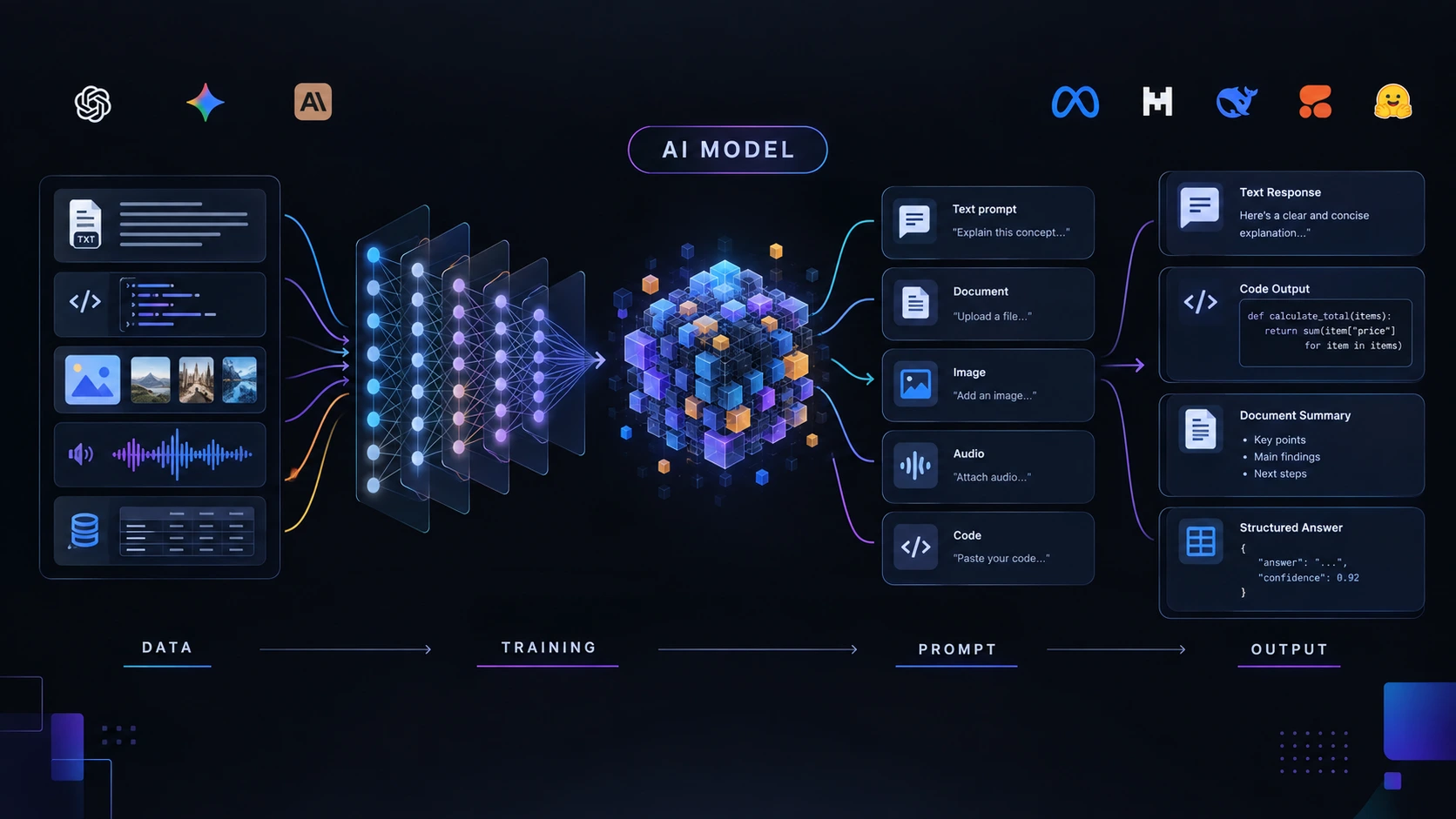
    If you have ever wondered why ChatGPT can answer questions, generate code, summarize documents, analyze images, or create content, the answer starts with an AI Model. But what actually happens behind the screen? An AI model is a trained system that learns patterns from data and uses those patterns to make predictions or generate results. In 2026, powerful AI models are available through chat applications, application programming interfaces, open-weight downloads, and developer platforms.

    Understanding these systems is useful even if you are not a developer. Marketers use AI models for content and research, students use them for learning, and developers use them to build applications. This article explains what an AI model is, how AI models are trained, and how they turn instructions into AI model output. It also looks at eight major AI model platforms and their current 2026 pricing.

    Editorial disclosure: This article is independently written for educational purposes. Pricing and model availability were checked against official provider pages in September 2026 and may change later.

    How We Evaluate AI Models

    We evaluated these platforms based on practical usefulness rather than benchmark scores alone.

    The evaluation considers:

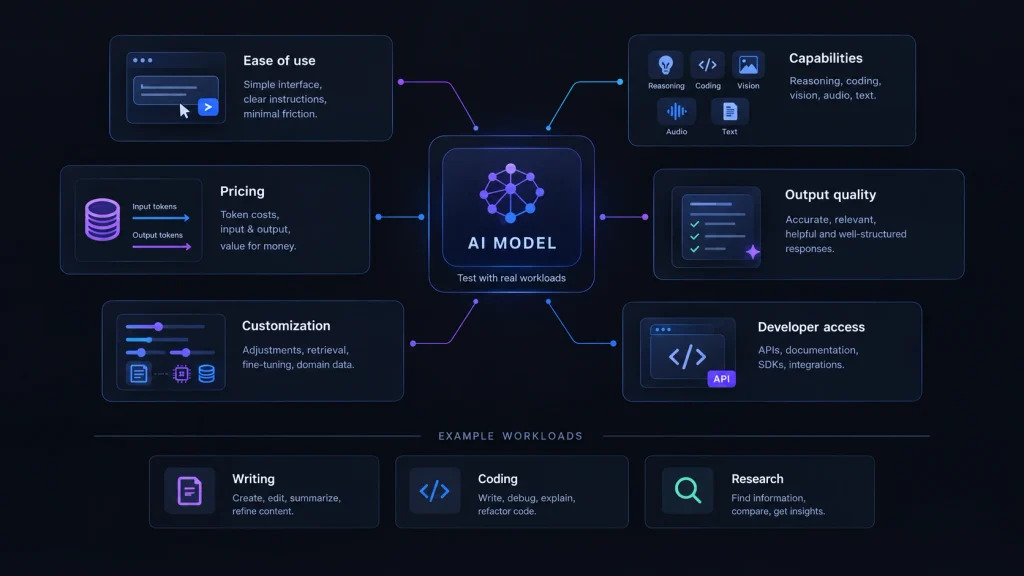
    • Ease of use: How quickly beginners can start.
    • Model capabilities: Reasoning, coding, text, vision, audio, and other inputs.
    • Output quality: Accuracy, consistency, and usefulness.
    • Developer access: APIs, documentation, and integration options.
    • Customization: Fine-tuning, retrieval, prompting, and deployment.
    • Pricing: Free plans, subscriptions, API rates, and infrastructure costs.

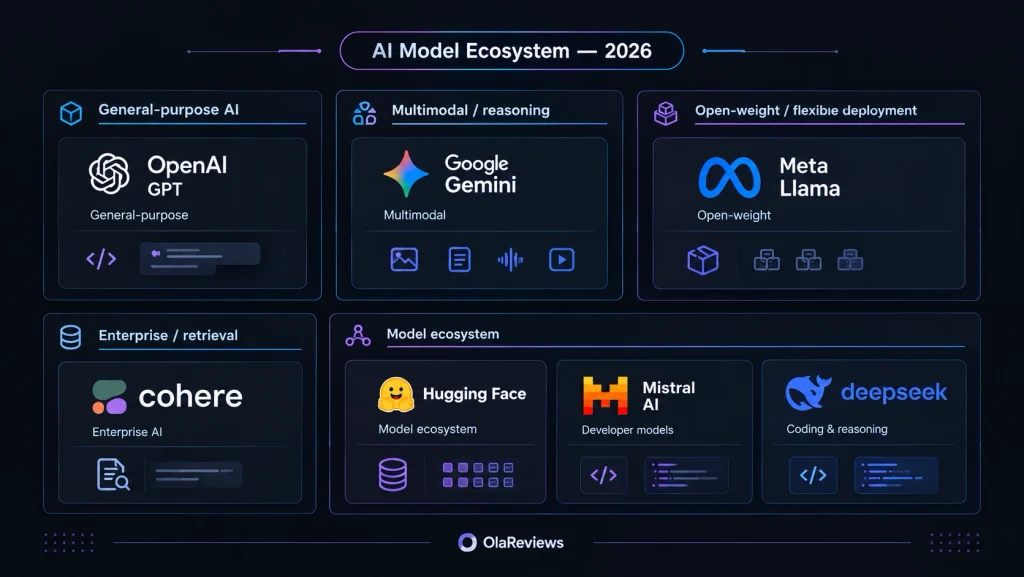
    We also considered what makes each platform different. Some are designed for general-purpose AI, while others focus on open-weight models, enterprise search, coding, or AI development. The goal is to explain both the technology behind AI models and the practical cost of using them.

    AI Models at a Glance

    AI Model / PlatformBest ForStarting Price
    OpenAI GPTGeneral-purpose AIFree
    Google GeminiMultimodal AIFree tier
    ClaudeWriting and reasoningFree
    Meta LlamaOpen-weight developmentFree model access*
    Mistral AIDevelopers and codingFree
    DeepSeekCoding and reasoningFree
    CohereEnterprise AIFree on selected models
    Hugging FaceOpen-source AIFree

    *Llama models are distributed under their applicable licenses. Hosting and inference can create additional costs.

    1. Best AI Model for General-Purpose AI: OpenAI GPT

    OpenAI GPT models are designed for a wide range of tasks, including writing, reasoning, coding, image understanding, multilingual work, and tool-based applications. For beginners, a chatbot is the easiest way to experiment. Developers can use the API to integrate models into websites, applications, automation systems, and other software. One simple way to understand an AI model is to give it the same question with different instructions. If you add context, examples, or constraints, the model can produce a different answer without being retrained. That is prompting, not AI model training.

    This distinction matters. Training changes the model’s learned parameters, while prompting changes the information and instructions available during an individual request. OpenAI’s current API pricing is token-based. The official pricing page lists GPT-6 Astra at $5 per 1 million input tokens and $25 per 1 million output tokens for short-context standard usage. GPT-5.6 Luna is listed at $0.20 per 1 million input tokens and $1.20 per 1 million output tokens. Long-context pricing can be higher.

    Developers interested in AI-assisted programming can also explore our guide to AI code editors in 2026.

    Pros

    • Broad range of AI capabilities
    • Strong developer ecosystem and API access

    Cons

    • API costs increase with heavy usage
    • AI output still needs verification

    Pricing: ChatGPT has a free option. API pricing currently includes GPT-5.6 Luna at $0.20/M input and $1.20/M output, while GPT-6 Astra starts at $5/M input and $25/M output for short-context standard usage.

    2. Best AI Model for Multimodal Work: Google Gemini

    Google Gemini is built for multimodal AI tasks. Depending on the model, it can work with combinations of text, images, audio, and video. This makes Gemini useful when an application needs more than text generation. For example, a developer can create a workflow where a user uploads an image and asks the model to identify information inside it.

    Google offers different Gemini models at different performance and cost levels. Its official pricing page lists both free-tier and paid-tier usage, with prices depending on the specific model. For example, the current pricing page lists certain Gemini models at $0.75 per 1 million input tokens and $3.75 per 1 million output tokens through December 31, 2026, while lower-cost variants are available at substantially lower rates. Google also applies different rates for caching and some specialized models.

    Gemini is also relevant to the wider development of AI search engines, where language models increasingly work with retrieved information rather than relying only on their internal training.

    Pros

    • Strong multimodal capabilities
    • Several model options for different workloads

    Cons

    • Model availability can change
    • Advanced models can become expensive at scale

    Pricing: Gemini API provides free-tier access for supported models. Paid API pricing varies by model, with current official rates ranging from low-cost Flash variants to higher-priced advanced models.

    3. Best AI Model for Writing and Reasoning: Claude

    Claude is designed for writing, analysis, reasoning, coding, and document-based workflows. It is particularly useful when you need to provide detailed instructions or work with large amounts of context. Common applications include editing reports, analyzing documents, drafting content, planning projects, and solving complicated problems.

    Claude also fits naturally into writing workflows. If you are researching different writing assistants, it is useful to understand that a writing application and the underlying AI model are not necessarily the same thing. Anthropic currently offers a Free plan. Claude Pro costs $20 per month, or $200 per year. Anthropic also offers Max 5x at $100 per month and Max 20x at $200 per month.

    For API users, the official Claude pricing page lists Claude Sonnet 5 at $2 per million input tokens and $10 per million output tokens. Anthropic confirmed in August 2026 that this introductory pricing became the permanent standard price.

    Pros

    • Strong writing and reasoning capabilities
    • Useful for long-form analysis and coding

    Cons

    • Free usage is limited
    • Higher API usage can become expensive

    Pricing: Free plan available. Claude Pro costs $20/month or $200/year. Max 5x costs $100/month, while Max 20x costs $200/month. Sonnet 5 API pricing is $2/M input and $10/M output.

    4. Best AI Model for Open-Weight Development: Meta Llama

    Meta Llama takes a different approach from consumer AI chatbots. Meta provides Llama models under their applicable community license terms, giving developers more flexibility to download, experiment with, and deploy model weights than they typically get with a purely hosted proprietary model.

    The Llama ecosystem includes models such as Llama 4 Scout and Llama 4 Maverick. Meta describes Llama 4 Scout as supporting a very large context window, while Maverick provides a much larger mixture-of-experts architecture. Llama is particularly interesting if you want to understand how to train an AI model, fine-tune an existing model, or experiment with local deployment.

    However, free model access does not mean that running a large model is free. GPU servers, storage, bandwidth, and inference can all create costs. There is also an important distinction between open-weight and completely unrestricted open-source software. Developers should always review the specific license attached to the model they plan to use.

    Pros

    • Flexible deployment options
    • Useful for developers and researchers

    Cons

    • Large models require significant computing resources
    • License terms need to be checked before commercial deployment

    Pricing: There is no standard Llama monthly subscription. Model weights are provided under their applicable licenses. Your actual cost depends on whether you self-host the model or use a third-party inference provider.

    5. Best AI Model for Developers: Mistral AI

    Mistral AI combines commercial models, open-weight models, developer APIs, and AI infrastructure. Its model catalog covers different workloads, allowing developers to choose models based on performance, latency, context, and cost. Mistral describes its lineup as including both open-weight and commercial large language models.

    For API users, one clear example is Mistral Large, which currently costs $0.50 per 1 million input tokens and $1.50 per 1 million output tokens. This pricing makes Mistral attractive when you need a capable model but want to keep token costs under control. Mistral also provides tools for more advanced AI development, including model customization, training, and deployment. That makes it useful beyond simple chatbot use.

    Pros

    • Competitive API pricing
    • Mix of open-weight and commercial models

    Cons

    • Large model catalog can be confusing for beginners
    • Advanced deployment requires technical knowledge

    Pricing: Mistral Large costs $0.50/M input and $1.50/M output tokens. Other Mistral models have different rates, so developers should check the current pricing page before choosing a model.

    6. Best AI Model for Coding and Reasoning: DeepSeek

    DeepSeek has become an important option for developers interested in coding, reasoning, and cost-efficient API usage. One useful feature for developers is its API compatibility with common AI development patterns. This can make it easier to test DeepSeek without completely redesigning an existing application.

    The official DeepSeek pricing documentation currently lists model prices per 1 million tokens. For the current V4 family, pricing includes different peak and off-peak rates depending on the model. The official pricing page lists V4 Flash at $0.14/M input and $0.28/M output during peak pricing, with lower off-peak rates of $0.07/M input and $0.14/M output. V4 Pro is listed at $0.435/M input and $0.87/M output during peak pricing, with lower off-peak pricing also available. This makes DeepSeek particularly interesting for high-volume applications where token costs matter.

    The important point is that price should not be the only factor. Developers should test coding accuracy, latency, context handling, reliability, and output quality using real workloads.

    Pros

    • Competitive token pricing
    • Strong focus on coding and reasoning

    Cons

    • Pricing and model availability can change
    • Generated code still requires testing

    Pricing: DeepSeek V4 Flash is currently pricing at $0.14/M input and $0.28/M output during peak periods, while V4 Pro is $0.435/M input and $0.87/M output. Off-peak rates are lower.

    7. Best AI Model Platform for Enterprise AI: Cohere

    Cohere focuses heavily on enterprise AI, retrieval, agents, search, and multilingual applications. Unlike consumer chatbot subscriptions, Cohere’s model pricing is mainly based on API usage or enterprise deployment. Its current Command family includes models such as Command A, Command A+, Command R7B, Command A Reasoning, and other specialized models.

    For example, Command A costs $2.50 per 1 million input tokens and $10 per 1 million output tokens. It has a 256,000-token context window and is designed for enterprise agents, tool use, and retrieval-augmented generation. Cohere also has lower-cost models. Command R7B costs $0.0375/M input and $0.15/M output, making it useful when throughput and cost are more important than maximum model capability.

    Cohere is especially relevant when companies need AI to work with their own information. Retrieval can bring current company data into a model’s context without retraining the underlying model every time a document changes.

    Pros

    • Strong enterprise and retrieval focus
    • Multiple models for different cost and performance requirements

    Cons

    • More technical than consumer AI platforms
    • Enterprise deployments can require additional infrastructure

    Pricing: Command A costs $2.50/M input and $10/M output. Command R7B is much cheaper at $0.0375/M input and $0.15/M output. Some newer Cohere models have separate pricing or free access subject to rate limits.

    8. Best AI Model Platform for Open-Source Experimentation: Hugging Face

    Hugging Face is different from most platforms in this list because it is an AI ecosystem rather than one model family. Its Model Hub provides access to a huge range of models and datasets. Developers can inspect model cards, experiment with Spaces, use inference providers, and deploy models with different hardware configurations. Hugging Face currently offers a free account, while PRO costs $9 per month, Team starts at $20 per user per month, and Enterprise starts at $50 with custom enterprise features.

    Its compute and inference services are priced separately. Hugging Face says its GPU compute starts at $0.60 per hour, while inference providers use pay-as-you-go billing. Free users currently receive $0.10 in monthly inference-provider credits, while PRO users receive $2 in monthly credits. For someone learning how to train an AI model, Hugging Face is particularly useful because it lets you explore different model families instead of being locked into one provider.

    Pros

    • Huge AI model and dataset ecosystem
    • Excellent for experimentation and learning

    Cons

    • Large number of choices can overwhelm beginners
    • Compute costs are separate from the basic Hub account

    Pricing: Free account available. PRO costs $9/month, Team starts at $20/user/month, and Enterprise starts at $50. GPU compute starts at $0.60/hour on the current pricing page.

    AI Model Pricing and Technical Comparison

    PlatformStarting PriceExample Current PricingModel Type
    OpenAI GPTFreeGPT-5.6 Luna: $0.20/M input, $1.20/M outputProprietary
    Google GeminiFree tierPaid rates vary by modelProprietary
    ClaudeFreeSonnet 5: $2/M input, $10/M outputProprietary
    Meta LlamaFree model access*Hosting/inference dependentOpen-weight
    MistralFreeMistral Large: $0.50/M input, $1.50/M outputMixed
    DeepSeekFreeV4 Flash: $0.14/M input, $0.28/M output peakOpen/hosted
    CohereFree on selected modelsCommand A: $2.50/M input, $10/M outputEnterprise-focused
    Hugging FaceFreePRO: $9/monthOpen ecosystem

    *Llama infrastructure and hosted inference costs depend on the deployment method.

    What Does “Per Million Tokens” Mean?

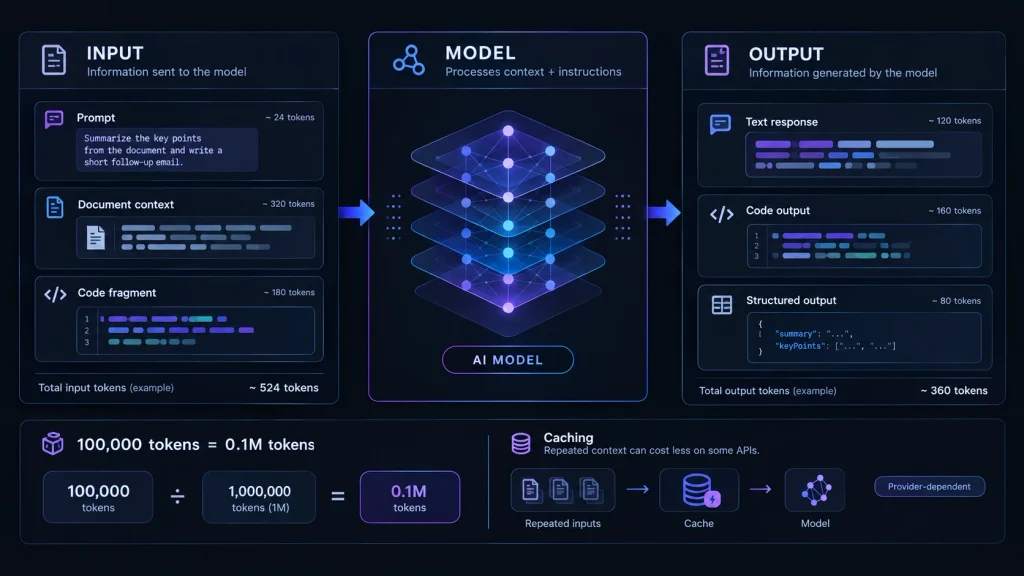
    Many AI APIs charge based on tokens instead of individual requests. A token is a small unit of information processed by an AI model. Depending on the language and text, it may represent part of a word, a complete short word, punctuation, or another piece of text.

    There are normally two main costs:

    • Input tokens: Information sent to the model.
    • Output tokens: Information generated by the model.

    For example, if an API costs $1 per million input tokens, sending 100,000 input tokens would cost roughly $0.10 before other applicable charges.

    This is why comparing only the headline price can be misleading. A model with a higher cost per million tokens might still be cheaper for a particular workload if it requires fewer tokens, produces better results, or reduces the number of requests needed. Caching can also reduce costs on some platforms when the same information is repeatedly processed.

    Final Thoughts

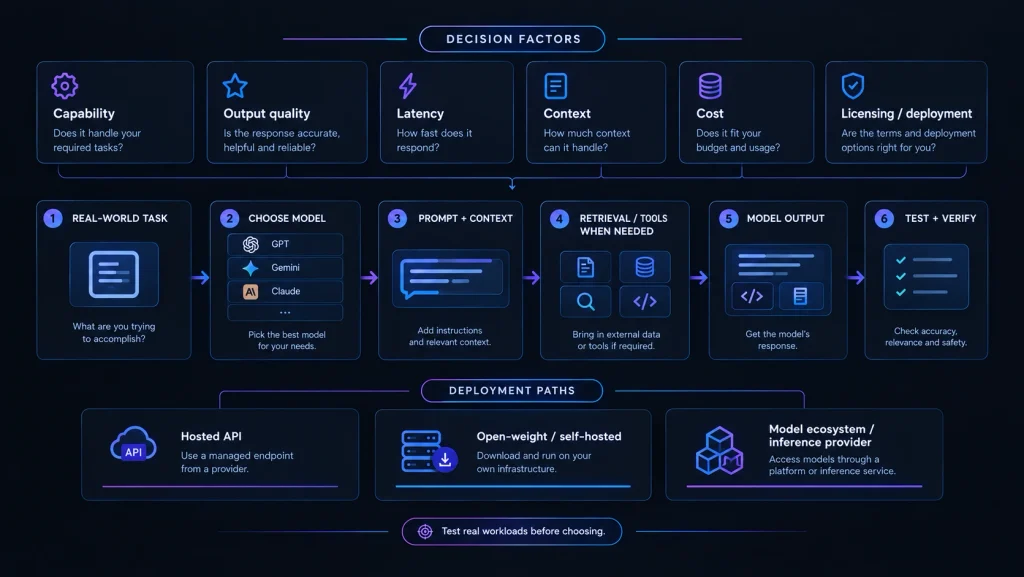
    Understanding an AI Model becomes much easier when you separate training, prompting, and output. Training teaches a model patterns from data. Prompting provides instructions and context. The model then uses its learned parameters and available context to generate an AI model output. In 2026, you do not need to build an AI model from scratch to start experimenting. Free plans, API access, open-weight models, and platforms such as Hugging Face have made AI development much more accessible.

    The best platform depends on what you want to accomplish. OpenAI and Gemini are strong choices for general-purpose applications. Claude is useful for writing and reasoning. Llama and Mistral are attractive for developers who want more control over models. DeepSeek can be compelling for coding and lower-cost API workloads. Cohere is designed around enterprise use cases, while Hugging Face gives developers access to a much broader AI ecosystem.

    Pricing matters, but it should not be the only factor. Context limits, output quality, latency, reliability, model capabilities, licensing, and deployment requirements can have a much larger impact on the final cost of an AI project. The best way to choose an AI model is therefore simple: test several models using the same real-world prompts and measure the results against your actual requirements.

    FAQ

    What is an AI model?

    An AI Model is a trained computational system that learns patterns from data and uses those patterns to make predictions, classifications, or generate content. Large language models are a type of AI model designed to process and generate language.

    How do you train an AI model?

    Learning how to train an AI model starts with data, a model architecture, computing resources, and an optimization process. During training, the model processes examples and adjusts internal parameters to reduce errors. Developers evaluate the results and may repeat the process with better data, settings, or training techniques. Training a frontier-scale model from scratch is extremely different from fine-tuning a smaller existing model.

    Is prompting the same as AI model training?

    No. Prompting gives an already-trained model instructions or additional context. Training changes the model’s internal parameters through an optimization process. Fine-tuning is a form of additional training where an existing model is adapted using another dataset.

    Can I train an AI model for free?

    You can learn the fundamentals for free using smaller models, open-weight models, cloud notebooks, and platforms such as Hugging Face. However, training a large foundation model from scratch requires substantial computing resources, datasets, storage, and engineering work.

    Which AI model is best?

    There is no single best AI model for every task. OpenAI and Gemini are strong general-purpose choices. Claude is useful for writing and reasoning. Llama and Mistral provide more flexibility around model deployment. DeepSeek is attractive for coding and cost-conscious API workloads. Cohere focuses on enterprise AI, while Hugging Face provides access to a broad ecosystem of models and tools.

  • AI Content Creation: Jasper Review 2026, Features and Pricing

    AI Content Creation: Jasper Review 2026, Features and Pricing

    AI Content Creation has become an important part of modern marketing. Businesses, bloggers, agencies, and content teams now use artificial intelligence to create blog posts, social media content, marketing copy, campaign ideas, and other digital assets faster. One platform built specifically around this need is Jasper. Unlike basic AI writing tools that mainly focus on generating text, Jasper is designed around marketing workflows, brand consistency, content creation, and team collaboration.

    We look at its features, pricing, brand tools, marketing workflows, strengths, limitations, and overall value. If you are considering Jasper for AI Content Creation, this guide will help you decide whether it fits your needs.

    Jasper Review 2026: At a Glance

    CategoryDetails
    ToolJasper
    Best ForMarketing teams, businesses, agencies, and content creators
    Primary UseAI Content Creation and marketing
    Starting Paid Price$59/month per seat when billed annually
    Monthly Price$69/month per seat
    Free Trial7 days
    Business PlanCustom pricing
    Brand VoiceYes
    KnowledgeYes
    Marketing AgentsYes
    Team FeaturesYes
    APIAvailable

    What Is Jasper?

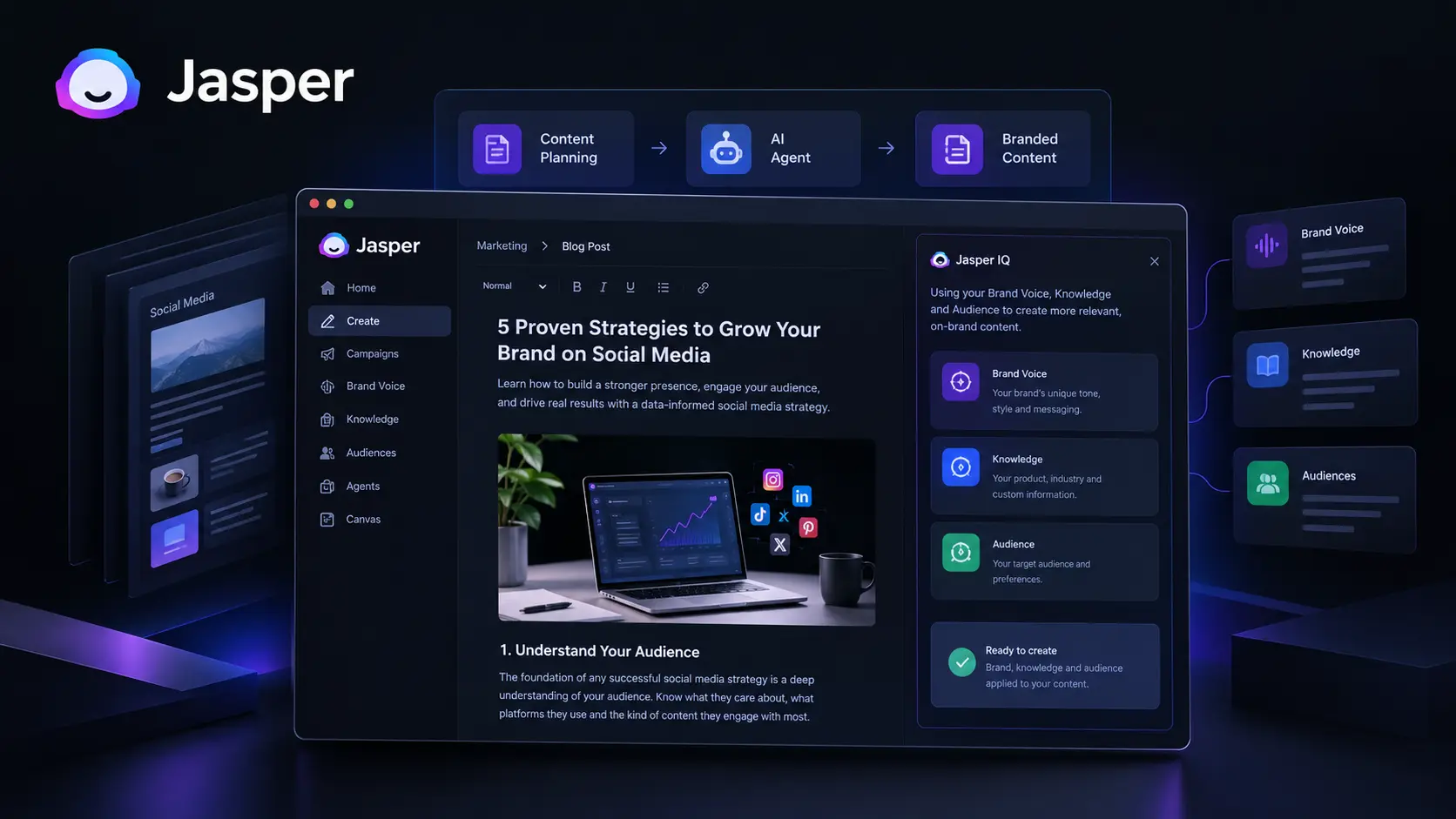
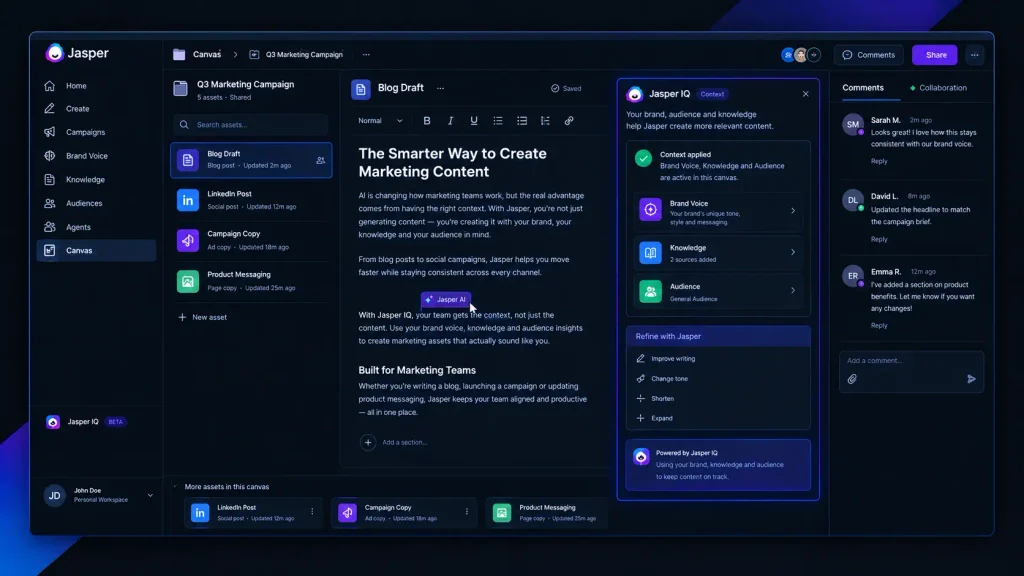
    Jasper is an AI-powered content and marketing platform built to help businesses create and manage marketing content. The platform goes beyond simple text generation by combining AI writing with features such as Brand Voice, Knowledge, Audiences, marketing-focused AI Agents, and workflow tools. This makes Jasper particularly interesting for companies that need to produce a large amount of content while keeping their messaging consistent. For a solo blogger, some of its advanced marketing features may be more than necessary. However, for marketing teams and businesses, the ability to combine AI Content Creation with brand information and audience context can be useful.

    Jasper Features for AI Content Creation

    Jasper offers several features designed to support different parts of the content creation process.

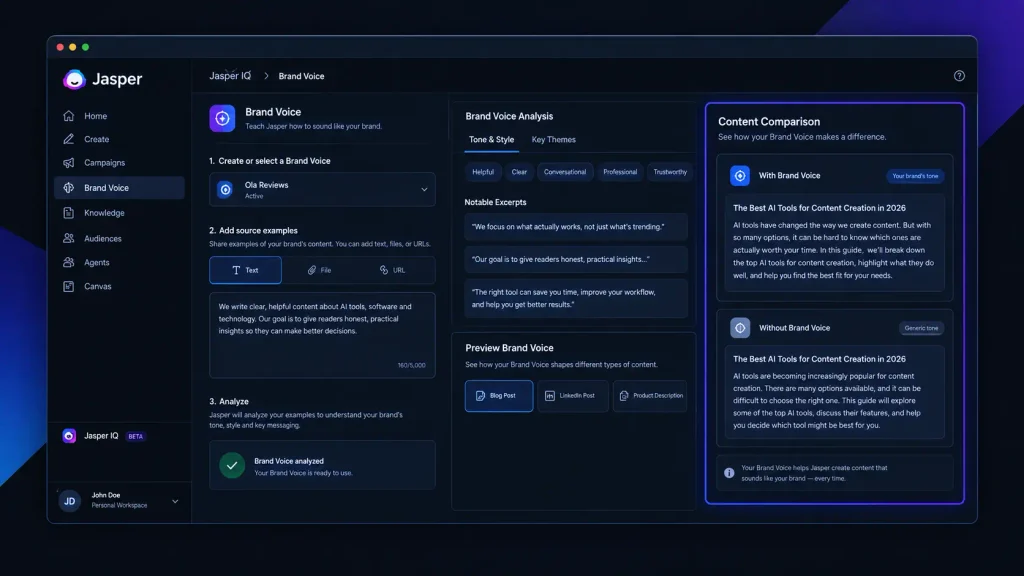
    1. Brand Voice

    One of Jasper’s strongest features is Brand Voice. Instead of asking AI to write content from scratch without context, users can provide examples of their existing writing so Jasper can learn the preferred style and tone. According to Jasper’s documentation, users can add Brand Voice examples using text, documents, or URLs. The platform can then use that information across supported content workflows. This can be especially useful for businesses that want different pieces of content to maintain a similar tone.

    For example, a company could define a professional but friendly voice and use it when creating:

    • Blog content
    • Product descriptions
    • LinkedIn posts
    • Marketing campaigns
    • Social media copy
    • Website content

    The Pro plan includes two Brand Voices, while Business users can create unlimited Brand Voices.

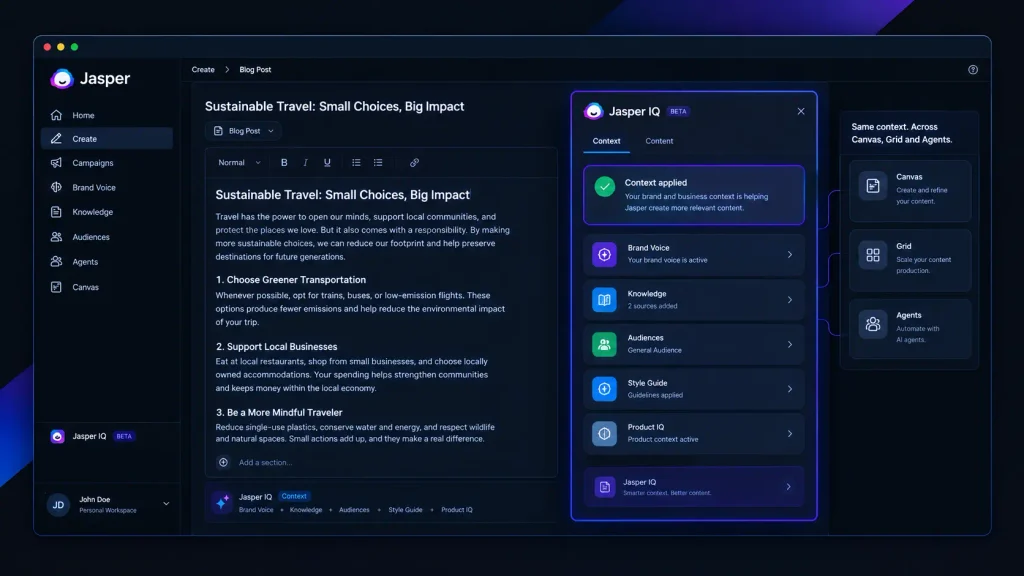
    2. Jasper IQ

    Jasper IQ brings several personalization features together. It can use information about your brand, audience, voice, and business knowledge to make generated content more relevant.

    Jasper IQ includes areas such as:

    • Brand Voice
    • Knowledge
    • Audiences
    • Style Guide
    • Visual standards

    These settings can be used across different Jasper workflows, including Canvas, Grid, Agents, and Chat. For businesses producing content regularly, this can reduce the need to repeatedly explain the same brand requirements to an AI tool.

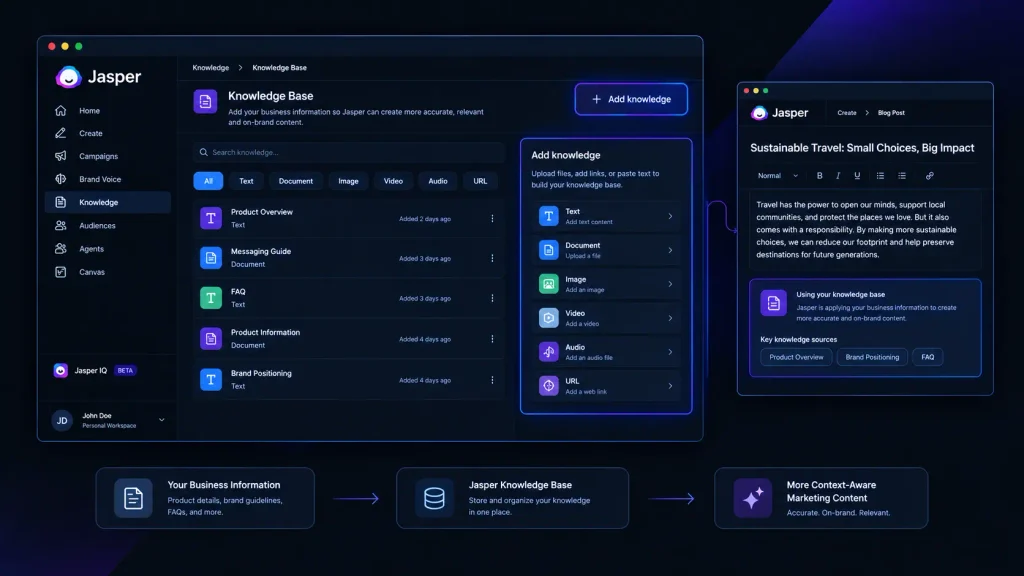
    3. Knowledge

    Another useful feature for AI Content Creation is Jasper’s Knowledge system. Businesses can provide information about their products, services, positioning, company values, target customers, and other important details. This gives the AI additional context when creating content.

    For example, a software company could provide information about:

    • Product features
    • Pricing
    • Target customers
    • Company positioning
    • Product benefits
    • Brand terminology

    The goal is to make generated content more relevant to the actual business instead of producing generic AI copy.

    4. Audiences

    Content should not sound the same for every audience. Jasper allows users to define audience information so marketing content can be created with specific customer groups in mind.

    For example, a company could create different audience profiles for:

    • Small business owners
    • Enterprise customers
    • Marketing professionals
    • Developers
    • New users

    This can be helpful when one company needs to communicate the same product benefits in different ways.

    5. Marketing-Focused AI Agents

    Jasper is particularly focused on marketing use cases. Its platform includes purpose-built AI Agents designed for marketing activities. Depending on the plan and workflow, these can support tasks such as content creation, research, optimization, and campaign work. This is one area where Jasper differs from a basic AI chatbot. Instead of starting with a blank chat box every time, marketers can work with workflows designed around specific marketing tasks.

    Jasper for Bloggers and Content Creators

    Jasper can also be useful for bloggers and independent content creators, especially when producing content at scale.

    It can help with tasks such as:

    • Blog ideas
    • Content outlines
    • Marketing copy
    • Social media posts
    • Product descriptions
    • Content variations
    • Campaign ideas

    However, Jasper should not be treated as a completely automatic publishing system. AI-generated content still needs human review. Writers should check facts, add original insights, improve examples, and make sure the final article actually helps readers. For bloggers who only need occasional AI writing assistance, a less expensive general-purpose AI tool may be enough.

    Jasper for Marketing Teams

    Jasper makes more sense when several people are working on marketing content. A marketing team can use centralized brand information and content guidelines to reduce inconsistencies between different writers and campaigns. This can be valuable for agencies and larger businesses where multiple people create content for the same brand. The platform’s business-oriented features also make it more suitable for organizations that need stronger control over AI-assisted marketing workflows.

    Jasper Pricing in 2026

    Currently, there are Pro and Business options available.

    Jasper Pro

    The Pro plan costs:

    • $59 per month per seat when billed annually
    • $69 per month per seat when billed monthly

    The Pro plan includes one seat along with features such as Canvas, core Agents, Brand Voice, Knowledge assets, and Audiences.

    Jasper also offers a 7-day free trial for Pro.

    Jasper Business

    The Business plan uses custom pricing. It is designed for organizations that need more advanced marketing workflows and additional control. Business features include advanced Agents, Custom AI Agents, Jasper Grid, expanded customization, API access, governance features, and other enterprise-oriented capabilities. For companies with larger teams or more complex marketing requirements, Business may provide more value than the Pro plan.

    Jasper Pricing Table

    PlanPriceBest For
    Pro$59/month per seat, annuallyIndividual marketers and smaller teams
    Pro Monthly$69/month per seatUsers who prefer monthly billing
    BusinessCustomLarger marketing teams and organizations

    Jasper also uses a hybrid credit model for some advanced features. Certain workflows, including selected research, optimization, GEO, API, MCP, and Grid-related activities, can consume credits.

    This is worth checking before purchasing if you expect to use advanced research or optimization features heavily.

    Is Jasper Worth the Price in 2026?

    Whether Jasper is worth the price depends largely on how you create content. For someone who only wants an AI tool to write occasional blog posts, $59 per month may feel expensive. But the calculation changes for marketing teams. If Jasper helps a team maintain brand consistency, speed up content production, organize marketing workflows, and reduce repetitive writing tasks, the higher subscription cost can make more sense. The biggest value is not simply AI-generated words. It is the combination of AI Content Creation with brand context, audience information, knowledge, and marketing workflows.

    Jasper Pros and Cons

    Pros

    • Strong focus on marketing content
    • Useful Brand Voice functionality
    • Supports brand and business knowledge
    • Audience personalization
    • Marketing-focused AI Agents
    • Useful for teams and agencies
    • Multiple content workflows
    • Business-oriented controls

    Cons

    • More expensive than many basic AI writing tools
    • Some advanced functionality uses credits
    • May be excessive for casual writers
    • Business pricing is not publicly fixed
    • AI-generated content still requires human editing

    Jasper vs. Basic AI Writing Tools

    FeatureJasperBasic AI Writing Tool
    AI Content CreationYesYes
    Brand VoiceAdvancedOften limited
    Business KnowledgeYesVaries
    Audience ProfilesYesLimited
    Marketing WorkflowsStrongBasic
    AI AgentsYesVaries
    Team FeaturesYesVaries
    Enterprise ControlsYesLimited
    Starting Price$59/month annuallyVaries

    The main difference is positioning.

    Basic AI writing tools are often designed around generating text from prompts. Jasper is designed more specifically around AI-powered marketing and content workflows.

    Who Should Use Jasper?

    Jasper is a good option for:

    Marketing Teams

    Teams creating content across multiple channels can benefit from shared brand information and structured workflows.

    Agencies

    Agencies managing multiple clients may find Brand Voice and Knowledge particularly useful for maintaining different brand requirements.

    Businesses

    Companies producing content at scale can use Jasper to support marketing campaigns, social media, blog content, and other activities.

    Content Creators

    Professional creators who publish frequently may benefit from Jasper’s content-generation capabilities, although the price should be considered carefully.

    Who Should Not Choose Jasper?

    Jasper may not be the best choice if you:

    • Only write occasionally
    • Need a very cheap AI writing tool
    • Do not need marketing-specific features
    • Prefer a simple chatbot interface
    • Have no need for brand management
    • Only want basic text generation

    In these cases, a simpler AI writing solution could offer better value.

    Final Verdict: Is Jasper the Right AI Content Creation Tool?

    Jasper stands out because it approaches AI Content Creation from a marketing perspective. Its combination of Brand Voice, Knowledge, Audiences, AI Agents, and marketing workflows makes it more than a basic AI text generator. This can be especially valuable for businesses, agencies, and marketing teams that need consistent content across multiple channels. The biggest drawback is the price. At $59 per month per seat when billed annually, Jasper is not the cheapest option for casual users. But if your goal is to build a structured AI-assisted marketing workflow rather than simply generate text, Jasper can be a strong choice in 2026.

    Frequently Asked Questions

    Is Jasper good for AI Content Creation?

    Yes. Jasper is specifically designed around AI Content Creation and marketing workflows. Its Brand Voice, Knowledge, Audiences, and marketing Agents can help businesses create more consistent content.

    Does Jasper have a free trial?

    Yes. Jasper offers a 7-day free trial for its Pro plan.

    Is Jasper good for bloggers?

    Jasper can be useful for bloggers who publish regularly and want help with ideas, outlines, marketing copy, and other content tasks.

    Does Jasper have Brand Voice?

    Yes. Brand Voice is one of Jasper’s key features. Pro includes two Brand Voices, while Business provides unlimited Brand Voices.

    Is Jasper expensive?

    Compared with basic AI writing tools, Jasper is relatively expensive. Its value comes from its marketing-focused features rather than simple text generation alone.

  • NotebookLM Review 2026: Features, Pricing and Research Tools

    NotebookLM Review 2026: Features, Pricing and Research Tools

    Researching a topic can get messy fast. You may have PDFs in one folder, web sources in another, notes scattered across documents, and dozens of questions that still need answers. This NotebookLM Review looks at whether Google’s research-focused notebook can bring that information together without making you spend hours organizing it yourself. NotebookLM has also evolved significantly in 2026.

    Google renamed it Gemini Notebook in July 2026, while keeping its core purpose as a research and learning workspace. The product is now becoming more closely connected with Gemini, Google Search, and other Google AI capabilities. For students, researchers, writers, marketers, and educators, that makes it an interesting option among modern AI research tools.

    How We Evaluate NotebookLM

    Because this article focuses on one dedicated research product rather than a large list of competing tools, the evaluation focuses on how NotebookLM fits into a real research workflow. We assessed its current 2026 capabilities, source handling, research features, AI-generated outputs, and subscription structure. Google’s June 2026 update also introduced more advanced reasoning, web-source discovery, code execution, and new output formats, making the current version considerably broader than the original document-questioning product.

    We focused on:

    • Source management: How easily you can collect and organize research material.
    • Source-based answers: Whether the tool keeps responses connected to your supplied information.
    • Research workflow: How quickly you can move from sources to useful conclusions.
    • Learning features: Audio, video, quizzes, flashcards, and study materials.
    • AI-generated outputs: Reports, mind maps, slides, charts, and other formats.
    • Pricing and limits: Whether the free version is enough for normal users.

    If you’ve already explored AI note-taking tools, you’ll notice that NotebookLM approaches the category from a research-first angle rather than simply trying to replace a traditional notes application.

    NotebookLM at a Glance

    Tool NameBest ForStarting Price
    NotebookLM / Gemini NotebookResearch, studying, document analysis and source-based Q&AFree

    NotebookLM’s Standard access is free. Google’s current documentation lists limits of up to 100 notebooks, 50 sources per notebook, and 50 conversations per day for standard access. Usage limits can change as Google updates the product.

    NotebookLM Review: Best AI Research Tool for Source-Based Research

    NotebookLM makes the most sense when you already have material you want to understand. You can create a notebook, add your sources, and then ask questions about that collection. Instead of treating every prompt like a completely new conversation, the notebook gives the AI a defined research context. That distinction matters.

    Imagine you’re researching a university assignment. You could put your lecture notes, several papers, a report, and other relevant documents into one notebook. Instead of opening each file separately, you can ask questions across the collection and use the resulting answers to identify themes or gaps. Google has expanded this workflow considerably in 2026. The company says NotebookLM can now help organize loose ideas, find relevant web sources, and build a structured research repository. It can also use a secure cloud computer to execute code for deeper analysis.

    Another useful detail is source capacity. Google’s current documentation lists 50 sources per notebook for Standard access, with higher limits available through paid tiers. This makes NotebookLM particularly useful as a research assistant when your work starts with documents rather than a blank chat box.

    Pros

    • Strong source-focused research workflow.
    • Multiple ways to turn research into summaries, study material, and other outputs.

    Cons

    • Usage limits depend heavily on your Google AI plan.
    • It is less useful when you simply want unrestricted open-ended brainstorming.

    Pricing: NotebookLM has free Standard access. Paid Google AI plans provide higher limits and additional Google AI benefits; pricing varies by market. Check the current Google AI plans and pricing before subscribing.

    NotebookLM Features Worth Using in 2026

    NotebookLM has moved well beyond simple PDF summarization. Its current feature set makes it closer to a research workspace where the same source collection can support several different tasks.

    Source-Based Q&A

    The core experience remains source-based questioning. You add your research material and ask questions about it. This can be especially useful when you need to locate connections across multiple documents rather than simply summarize one file.

    Google itself describes NotebookLM as a research tool grounded in information you trust, and its 2026 updates have focused heavily on improving reasoning and research workflows. For example, a researcher could collect several papers and ask the notebook to identify common conclusions, conflicting findings, or important themes. A writer could use the same workflow to understand a collection of reports before outlining an article.

    If you’re already using AI search engines, the distinction is worth remembering: NotebookLM is particularly useful when you want to work deeply with a controlled collection of sources.

    Audio Overviews

    Audio Overviews remain one of NotebookLM’s most recognizable features. Instead of reading another wall of AI-generated text, you can turn your research into an audio discussion. That can be useful when reviewing study material or revisiting research away from your desk.

    Google’s current documentation lists up to 3 Audio Overviews per day under Standard access, with substantially higher limits on paid tiers. This is more than a novelty if you’re studying. You can use written sources for detailed reading and audio for reinforcement.

    Video Overviews

    NotebookLM has also moved into video-based learning. Google introduced Cinematic Video Overviews in 2026, using Gemini and other Google models to create more visual presentations from source material. The feature was initially introduced for Google AI Ultra users. That gives educators and students another way to interact with complex material.

    Rather than producing one generic explanation for every topic, the notebook can transform your existing research into a different format designed for consumption.

    Quizzes and Flashcards

    Students may get some of the most practical value from quizzes and flashcards. Instead of manually turning a chapter or collection of notes into revision questions, NotebookLM can generate study materials from the sources in your notebook.

    Google’s current documentation lists 10 flashcard generations and 10 quizzes per day under Standard access, with higher limits as you move up the available tiers. That makes the tool much more useful for active learning than a standard summarization chatbot.

    And if you’re interested specifically in AI-powered meeting notes, you can also see how AI meeting notetakers.

    Reports, Mind Maps and Research Outputs

    NotebookLM can also turn source material into structured outputs such as reports and mind maps. Google’s 2026 updates have expanded the product further into charts, spreadsheets, slide decks, and other formats. For marketers and content creators, this can shorten the distance between research and production. Instead of collecting information first and figuring out how to structure it later, you can use the same notebook as the working context for multiple outputs.

    NotebookLM and Gemini Notebook: What’s Changed?

    One of the biggest things to understand in a 2026 NotebookLM Review is the name change. In July 2026, Google announced that NotebookLM was becoming Gemini Notebook. Google says the product remains a standalone research tool but is becoming more integrated with the wider Gemini ecosystem.

    That integration is already visible. Google introduced notebooks inside Gemini, allowing users to organize chats, files, and research while syncing notebooks between Gemini and NotebookLM. Google has also started adding new research capabilities. In August 2026, Google introduced Expert Intelligence, allowing users to incorporate insights from selected trusted books and expert sources into Gemini Notebook.

    So if you’re searching for “NotebookLM” today, don’t be surprised if Google’s newer interface or documentation refers to Gemini Notebook.

    NotebookLM Pricing in 2026

    NotebookLM itself has free access, but Google’s paid AI subscriptions increase usage and provide access to a broader collection of Google AI features.

    Current documentation shows the following usage levels:

    Access LevelNotebooksSources / NotebookConversations / DayAudio Overviews / Day
    Standard10050503
    Higher Access2001002006
    Higher Tier50030050020
    Expanded5004001,00040
    Maximum5006005,000200

    These are usage limits rather than a simple list of traditional NotebookLM plans, and Google notes that limits can change. Google also changed how some Gemini Notebook limits work in September 2026, moving toward compute-based limits that consider factors such as prompt complexity, models used, features, and conversation length.

    For current subscription pricing, it is safer to check Google’s official Google AI plans because prices and availability vary by country. The key takeaway is simple: start free. If you’re constantly hitting usage limits or need the broader Google AI package, then consider upgrading.

    Is NotebookLM One of the Best AI Note-Taking Tools?

    That depends on what you expect from note-taking software. If you want a traditional workspace for manually writing notes, creating databases, managing tasks, and organizing personal information, NotebookLM may not be your ideal replacement. But if your idea of note-taking includes collecting sources, asking questions, generating summaries, studying material, and turning research into new outputs, NotebookLM becomes much more compelling.

    That’s why I would classify it primarily among AI research tools, with note-taking being one part of the larger workflow. Its biggest advantage is context. Your documents are not just attachments sitting beside a chatbot; they become the foundation for the notebook’s research process.

    Who Should Use NotebookLM?

    Students

    You can collect lecture notes, textbooks, papers, and study material and then use the notebook to generate questions, flashcards, summaries, and audio overviews.

    Researchers

    Researchers can keep related source material together and use the notebook to explore themes, connections, and unanswered questions.

    Content Creators and Writers

    A writer can create a source library before drafting an article, script, report, or long-form piece. This is particularly useful when accuracy depends on understanding several documents.

    Marketers

    Marketing professionals can use notebooks for reports, product documentation, customer research, campaign material, and other source-heavy projects.

    Educators

    Teachers can transform teaching resources into study guides, questions, summaries, and other learning material. The common factor is not the profession. It is the workflow: you already have information and want to understand or transform it.

    Final Verdict: Is NotebookLM Worth Trying in 2026?

    This NotebookLM Review comes down to a fairly simple recommendation: if your work involves documents, research papers, reports, notes, or other source-heavy material, try the free version first. You don’t need to commit to a paid plan immediately. Add a useful collection of sources, ask specific questions, test the study features, and see whether the workflow saves you time.

    For students, researchers, writers, educators, and marketers, NotebookLM’s biggest strength is its ability to turn an existing pile of information into something you can actually work with. And with Google moving NotebookLM toward Gemini Notebook, deeper research, code execution, and broader Google integration, the more interesting question may be: how much of your research workflow will AI notebooks handle for you next?

    FAQ

    Is NotebookLM free in 2026?

    Yes. Standard access remains free, with usage limits. Google’s current documentation lists up to 100 notebooks, 50 sources per notebook, and 50 conversations per day under Standard access. Other features, including audio, video, reports, flashcards, and quizzes, also have daily limits.

    Is NotebookLM good for academic research?

    Yes, particularly when your research involves a defined collection of papers, notes, reports, or other sources. It can help you understand and organize that material, but you should still check important claims against the original documents. Google itself notes that AI-generated responses can contain inaccuracies. For serious academic work, think of NotebookLM as a research assistant not as a replacement for reading the original sources.

    Is NotebookLM still called NotebookLM?

    Google announced in July 2026 that NotebookLM was being renamed Gemini Notebook. The company says it remains a standalone research product while becoming more connected to Gemini and Google Search. That means both names are worth understanding if you’re researching AI note-taking tools or looking for the product online.

    Editorial disclosure: This review is independently researched and written for informational purposes. Pricing and usage limits can change by region and subscription plan.

  • AI Agents vs Traditional SaaS: Is Software Changing Forever in 2026?

    AI Agents vs Traditional SaaS: Is Software Changing Forever in 2026?

    If you run a business, you already know the frustration: your team uses one tool for customer support, another for research, another for coding, and several more just to move information between them. AI Agents are changing that workflow by giving software more freedom to plan tasks, use tools, and complete multiple steps with less manual direction. Traditional SaaS still has a major advantage: predictable workflows, familiar interfaces, and clearly defined functions. But AI agent platforms are pushing software toward a different model where you describe the outcome instead of clicking through every step yourself. That raises an important question: are AI agents replacing traditional SaaS, or are they simply becoming another layer on top of it?
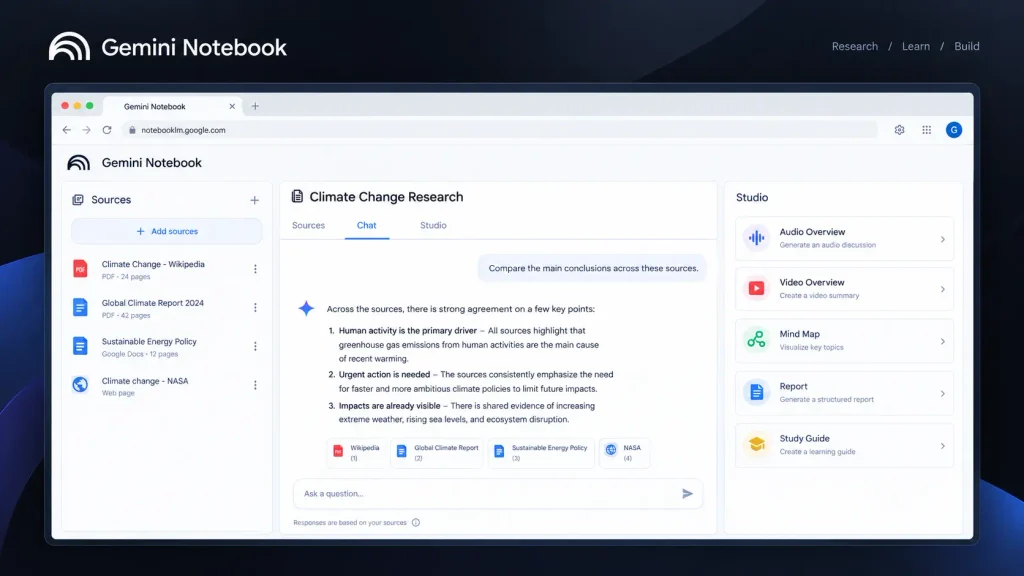
    How We Evaluate AI Agents

    For this comparison, we focus on two representative AI agent products and evaluate them around the tasks that matter when you are deciding whether an agent can replace or complement conventional software.

    Our evaluation focuses on:

    • Task autonomy: How much work can the system perform after receiving a goal?
    • Tool usage: Can it interact with external tools, files, applications, or services?
    • Workflow complexity: Is it useful for a single task or longer multi-step processes?
    • Control: How easily can you review, interrupt, or redirect its work?
    • Ease of use: Can a non-developer understand and operate the workflow?
    • Value: Does the capability justify moving away from conventional SaaS workflows?

    The goal is not to declare every AI agent better than SaaS. Instead, you should be able to see where each approach makes sense for developers, marketers, business owners, and everyday software users.

    AI Agents vs Traditional SaaS at a Glance

    Tool / ApproachBest ForStarting Price
    OpenClawAutonomous, customizable agent workflowsFree software; model/infrastructure costs vary
    Hermes AgentDeveloper-focused autonomous AI workflowsFree software; model/infrastructure costs vary

    Note: Traditional SaaS is an approach rather than a single product, so its pricing depends entirely on the software category and provider.

    Best AI Agent Platform for Custom Autonomous Workflows: OpenClaw

    Best AI Agent Platform

    OpenClaw is aimed at users who want an AI agent to do more than answer questions. Its official site describes it as an open-source system that can run on your machine and perform actions such as organizing an inbox, sending emails, managing a calendar, and handling tasks through messaging apps.

    That distinction becomes important when you compare AI agents with traditional SaaS. A conventional application generally waits for you to select the next function. An autonomous agent can potentially determine what needs to happen next based on the goal you provide.
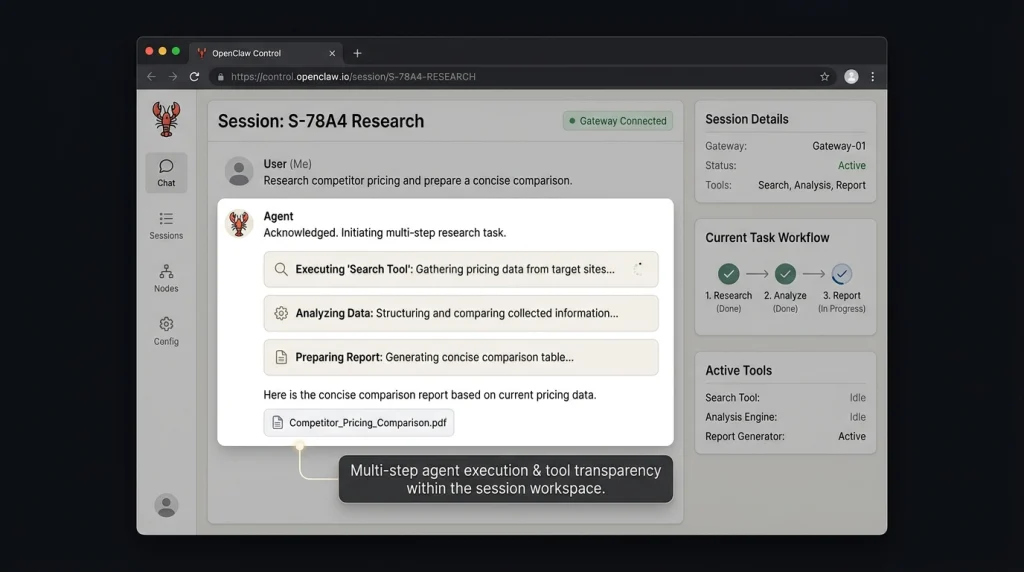
    OpenClaw is particularly interesting for technically confident users because its local-first approach gives you more control over the environment in which the agent operates. Instead of opening another SaaS dashboard for every task, you can use the agent as an automation layer around your existing workflow.

    The difference becomes clearer when you give an agent a task containing several dependent steps rather than a simple question. Researching information, organizing it, and producing an output requires more than generating one response. It requires the system to manage a workflow.
    OpenClaw is therefore more interesting when you care about AI automation tools that can participate in workflows rather than simply generate content.

    Pros

    • Open-source and designed to run on your own machine.
    • Can connect agent-style tasks with everyday communication and productivity workflows.

    Cons

    • Setup can require more technical knowledge than conventional SaaS.
    • Model, infrastructure, and usage costs can vary depending on how you deploy it.

    Pricing: The OpenClaw software itself is open source; your actual cost depends on the AI models, infrastructure, and services you connect to it.

    Best AI Agent for Developer-Oriented Automation: Hermes Agent

    Best AI Agent for Developer

    Hermes Agent takes a similarly agent-focused approach, but its appeal is especially relevant if you are comfortable working with developer tools and want an autonomous system rather than another conventional dashboard.

    Hermes Agent is developed by Nous Research and is available as an open-source agent with native desktop applications for macOS, Windows, and Linux. Its official site also provides a terminal-based installation method, making it accessible to users who prefer command-line workflows.

    This is where the AI Agents vs Traditional SaaS debate gets interesting. Traditional SaaS tends to package a fixed collection of features into an interface. An agent-based system can instead operate around a goal and determine which available capabilities are useful for reaching it.

    Hermes is also designed around the idea of an agent that grows with continued use. Its project describes a built-in learning loop that can create skills from experience, improve them during use, persist knowledge, and search previous conversations.

    The key test is not whether Hermes Agent can answer a technical question. Modern AI assistants can already do that. The more important question is whether the system can maintain context and perform multiple actions without requiring you to micromanage every step.
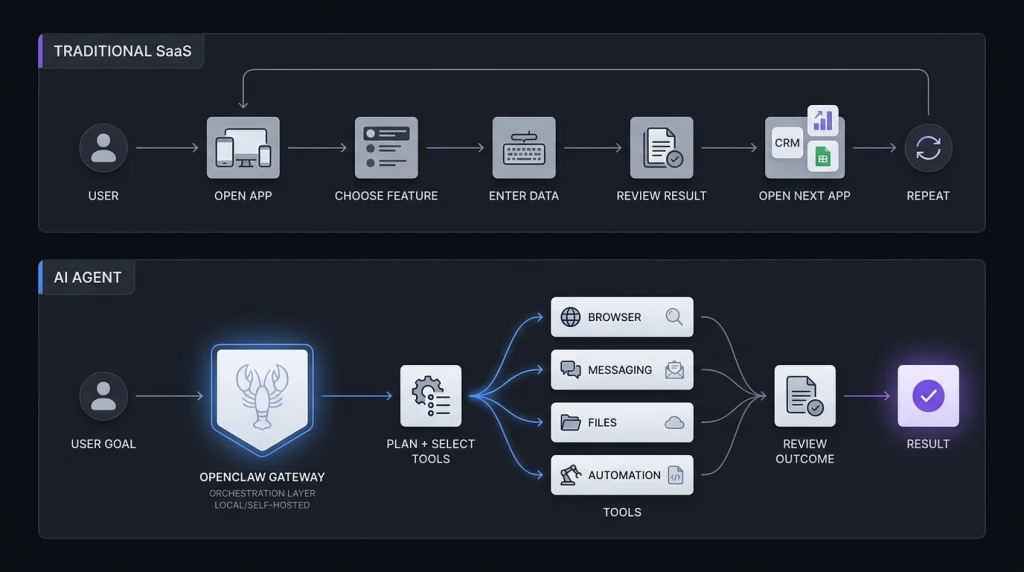
    That makes Hermes Agent worth considering if you are exploring autonomous AI agents for development or technical workflows.

    Pros

    • Open-source with native desktop applications for major desktop operating systems.
    • Built around persistent knowledge, skills, and a self-improving workflow model.

    Cons

    • It is better suited to technically confident users than people looking for a simple SaaS dashboard.
    • Running it still requires consideration of model and infrastructure costs.

    Pricing: Hermes Agent itself is open source. You can run it with your own infrastructure and model provider, while Nous Portal also offers a free tier and paid plans with monthly credits and access to more than 300 models.

    AI Agents vs Traditional SaaS: What Actually Changes?

    AI Agents vs Traditional SaaS

    The biggest difference is not simply that one product uses AI and the other does not.

    It is who controls the workflow.

    With traditional SaaS, you normally control the sequence:

    Open software → choose feature → enter information → review result → choose next feature.

    With an AI agent, the workflow can become:

    Give goal → agent plans actions → agent uses available tools → review outcome.

    That sounds like a small change, but it can dramatically affect how software is designed. Traditional SaaS is excellent when you already know what you need to do. If you need accounting software to create an invoice, for example, a structured interface can be faster and more reliable than asking an autonomous agent to figure it out. Agents become more attractive when the workflow is messy.

    Research, investigation, coding, information gathering, repetitive administration, and cross-application tasks can involve dozens of small decisions. That is where an agent has more room to provide value. The trade-off is control. A conventional SaaS workflow is usually predictable because you explicitly perform each action. An agent introduces another variable: whether the system interpreted your goal correctly.

    Where Traditional SaaS Still Wins

    It would be a mistake to assume that AI agents make ordinary software obsolete. Traditional SaaS remains powerful for repeatable tasks where consistency matters more than autonomy. Think about payroll, accounting, CRM records, project management, or inventory. You often want clear permissions, predictable screens, audit trails, and repeatable processes. In those situations, giving an autonomous system unrestricted control may create more problems than it solves.

    SaaS also benefits from specialization. A dedicated writing application can provide focused editing controls. A CRM can organize customer records in a predictable structure. A project management platform can show tasks, deadlines, owners, and progress without requiring an agent to interpret the entire workflow. If you want to improve writing specifically, for example, dedicated writing assistants can still be a better fit than an autonomous agent for straightforward grammar and editing work.

    Where AI Agents Have the Advantage

    AI agents become compelling when your work does not fit neatly into one application. Imagine that you need to research competitors, collect information from several sources, organize the findings, compare them, and prepare a report. A traditional SaaS setup might require several applications and plenty of manual copying.

    An agent can potentially act as the coordinator between those steps. This is why AI Agent Platforms are attracting attention. They are not simply competing with individual SaaS applications. In many cases, they are trying to sit above them and coordinate multiple tools.

    OpenClaw is a good example of this broader approach because its official positioning focuses on performing tasks through communication channels and connected capabilities rather than simply returning text.

    Hermes Agent approaches the problem from another direction, emphasizing an agent that can build skills and retain knowledge across sessions. The more fragmented your workflow becomes, the more interesting that model is. But autonomy should not be confused with accuracy. You still need checkpoints for important decisions, sensitive information, financial actions, and anything where an incorrect result could cause real damage.

    Which Approach Should You Choose?

    Your NeedBetter Fit
    Fixed, repeatable business processTraditional SaaS
    Simple document or content editingTraditional SaaS
    Multi-step researchAI Agent
    Cross-tool automationAI Agent
    Predictable reportingTraditional SaaS
    Developer experimentationAI Agent
    Sensitive financial workflowsSaaS + human oversight
    Complex repetitive workflowsAI Agent + human review

    The best answer for many businesses is not AI agents or SaaS.

    It is both.

    You can keep specialized SaaS products as the systems of record while using agents as an orchestration layer around them. That approach gives you the predictability of conventional software without forcing employees to manually perform every repetitive step.

    Final Verdict: Is Software Really Changing?

    AI Agents are changing the relationship between people and software, but traditional SaaS is not disappearing overnight. The more realistic future is a combination of both: specialized applications handling structured jobs while agents coordinate complex work across them. If you are curious, start with a small workflow and compare the time, accuracy, and supervision required against your existing SaaS process. The bigger question is no longer whether software can perform a task it is how much of the workflow should you still have to operate yourself?

    Frequently Asked Questions

    Are AI Agents going to replace SaaS?

    Probably not completely. AI agents are more likely to change how you interact with SaaS. Instead of manually opening several applications, you may increasingly use an agent to coordinate actions across them. Specialized SaaS products will still be valuable where structured data, compliance, permissions, and predictable workflows matter.

    What are AI Agent Platforms used for?

    AI Agent Platforms are designed to help agents perform tasks using models, tools, data, and workflows. Depending on the platform, you might use them for research, coding, customer support, automation, or business processes.

    Should a small business use autonomous AI agents?

    Start small. Pick one repetitive workflow where the potential benefit is obvious and the consequences of an error are manageable. Let the agent handle low-risk steps while keeping human approval for important decisions. Once you understand its strengths and failure points, you can expand its responsibilities.

    Editorial disclosure: This comparison is based on product research and workflow-focused evaluation; pricing and features can change over time.