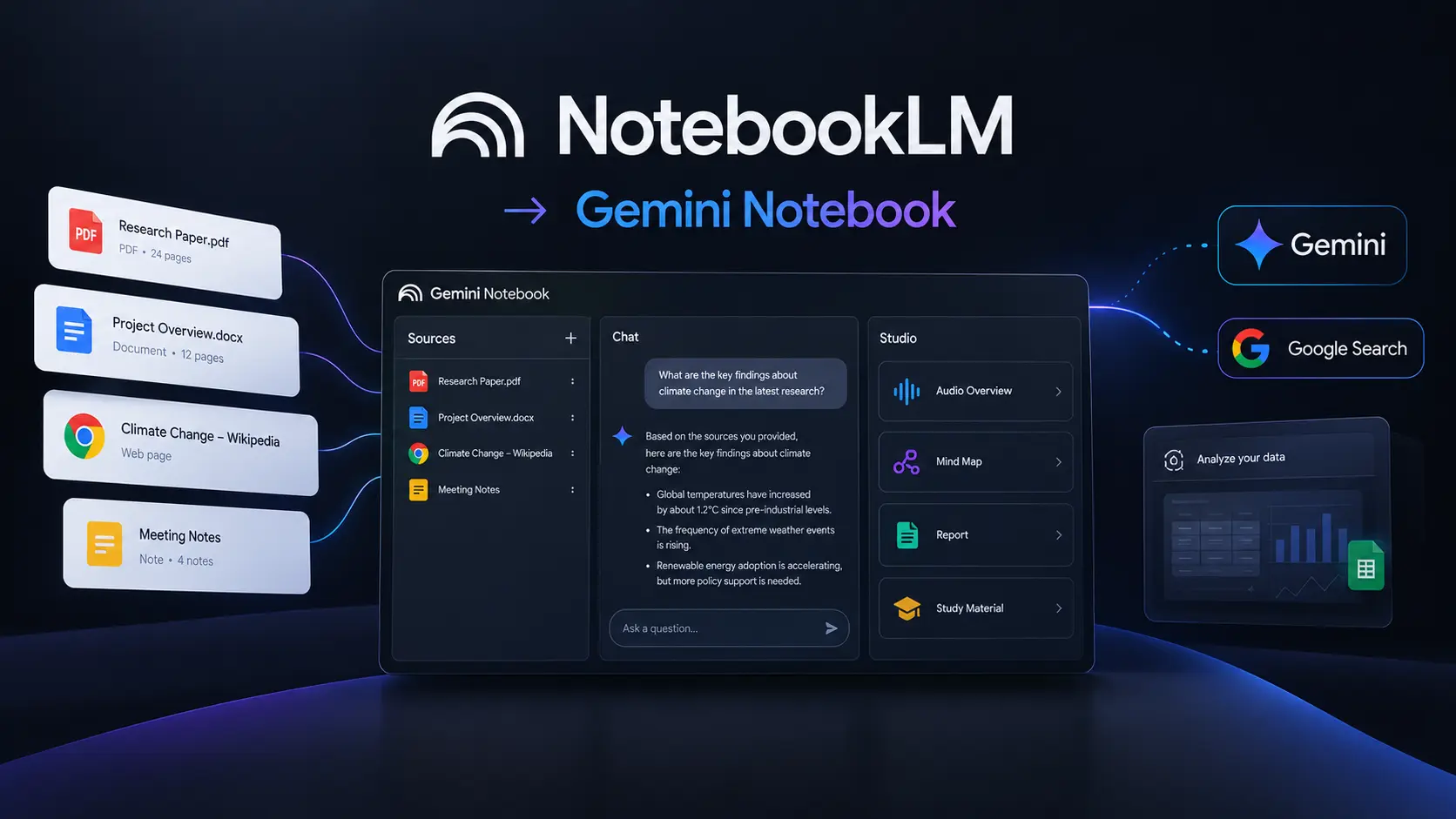
Researching a topic can get messy fast. You may have PDFs in one folder, web sources in another, notes scattered across documents, and dozens of questions that still need answers. This NotebookLM Review looks at whether Google’s research-focused notebook can bring that information together without making you spend hours organizing it yourself. NotebookLM has also evolved significantly in 2026.
Google renamed it Gemini Notebook in July 2026, while keeping its core purpose as a research and learning workspace. The product is now becoming more closely connected with Gemini, Google Search, and other Google AI capabilities. For students, researchers, writers, marketers, and educators, that makes it an interesting option among modern AI research tools.
How We Evaluate NotebookLM
Because this article focuses on one dedicated research product rather than a large list of competing tools, the evaluation focuses on how NotebookLM fits into a real research workflow. We assessed its current 2026 capabilities, source handling, research features, AI-generated outputs, and subscription structure. Google’s June 2026 update also introduced more advanced reasoning, web-source discovery, code execution, and new output formats, making the current version considerably broader than the original document-questioning product.
We focused on:
- Source management: How easily you can collect and organize research material.
- Source-based answers: Whether the tool keeps responses connected to your supplied information.
- Research workflow: How quickly you can move from sources to useful conclusions.
- Learning features: Audio, video, quizzes, flashcards, and study materials.
- AI-generated outputs: Reports, mind maps, slides, charts, and other formats.
- Pricing and limits: Whether the free version is enough for normal users.
If you’ve already explored AI note-taking tools, you’ll notice that NotebookLM approaches the category from a research-first angle rather than simply trying to replace a traditional notes application.
NotebookLM at a Glance
| Tool Name | Best For | Starting Price |
| NotebookLM / Gemini Notebook | Research, studying, document analysis and source-based Q&A | Free |
NotebookLM’s Standard access is free. Google’s current documentation lists limits of up to 100 notebooks, 50 sources per notebook, and 50 conversations per day for standard access. Usage limits can change as Google updates the product.
NotebookLM Review: Best AI Research Tool for Source-Based Research
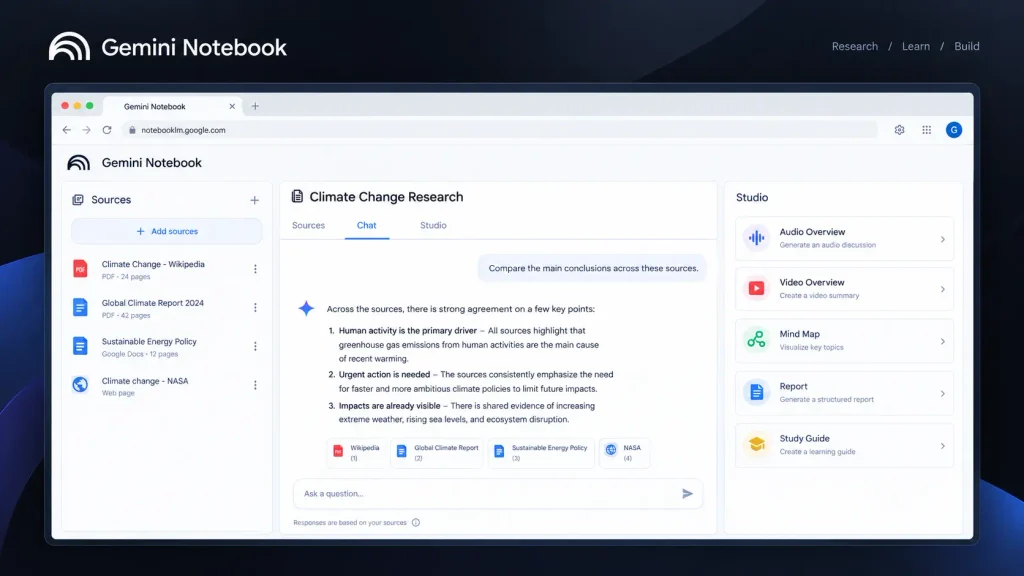
NotebookLM makes the most sense when you already have material you want to understand. You can create a notebook, add your sources, and then ask questions about that collection. Instead of treating every prompt like a completely new conversation, the notebook gives the AI a defined research context. That distinction matters.
Imagine you’re researching a university assignment. You could put your lecture notes, several papers, a report, and other relevant documents into one notebook. Instead of opening each file separately, you can ask questions across the collection and use the resulting answers to identify themes or gaps. Google has expanded this workflow considerably in 2026. The company says NotebookLM can now help organize loose ideas, find relevant web sources, and build a structured research repository. It can also use a secure cloud computer to execute code for deeper analysis.
Another useful detail is source capacity. Google’s current documentation lists 50 sources per notebook for Standard access, with higher limits available through paid tiers. This makes NotebookLM particularly useful as a research assistant when your work starts with documents rather than a blank chat box.
Pros
- Strong source-focused research workflow.
- Multiple ways to turn research into summaries, study material, and other outputs.
Cons
- Usage limits depend heavily on your Google AI plan.
- It is less useful when you simply want unrestricted open-ended brainstorming.
Pricing: NotebookLM has free Standard access. Paid Google AI plans provide higher limits and additional Google AI benefits; pricing varies by market. Check the current Google AI plans and pricing before subscribing.
NotebookLM Features Worth Using in 2026
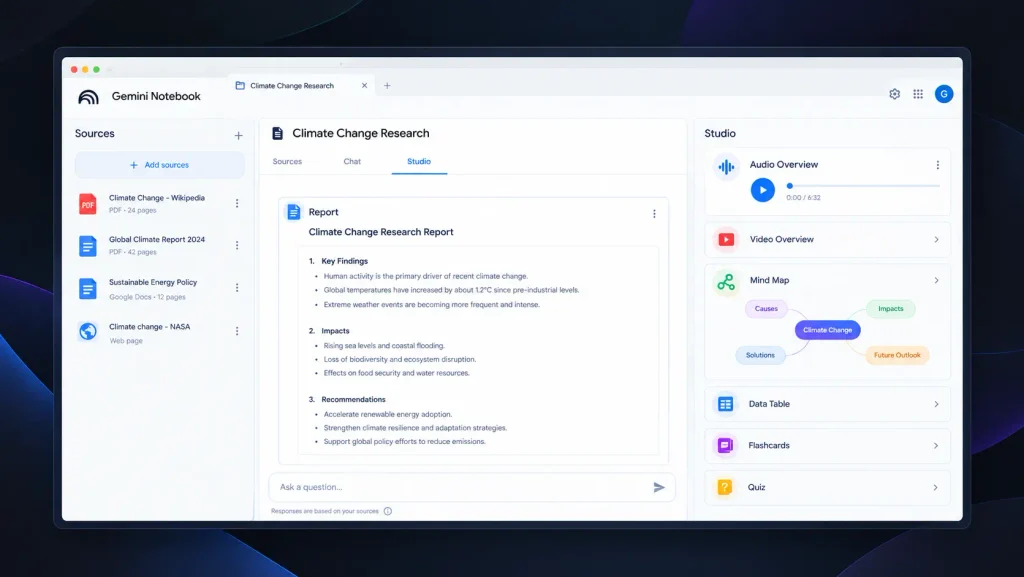
NotebookLM has moved well beyond simple PDF summarization. Its current feature set makes it closer to a research workspace where the same source collection can support several different tasks.
Source-Based Q&A
The core experience remains source-based questioning. You add your research material and ask questions about it. This can be especially useful when you need to locate connections across multiple documents rather than simply summarize one file.
Google itself describes NotebookLM as a research tool grounded in information you trust, and its 2026 updates have focused heavily on improving reasoning and research workflows. For example, a researcher could collect several papers and ask the notebook to identify common conclusions, conflicting findings, or important themes. A writer could use the same workflow to understand a collection of reports before outlining an article.
If you’re already using AI search engines, the distinction is worth remembering: NotebookLM is particularly useful when you want to work deeply with a controlled collection of sources.
Audio Overviews
Audio Overviews remain one of NotebookLM’s most recognizable features. Instead of reading another wall of AI-generated text, you can turn your research into an audio discussion. That can be useful when reviewing study material or revisiting research away from your desk.
Google’s current documentation lists up to 3 Audio Overviews per day under Standard access, with substantially higher limits on paid tiers. This is more than a novelty if you’re studying. You can use written sources for detailed reading and audio for reinforcement.
Video Overviews
NotebookLM has also moved into video-based learning. Google introduced Cinematic Video Overviews in 2026, using Gemini and other Google models to create more visual presentations from source material. The feature was initially introduced for Google AI Ultra users. That gives educators and students another way to interact with complex material.
Rather than producing one generic explanation for every topic, the notebook can transform your existing research into a different format designed for consumption.
Quizzes and Flashcards
Students may get some of the most practical value from quizzes and flashcards. Instead of manually turning a chapter or collection of notes into revision questions, NotebookLM can generate study materials from the sources in your notebook.
Google’s current documentation lists 10 flashcard generations and 10 quizzes per day under Standard access, with higher limits as you move up the available tiers. That makes the tool much more useful for active learning than a standard summarization chatbot.
And if you’re interested specifically in AI-powered meeting notes, you can also see how AI meeting notetakers.
Reports, Mind Maps and Research Outputs
NotebookLM can also turn source material into structured outputs such as reports and mind maps. Google’s 2026 updates have expanded the product further into charts, spreadsheets, slide decks, and other formats. For marketers and content creators, this can shorten the distance between research and production. Instead of collecting information first and figuring out how to structure it later, you can use the same notebook as the working context for multiple outputs.
NotebookLM and Gemini Notebook: What’s Changed?
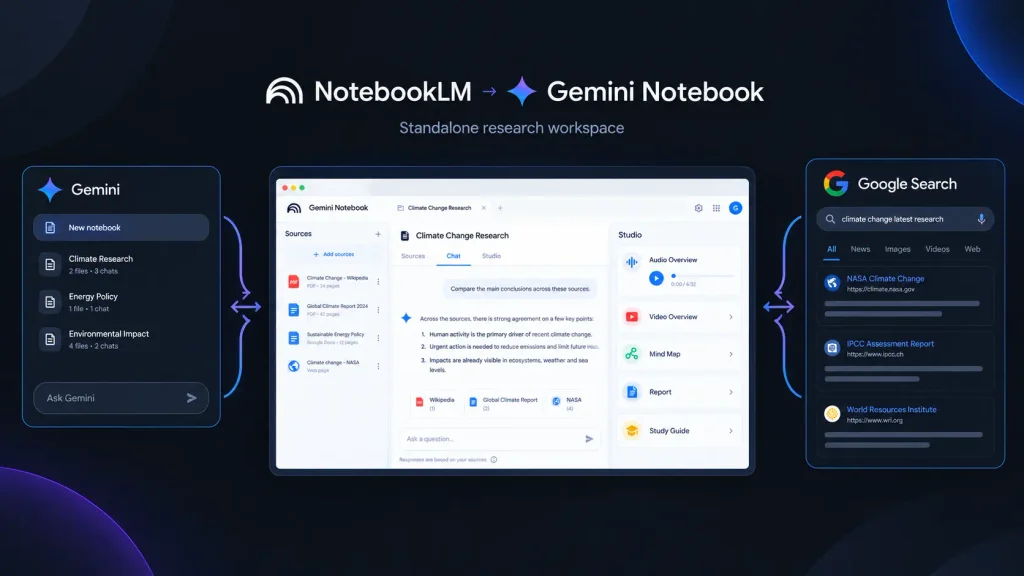
One of the biggest things to understand in a 2026 NotebookLM Review is the name change. In July 2026, Google announced that NotebookLM was becoming Gemini Notebook. Google says the product remains a standalone research tool but is becoming more integrated with the wider Gemini ecosystem.
That integration is already visible. Google introduced notebooks inside Gemini, allowing users to organize chats, files, and research while syncing notebooks between Gemini and NotebookLM. Google has also started adding new research capabilities. In August 2026, Google introduced Expert Intelligence, allowing users to incorporate insights from selected trusted books and expert sources into Gemini Notebook.
So if you’re searching for “NotebookLM” today, don’t be surprised if Google’s newer interface or documentation refers to Gemini Notebook.
NotebookLM Pricing in 2026
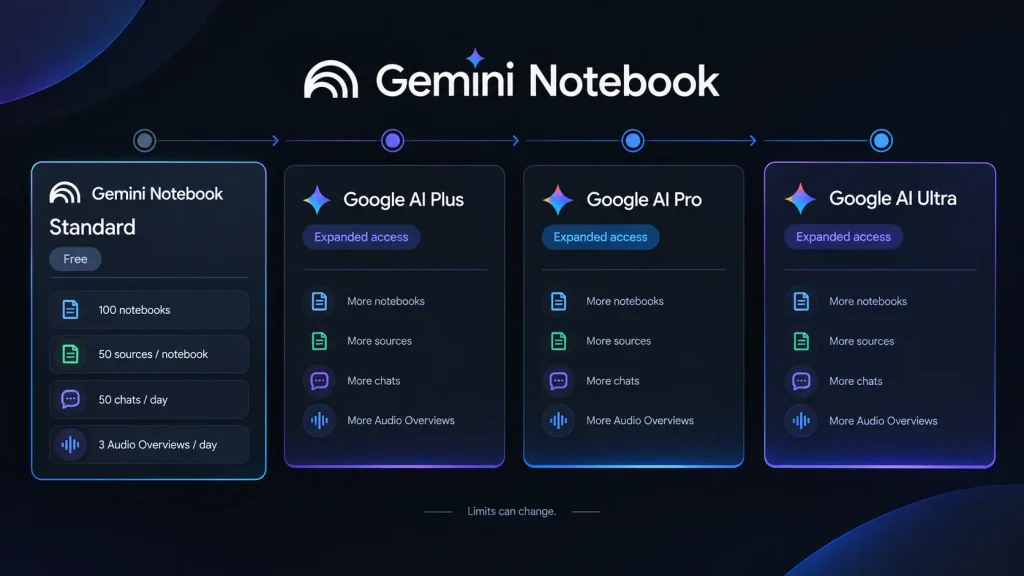
NotebookLM itself has free access, but Google’s paid AI subscriptions increase usage and provide access to a broader collection of Google AI features.
Current documentation shows the following usage levels:
| Access Level | Notebooks | Sources / Notebook | Conversations / Day | Audio Overviews / Day |
| Standard | 100 | 50 | 50 | 3 |
| Higher Access | 200 | 100 | 200 | 6 |
| Higher Tier | 500 | 300 | 500 | 20 |
| Expanded | 500 | 400 | 1,000 | 40 |
| Maximum | 500 | 600 | 5,000 | 200 |
These are usage limits rather than a simple list of traditional NotebookLM plans, and Google notes that limits can change. Google also changed how some Gemini Notebook limits work in September 2026, moving toward compute-based limits that consider factors such as prompt complexity, models used, features, and conversation length.
For current subscription pricing, it is safer to check Google’s official Google AI plans because prices and availability vary by country. The key takeaway is simple: start free. If you’re constantly hitting usage limits or need the broader Google AI package, then consider upgrading.
Is NotebookLM One of the Best AI Note-Taking Tools?
That depends on what you expect from note-taking software. If you want a traditional workspace for manually writing notes, creating databases, managing tasks, and organizing personal information, NotebookLM may not be your ideal replacement. But if your idea of note-taking includes collecting sources, asking questions, generating summaries, studying material, and turning research into new outputs, NotebookLM becomes much more compelling.
That’s why I would classify it primarily among AI research tools, with note-taking being one part of the larger workflow. Its biggest advantage is context. Your documents are not just attachments sitting beside a chatbot; they become the foundation for the notebook’s research process.
Who Should Use NotebookLM?
Students
You can collect lecture notes, textbooks, papers, and study material and then use the notebook to generate questions, flashcards, summaries, and audio overviews.
Researchers
Researchers can keep related source material together and use the notebook to explore themes, connections, and unanswered questions.
Content Creators and Writers
A writer can create a source library before drafting an article, script, report, or long-form piece. This is particularly useful when accuracy depends on understanding several documents.
Marketers
Marketing professionals can use notebooks for reports, product documentation, customer research, campaign material, and other source-heavy projects.
Educators
Teachers can transform teaching resources into study guides, questions, summaries, and other learning material. The common factor is not the profession. It is the workflow: you already have information and want to understand or transform it.
Final Verdict: Is NotebookLM Worth Trying in 2026?
This NotebookLM Review comes down to a fairly simple recommendation: if your work involves documents, research papers, reports, notes, or other source-heavy material, try the free version first. You don’t need to commit to a paid plan immediately. Add a useful collection of sources, ask specific questions, test the study features, and see whether the workflow saves you time.
For students, researchers, writers, educators, and marketers, NotebookLM’s biggest strength is its ability to turn an existing pile of information into something you can actually work with. And with Google moving NotebookLM toward Gemini Notebook, deeper research, code execution, and broader Google integration, the more interesting question may be: how much of your research workflow will AI notebooks handle for you next?
FAQ
Is NotebookLM free in 2026?
Yes. Standard access remains free, with usage limits. Google’s current documentation lists up to 100 notebooks, 50 sources per notebook, and 50 conversations per day under Standard access. Other features, including audio, video, reports, flashcards, and quizzes, also have daily limits.
Is NotebookLM good for academic research?
Yes, particularly when your research involves a defined collection of papers, notes, reports, or other sources. It can help you understand and organize that material, but you should still check important claims against the original documents. Google itself notes that AI-generated responses can contain inaccuracies. For serious academic work, think of NotebookLM as a research assistant not as a replacement for reading the original sources.
Is NotebookLM still called NotebookLM?
Google announced in July 2026 that NotebookLM was being renamed Gemini Notebook. The company says it remains a standalone research product while becoming more connected to Gemini and Google Search. That means both names are worth understanding if you’re researching AI note-taking tools or looking for the product online.
Editorial disclosure: This review is independently researched and written for informational purposes. Pricing and usage limits can change by region and subscription plan.
Leave a Reply