You can have a strong idea, solid research, and a clear argument and still spend too much time fixing commas, spelling mistakes, awkward sentences, and inconsistent wording. That is where writing assistants can make a real difference. Modern AI writing assistants and grammar checking tools can catch common errors while you write and, depending on the tool, help you rewrite sentences, adjust tone, or improve clarity.
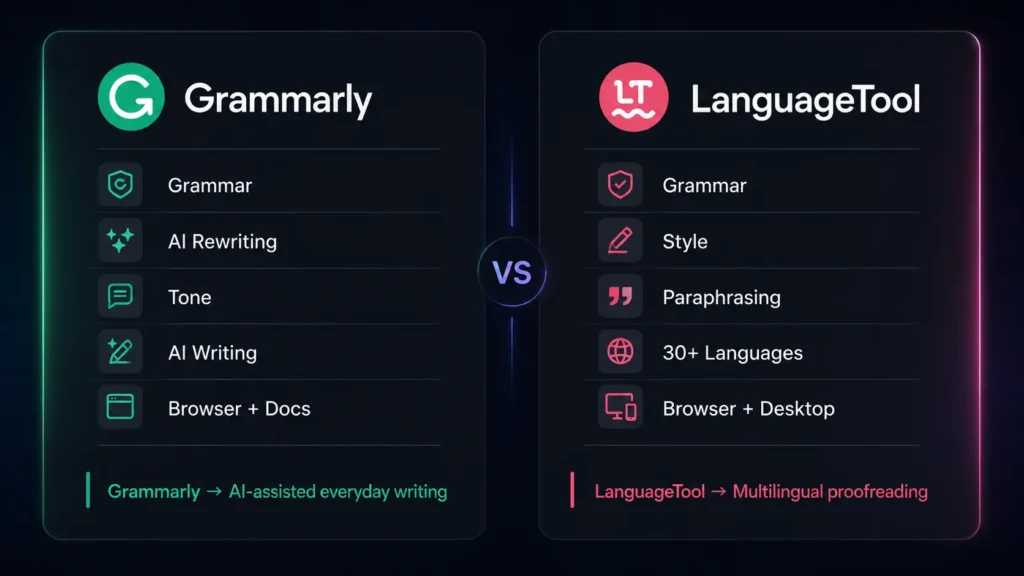
We look at two popular choices: Grammarly and LanguageTool. Both can proofread your writing, but they approach the job differently. Grammarly puts a strong focus on AI-powered communication and rewriting, while LanguageTool stands out for multilingual proofreading and detailed language checking.
Editorial disclosure: This comparison is based on independent feature and workflow evaluation. Pricing and features can change, so check the official product pages before subscribing.
How We Evaluate Writing Assistants
We evaluated 2 tools based on their current features, pricing information, interfaces, integrations, and practical writing workflows available in 2026. Rather than simply counting features, we focused on how useful each platform is when you are actually trying to finish a piece of writing.
Our evaluation criteria included:
- Grammar, spelling, punctuation, and proofreading
- AI rewriting and writing assistance
- Ease of use across browsers, apps, and documents
- Language and dialect support
- Character, AI, or usage limits
- Free and paid-plan value
The comparison is written from a content and editorial perspective, with attention to writers, students, marketers, bloggers, copywriters, editors, journalists, authors, researchers, teachers, business professionals, freelancers, SEO specialists, agencies, developers, and content teams.
At-a-Glance Comparison
| Tool Name | Best For | Starting Price |
| Grammarly | AI-assisted writing, rewriting, proofreading, and professional communication | Free |
| LanguageTool | Multilingual proofreading, grammar checking, and style correction | Free |
Both tools offer free options, so you can test their core writing features before deciding whether a paid plan is worthwhile.
Grammarly: Best Writing Assistant for AI-Powered Everyday Writing
If you write emails, blog posts, marketing copy, social media content, reports, or business documents, Grammarly is the more AI-focused option of the two. Its main strength is combining proofreading with AI assistance. Grammarly checks grammar, spelling, punctuation, clarity, and tone, while its AI features can help you compose, brainstorm, rewrite, and refine content.
One useful workflow is sentence rewriting. You can select text that feels too long, repetitive, or unclear and use Grammarly’s AI assistance to create a cleaner version. Instead of switching between your document and a separate AI chatbot, the writing assistance remains close to the text you are already editing.
Grammarly also supports writing across different environments, making it useful when your work moves between documents, email, websites, and other applications.
For marketers, copywriters, social media managers, entrepreneurs, business professionals, and content teams, this combination of proofreading and AI writing assistance can save time during everyday editing.
Pros
- Strong combination of grammar checking, rewriting, tone suggestions, and AI writing
- Useful for business writing, marketing content, blogs, emails, and social media
Cons
- Advanced AI and rewriting features are limited on the free version
- Multilingual writers may find LanguageTool more suitable
Grammarly Features
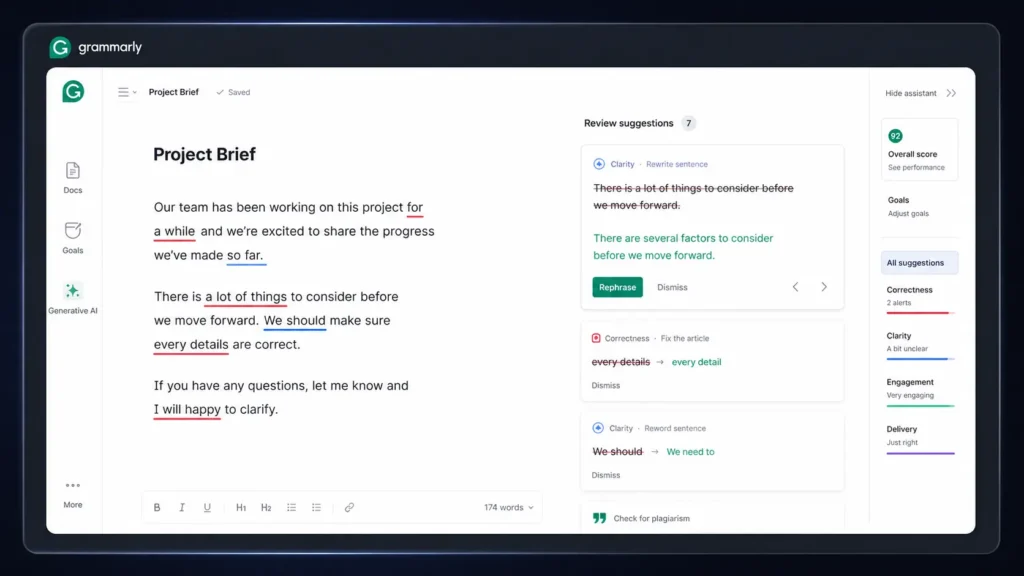
Grammarly’s writing features include grammar checking, spelling correction, punctuation suggestions, clarity improvements, tone detection, rewriting, brainstorming, and AI-assisted content generation. Its AI writing capabilities are especially useful when you want to change the wording of existing content instead of starting from a blank page. You can use Grammarly to make text more concise, professional, friendly, or easier to understand.
Grammarly Pricing
Grammarly offers a Free plan at $0. For users who need more advanced writing assistance, Grammarly Pro currently costs $30/member/month, $60/member for three months, or $144/member/year, which averages $12 per month when billed annually. The Pro plan adds advanced writing suggestions, full-sentence rewrites, tone features, and expanded AI writing capabilities.
LanguageTool: Best Writing Assistant for Multilingual Proofreading
LanguageTool takes a different approach. If you regularly write in multiple languages or want a writing assistant with strong proofreading capabilities, it is worth considering.
LanguageTool supports 30+ languages and dialects, giving it a major advantage for multilingual writers, students, researchers, editors, translators, and international teams. It checks grammar, spelling, punctuation, style, and word choice. The platform also includes AI-powered paraphrasing, allowing you to rewrite sentences without completely changing the original meaning.
A particularly useful detail is its text limit. The free version allows up to 10,000 characters per text, while Premium increases that limit to 150,000 characters. That difference becomes important when you are proofreading a long article, report, thesis section, or other large document.
LanguageTool also provides browser and desktop tools, making it practical for writers who work across different applications.
Pros
- Supports 30+ languages and dialects
- Strong proofreading and paraphrasing features for multilingual and long-form writing
Cons
- AI content generation is less extensive than Grammarly
- Advanced features require the Premium plan
LanguageTool Features
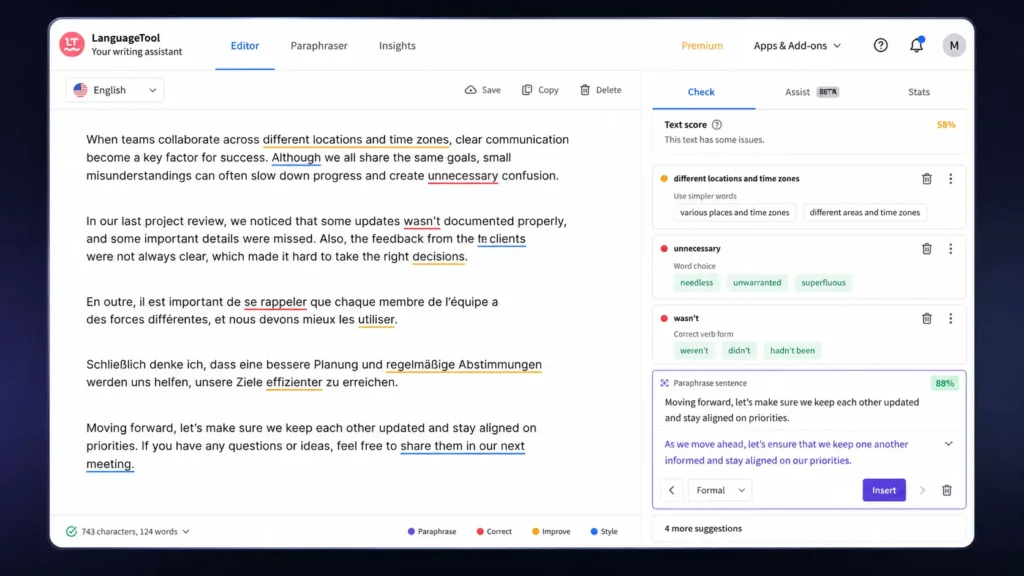
LanguageTool provides grammar checking, spelling correction, punctuation checking, style suggestions, multilingual proofreading, paraphrasing, personal dictionary support, and Style Guide features. Its multilingual support is one of its biggest strengths. You can work with different English varieties and a wide selection of other languages, making the platform useful for international content teams and multilingual writers. The AI paraphrasing feature is also practical when you already have a sentence but want to make it clearer, shorter, or more polished.
LanguageTool Pricing
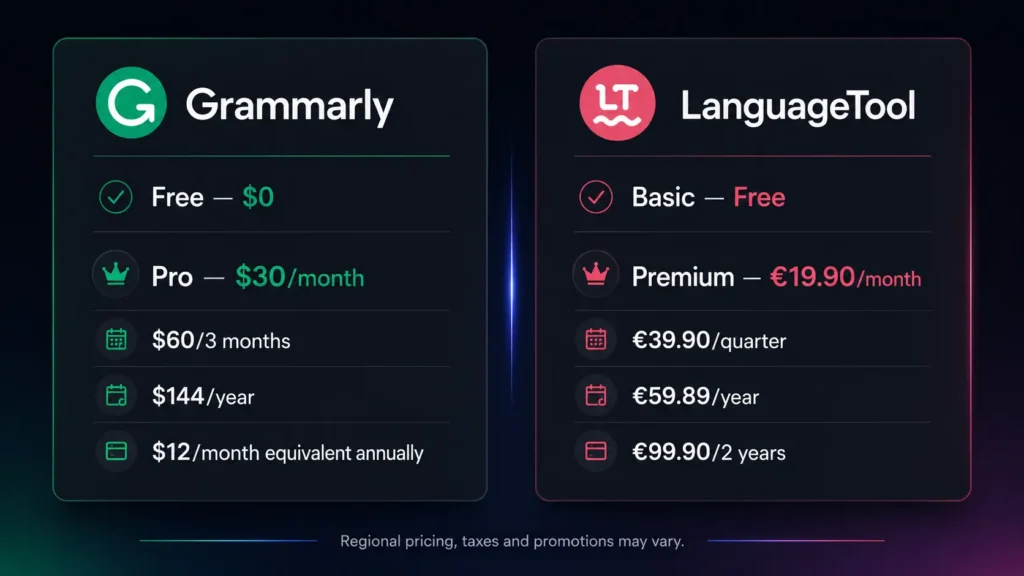
LanguageTool provides a Basic plan for free. The LanguageTool Premium plan adds advanced grammar and style checking, larger text limits, unlimited AI sentence paraphrasing, and additional customization features. Current individual Premium pricing includes €19.90/month, €39.90/quarter, €59.89/year, or €99.90 for two years, according to LanguageTool’s official subscription information. Pricing can vary based on region, currency, billing cycle, taxes, and promotions.
Grammarly vs LanguageTool: Feature Comparison
| Feature | Grammarly | LanguageTool |
| Grammar checking | Yes | Yes |
| Spelling correction | Yes | Yes |
| Punctuation checking | Yes | Yes |
| AI rewriting | Yes | Yes |
| AI content generation | Strong | More focused on paraphrasing |
| Tone suggestions | Yes | Yes |
| Multilingual support | Multiple languages | 30+ languages and dialects |
| Long-text support | Plan dependent | Up to 150,000 characters with Premium |
| Browser support | Yes | Yes |
| Desktop apps | Yes | Yes |
| Microsoft Word | Yes | Yes |
| Google Docs | Yes | Yes |
| Personal dictionary | Yes | Yes |
| Style customization | Yes | Yes |
| Free plan | Yes | Yes |
| Paid plan | Grammarly Pro | LanguageTool Premium |
Which Writing Assistants Should You Choose?
The best option depends on what you want your writing assistant to do.
Choose Grammarly if you want a broader AI writing workflow. It is particularly suitable for bloggers, marketers, copywriters, social media managers, entrepreneurs, business professionals, website owners, SEO specialists, freelancers, and content teams.
Choose LanguageTool if multilingual writing and detailed proofreading are higher priorities. Students, researchers, authors, editors, teachers, journalists, and international teams may benefit from its broader language coverage.
If you regularly explore AI tools, SaaS products, and software comparisons, you can find more reviews and guides to help compare different software options.
For someone who mostly writes in English and wants help moving from rough text to polished communication, Grammarly is likely the easier choice. If you work across multiple languages or spend more time proofreading than generating content, LanguageTool deserves a closer look.
Final Verdict
There is no single winner for every writer. Grammarly is the better fit if you want AI-powered rewriting, tone assistance, proofreading, and everyday communication in one workflow. LanguageTool is the stronger choice when multilingual proofreading, longer documents, and detailed language controls matter more.
Frequently Asked Questions
Which is better for grammar checking: Grammarly or LanguageTool?
Both are strong grammar checking tools, but they have different strengths. Grammarly is particularly useful when grammar checking is combined with rewriting, tone adjustment, and AI writing. LanguageTool is more attractive when multilingual support, detailed language checking, and longer text fields are important.
What are the main features of Grammarly and LanguageTool?
The main Grammarly features include grammar checking, spelling correction, punctuation suggestions, clarity improvements, tone detection, rewriting, brainstorming, and AI-assisted writing. LanguageTool features include grammar checking, spelling correction, punctuation checking, style suggestions, multilingual proofreading, paraphrasing, personal dictionaries, and Style Guide functionality.
Can I use these writing assistants for free?
Yes. Grammarly provides a Free plan, while advanced features are available through Grammarly Pro. LanguageTool also provides a free Basic plan, while advanced features are available through LanguageTool Premium.