Forgetting passwords, reusing the same login across multiple websites, or saving credentials in random notes can quickly become a security headache. Password managers give you a safer way to create, store, and autofill unique passwords without forcing you to remember dozens of complicated combinations. Two names that deserve serious attention are Bitwarden and 1Password. Both offer encrypted vaults, password generation, autofill, secure sharing, and security-monitoring features. However, their approaches to pricing, usability, transparency, and account protection are different. If you are choosing between them for yourself, your family, remote work, or a small business, this comparison will help you decide which option fits your needs.
Editorial disclosure: This comparison is based on independent product evaluation and current official product information. Pricing and features may change.
How We Evaluate Password Managers
We evaluated two password managers Bitwarden and 1Password in August 2026, focusing on practical everyday use instead of simply comparing feature lists.
Our evaluation considered:
- Security architecture and encryption
- Password generation and autofill
- Desktop, browser, and mobile experience
- Vault organization and sharing
- Family and business management
- Pricing and overall value
We also considered practical tasks such as creating a new login, generating a strong password, adding another device, sharing credentials, and reviewing stored account security.
If you regularly work across multiple online services, password management is only one part of maintaining a secure digital workflow. For broader productivity software comparisons, you can also explore Google Workspace vs LibreOffice. The goal is straightforward: help you understand not just which product has more features, but which one makes sense for your everyday password habits.
Password Managers at a Glance
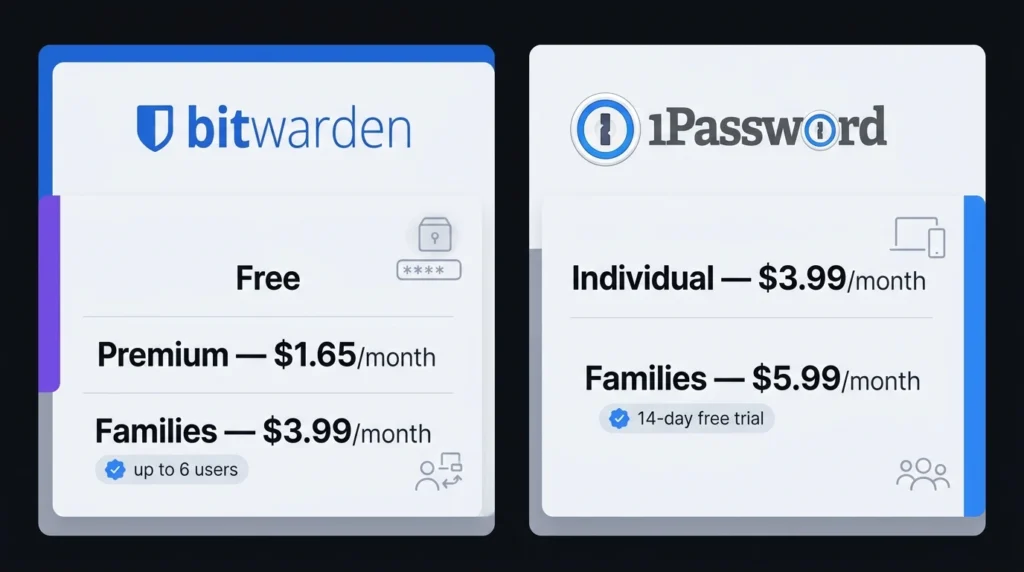
| Tool Name | Best For | Starting Price |
| Bitwarden | Open-source security and value | Free |
| 1Password | Polished everyday password management | $3.99/month |
Bitwarden offers a free individual plan with unlimited passwords and access across devices. You can check its current plans on the official Bitwarden pricing page.
1Password does not have a permanent free personal plan, but you can start with its trial. Its regular Individual price is $3.99/month when billed annually, while Families is $5.99/month. See the official 1Password personal pricing page for current pricing and promotions.
Best Password Managers for Security: Bitwarden vs 1Password
Best Password Management Tool for Open-Source Security: Bitwarden
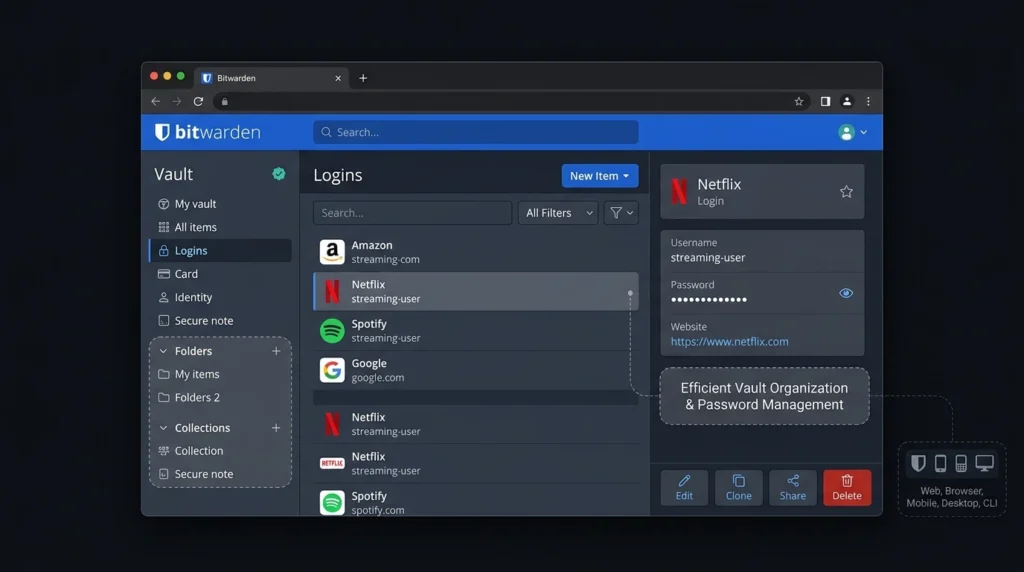
Bitwarden is particularly attractive if you want strong security without immediately paying for a subscription. Its free personal plan covers unlimited logins, notes, cards, and identities, while also providing access across devices. One practical detail that makes Bitwarden interesting is its broad platform support. You can use browser extensions, desktop applications, mobile apps, the web vault, and even a command-line interface. That flexibility matters if you regularly switch between a personal laptop, work computer, and phone.
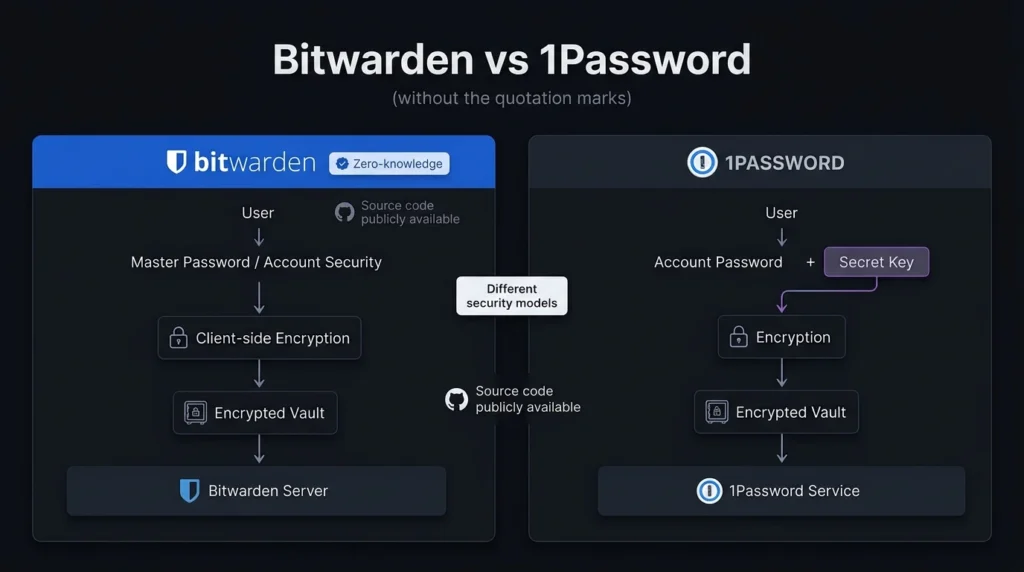
Security is its biggest differentiator. Bitwarden uses a zero-knowledge architecture, meaning the company says it cannot decrypt the contents of your vault. Its source code is also publicly available, allowing researchers and technically minded users to inspect the software. For people searching for password security software that combines affordability with open-source transparency, Bitwarden is difficult to overlook.
Pros
- Free plan supports unlimited password storage and multiple devices.
- Open-source and zero-knowledge security architecture.
Cons
- Interface is more functional than premium.
- Some advanced features require a paid plan.
Pricing: Bitwarden pricing includes a Free individual plan. Premium is $1.65/month ($19.80/year), while Families is $3.99/month for up to 6 users when billed annually. Business plans include Teams at $4/user/month and Enterprise at $6/user/month with annual billing.
Best Password Manager for Ease of Use: 1Password
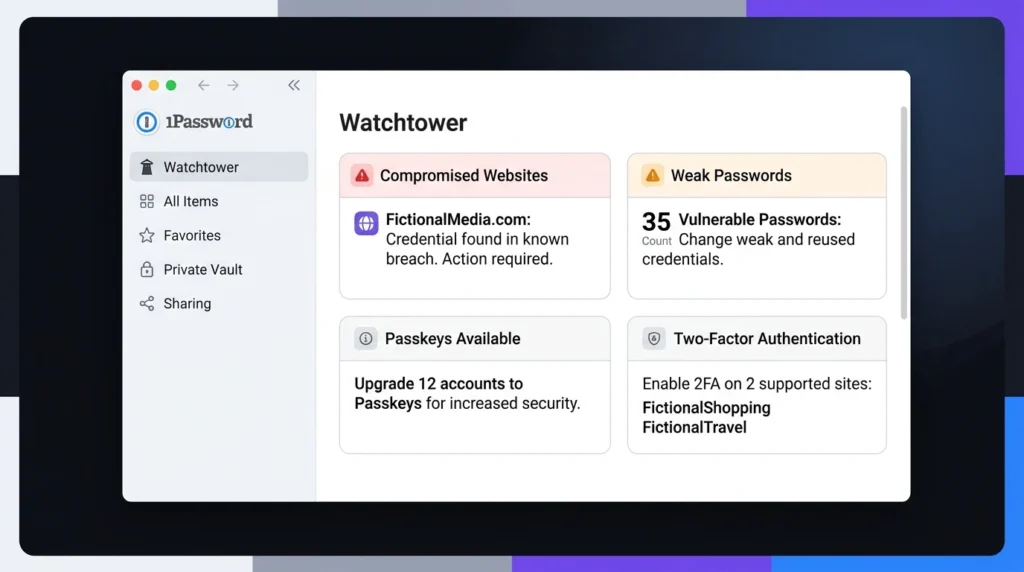
1Password takes a more polished approach to password management. Rather than competing mainly on price, it focuses on making security features easier to use during everyday work.
There is also a useful setup shortcut when you add another device. If you are already signed in, you can use the Set Up Another Device option and scan a QR code to help configure the new device. It is a small interaction, but it can save you from manually dealing with lengthy account information.
1Password also includes Watchtower, which helps identify weak or compromised credentials and other security concerns. For users who want secure password managers without spending much time thinking about the underlying security architecture, 1Password is a strong candidate.
Pros
- Polished interface with strong everyday usability.
- Excellent organization and family-sharing features.
Cons
- No permanent free personal plan.
- Costs more than Bitwarden.
Pricing: 1Password Personal & Family pricing starts at $3.99/month for Individual with annual billing. Families costs $5.99/month for up to five members. A 14-day free trial is available.
Bitwarden vs 1Password: Feature Comparison
| Feature | Bitwarden | 1Password |
| Free personal plan | Yes | No permanent free plan |
| Password generator | Yes | Yes |
| Autofill | Yes | Yes |
| Encrypted vault | Yes | Yes |
| Zero-knowledge architecture | Yes | Yes |
| Open source | Yes | No |
| Family plan | Up to 6 users | Up to 6 members |
| Security monitoring | Vault health reports | Watchtower |
| Cross-device access | Yes | Yes |
| Self-hosting | Available | No standard self-hosted option |
| Business plans | Yes | Yes |
Bitwarden’s open-source approach is one of its most important differences. Its security documentation explains how vault information is encrypted before being stored and how users control the keys needed to decrypt it.
1Password uses a different model. Its security information explains how the account password works alongside the Secret Key as part of its protection system. That does not mean one service is secure and the other is not. Both are built around strong encryption. The more important question is which security model and user experience you prefer.
Password Management Tools for Remote Workers
Remote work can make password organization more complicated. You may have separate credentials for client accounts, project-management platforms, cloud storage, communication tools, and company services. This is where organized vaults become useful. Instead of putting everything into one long list, you can separate personal credentials from work-related accounts and share only the items another person actually needs.
Bitwarden’s organizational features are useful if you want a relatively straightforward structure for shared credentials. 1Password takes a similarly organized approach through separate vaults and sharing controls. If you are building a larger remote-work software stack, password security should also sit alongside secure communication, file sharing, and productivity tools.
Which Password Manager Is Better for Families?
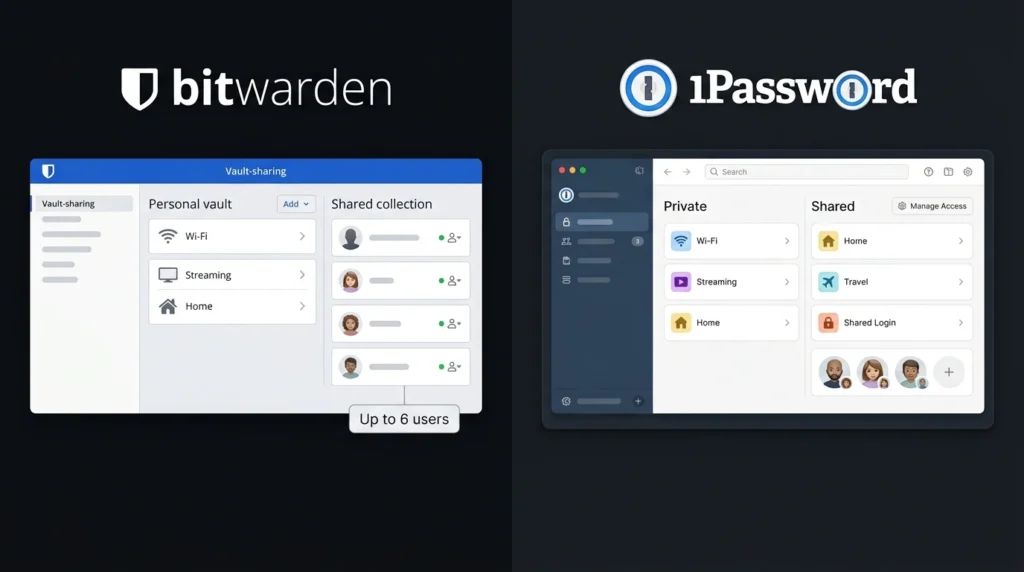
Family use changes the decision because you are no longer managing only your own credentials. Bitwarden Families supports up to six users and provides shared collections for family credentials. At $3.99/month when billed annually, it is also the cheaper of the two family options. You can confirm the current amount on Bitwarden’s official pricing page.
1Password Families costs $5.99/month at the regular annual price and supports the account holder plus up to five invited family members. Shared vaults let you give relatives access to selected credentials while keeping personal items separate. Current details are available on 1Password’s family pricing page. If your main concern is keeping costs low, Bitwarden has the advantage. If you prefer a more polished family-management experience, 1Password may be worth the additional subscription.
Which Is Better for Small Businesses?
Businesses need more than a place to save passwords. You may need employee management, access controls, secure sharing, activity information, and a way to remove access when someone leaves. Bitwarden Business provides Teams and Enterprise plans with organization-focused features. Teams starts at $4/user/month, while Enterprise starts at $6/user/month, based on annual billing.
1Password Business focuses on administrative controls, secure sharing, identity-provider integrations, and centralized management. Its Business plan is $8.99/user/month with annual billing, while the Teams Starter Pack costs $24.95/month for up to 10 users. For a small company watching its software budget, Bitwarden’s pricing can make a meaningful difference. If your organization already relies heavily on identity-management systems and values a polished administration experience, 1Password deserves consideration.
Final Verdict: Bitwarden or 1Password?
So, which one should you choose? Bitwarden is the better pick if you want a free starting point, open-source transparency, and strong security at a low cost. 1Password is the stronger choice if you are willing to pay for a polished experience, convenient sharing, and its additional Secret Key security model. You do not have to make the decision blindly. Try Bitwarden’s free plan or start the 1Password free trial and see which workflow fits your routine. The best password managers are ultimately the ones you will actually use consistently. Which one would make it easier for you to stop reusing passwords?
Frequently Asked Questions
Are password managers safe?
Reputable password managers can improve your security because they allow you to create a different strong password for every account. Bitwarden uses a zero-knowledge architecture, while 1Password combines your account password with its Secret Key. Still, no password manager can protect you from every threat. You should use two-factor authentication where available, keep your devices updated, and protect your main password-manager credentials carefully.
Is Bitwarden better because it is open source?
Not automatically. Open-source software gives developers and security researchers an opportunity to inspect the code, which provides valuable transparency. Bitwarden combines this approach with its zero-knowledge architecture. 1Password is not open source, but it uses its own security model that includes the Secret Key. Your decision should therefore depend on the level of transparency, usability, and control you value rather than one feature alone.
Which password management tools are cheapest?
Bitwarden wins on entry price because its core personal plan is free. 1Password requires a subscription after its trial, with Individual normally costing $3.99/month when billed annually. If you only need basic password storage and strong password generation, Bitwarden’s free plan may be all you need. If you want a more polished experience and are comfortable with a subscription, 1Password is worth testing.