AI Design Platforms: Canva vs Lovart Features and Pricing Compared in 2026
Creating social media graphics, ads, presentations, product visuals, and branded content can quickly become a full-time job. You may have the idea ready, but turning that idea into a polished design often means jumping between templates, image generators, editors, and other creative tools. That is where AI Design Platforms are becoming useful.
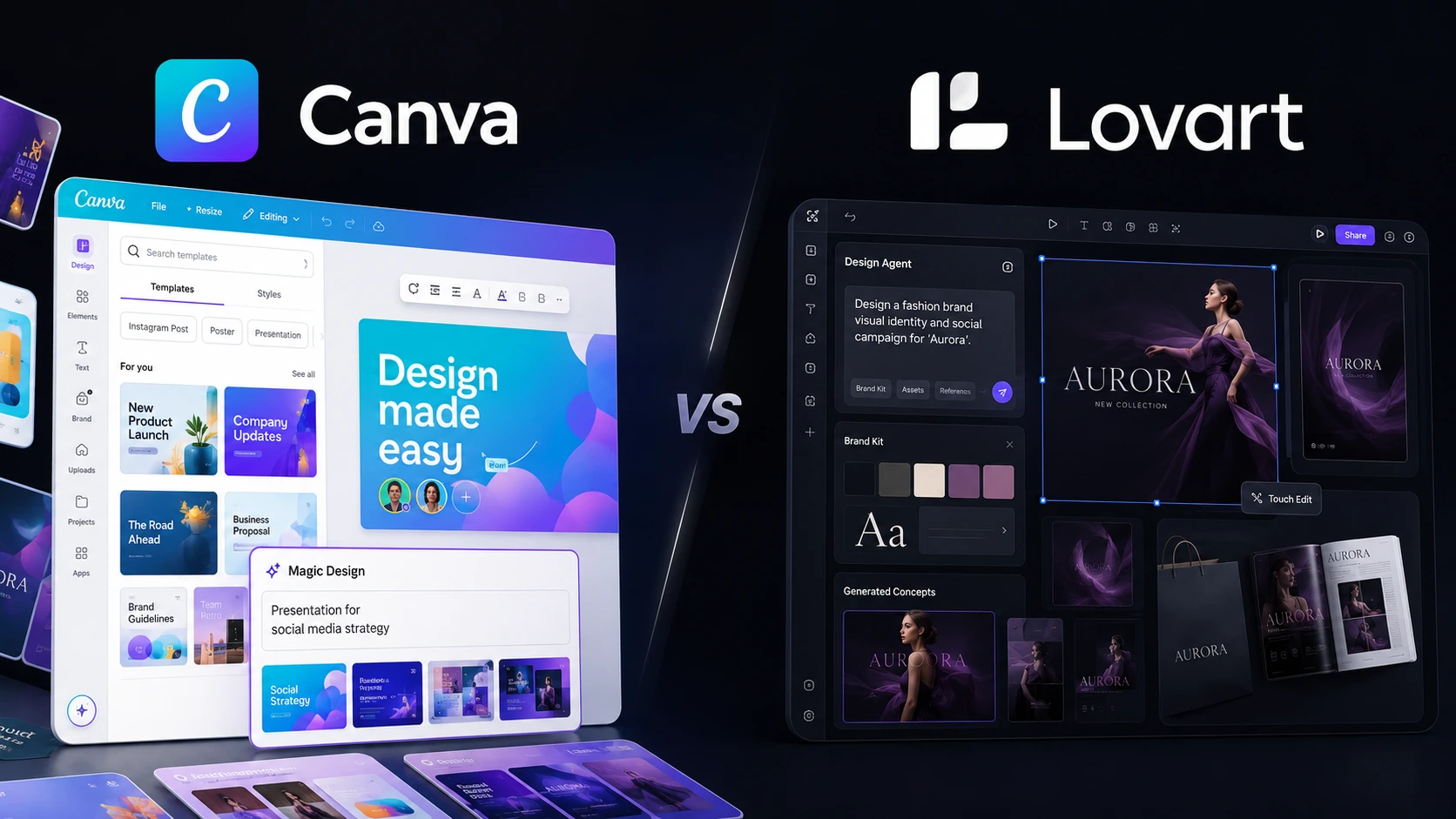
Two platforms worth comparing in 2026 are Canva and Lovart. Canva takes a broad visual-design approach, combining templates, editing, collaboration, brand tools, and AI features. Lovart goes further toward an AI-agent workflow, where you can describe a creative objective and let the platform generate and refine multiple assets around it. This guide compares Canva vs Lovart on features, usability, AI capabilities, pricing, and practical workflows so you can choose the better fit for your work.
Editorial disclosure: This article uses independent workflow evaluation and current official product information; pricing and features may change over time.
How We Evaluate AI Design Platforms
We evaluated both platforms during the 2026 comparison period with a focus on everyday content-production tasks rather than simply counting features.
The evaluation considered:
- Ease of creating designs from a brief
- AI image and content generation
- Templates and brand management
- Editing and revision controls
- Export and publishing options
- Pricing and AI usage limits
The goal was simple: if you have a real marketing task in front of you, how quickly can you move from an idea to a usable asset?
We also looked at what happens after the first generation. AI can produce an attractive first draft, but professional work usually involves revisions, brand consistency, resizing, and multiple versions. Those details often separate useful AI design tools from flashy generators.
Canva vs Lovart at a Glance
| Tool | Best For | Starting Price |
| Canva | Templates, social media, presentations, branding, and general-purpose design | Free |
| Lovart | AI-generated campaigns, brand assets, images, video, and agentic design workflows | Free |
Canva’s current Free plan includes 1,000+ design types, 1.6 million+ templates, 4.7 million+ media assets, 5GB storage, and a limited AI allowance. Lovart also offers a free starting option, while its paid plans use monthly credit allocations based on the plan you select.
Best AI Design Platform for Templates and Everyday Content: Canva
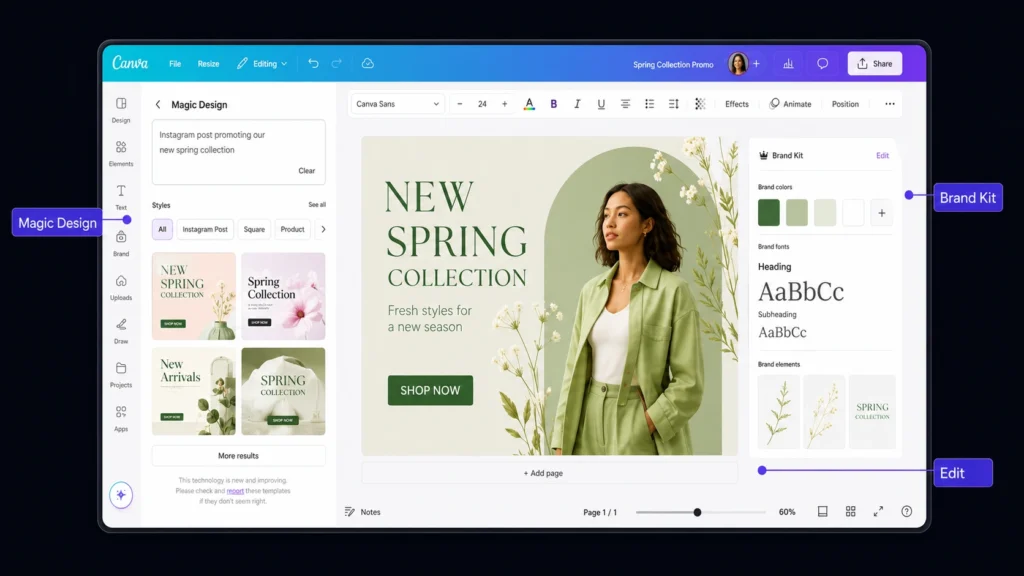
Canva is the stronger choice when you want a familiar editor that can handle almost every type of visual content you produce.
You can start with a template, change the dimensions, replace images and text, apply your brand elements, and export the finished design without learning a complicated professional graphics application. Its current Free plan offers more than 1.6 million templates and 4.7 million photos, videos, graphics, and audio assets.
The workflow is particularly useful for marketers. Imagine you create a promotional Instagram post and later need a presentation slide, a Facebook graphic, and a printable version. Canva’s broader Visual Suite makes those format changes much easier than rebuilding each design from scratch.
Canva’s AI capabilities have also expanded. Its current plans include tools such as AI-powered generation, Magic Layers, AI image creation, and other AI features, with usage allowances that differ by subscription. Canva Free can provide up to 200 Standard AI uses or 20 Premium AI uses, while Pro increases that allowance substantially.
If you are new to AI-powered design tools, Canva is less intimidating because AI sits alongside a conventional editor instead of replacing it.
Pros
- Huge template and media ecosystem
- Excellent for social media, presentations, documents, and marketing assets
Cons
- Some advanced AI features consume monthly allowances
- The workflow remains more manual than an AI-first design agent
Pricing: Canva Free costs $0. Canva Pro is currently listed at US$180/year for one person. Canva Business is listed at US$250/year per person, while Canva’s Business launch pricing is also stated as US$20 per person/month with no seat minimum.
Best AI Design Platform for AI-Generated Campaigns: Lovart
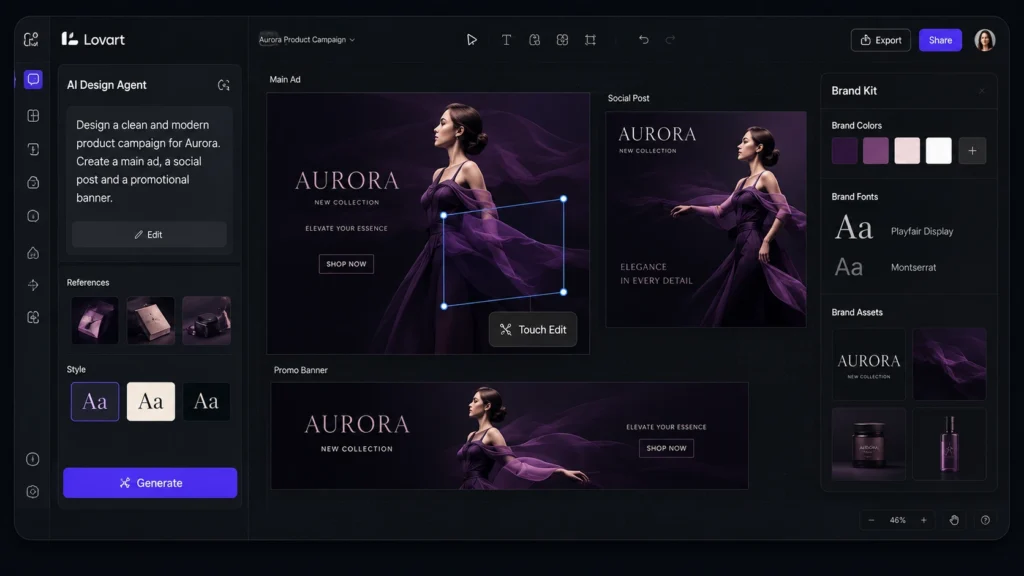
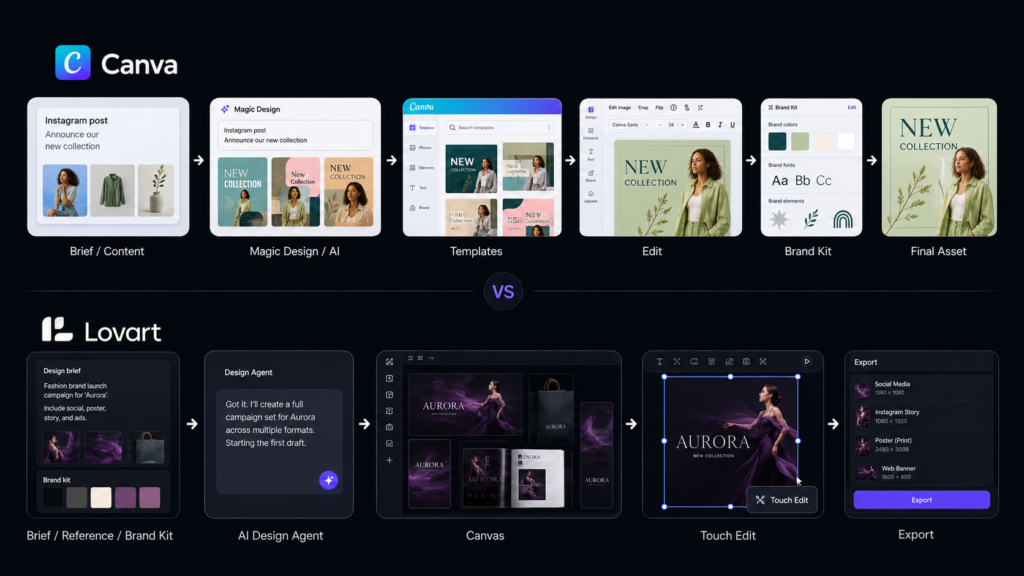
Lovart takes a noticeably different route. Instead of starting with a blank canvas or a huge template library, you can begin with a creative brief and let the AI handle more of the production process.
Its official platform describes the workflow as moving from a brand brief toward complete assets such as logos, packaging, social content, and video advertising. Lovart can also use Brand Kits to keep colors, fonts, logos, and design rules consistent across generations.
One practical difference becomes obvious when you need revisions. Lovart’s editing system allows you to work on individual elements rather than simply regenerating the entire image. Its Edit Element workflow is designed to replace or modify a selected part while preserving the broader composition.
That can save time on a common problem with generative AI: you finally get the right composition, but one object, product detail, or visual element is wrong. Starting again is frustrating. Element-level editing gives you another route.
Lovart also uses a credit-based system. Its June 2026 subscription FAQ lists 2,000 monthly credits for Starter, 3,500 for Basic, 11,000 for Pro, and 27,000 for Ultimate. Monthly credits reset each billing cycle and unused monthly credits do not roll over.
Pros
- Strong brief-to-campaign workflow
- Useful for AI-generated images, branding, social content, and video
Cons
- Credit consumption varies by model and task
- More automation can mean a learning curve for users who prefer traditional editing
Pricing: Lovart has a Free option, with paid plans starting around $19/month for Starter, followed by Basic at $49/month, Pro at $99/month, and Ultimate at $149/month according to Lovart’s published plan information. Paid tiers use monthly credit allocations, while additional credit packs can also be purchased.
Canva vs Lovart: Key Feature Differences
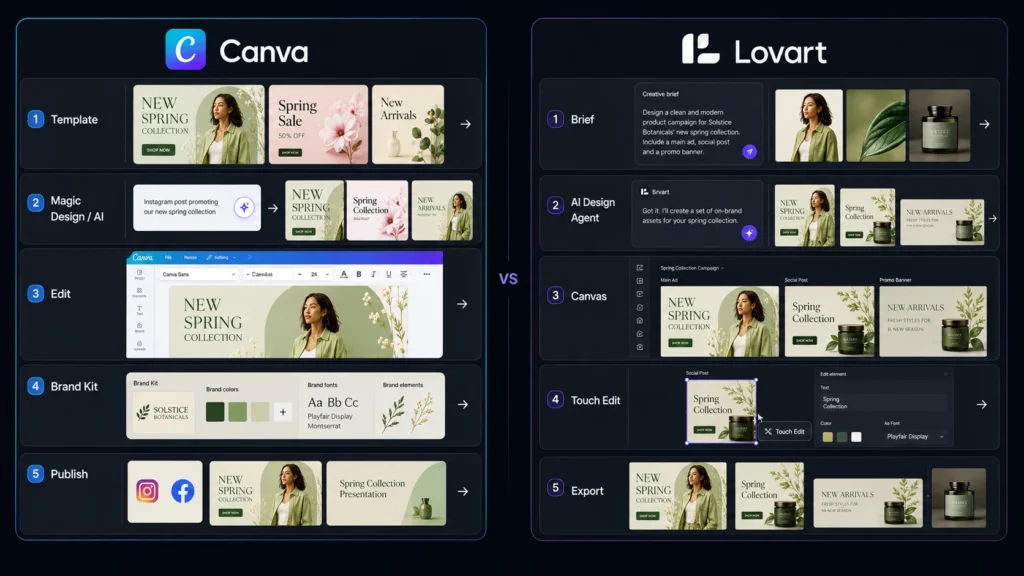
The biggest difference is not simply which platform has more AI features. It is how you interact with those features.
| Feature | Canva | Lovart |
| Traditional editor | Strong drag-and-drop workflow | AI-first canvas workflow |
| Templates | 1.6M+ on Free; 3.6M+ on paid plans | Uses AI Skills and generated projects |
| AI generation | Yes | Yes |
| AI image creation | Yes | Yes |
| AI video | Yes | Yes |
| Brand management | Brand Kits | Brand Kits |
| AI-assisted editing | Yes | Element-level editing |
| Social media content | Excellent | Strong |
| Presentations | Excellent | Supported |
| Campaign generation | More manual | AI-led workflow |
| Monthly AI/credit system | AI allowance by plan | Monthly credits by plan |
| Best workflow | Template → edit → publish | Brief → generate → refine |
Canva’s strength is breadth. Its current paid plans combine premium content, AI tools, Brand Kits, social scheduling, collaboration, and other visual communication features. Canva Business also adds stronger brand controls and marketing-oriented capabilities.
Lovart is more focused on connecting the stages of creative production. Its Brand Kit system can be attached to individual generations or applied at the project level, allowing subsequent generations to follow the selected brand identity.
If you want to explore another AI-focused visual category, you can also read our related 3D AI tools comparison on OLA Reviews.
Which Platform Is Better for Social Media Marketing?
For routine social media work, Canva has the edge. You can choose an Instagram, LinkedIn, Facebook, YouTube, or presentation format, start from an existing template, and manually adjust the content. Canva also includes social content scheduling on its Pro plan.
Lovart becomes more interesting when the social campaign involves many connected creative assets. For example, if you want a product announcement with several visual variations, different layouts, and supporting video, its AI-agent approach can reduce the number of individual creative decisions you have to make.
So the distinction is simple: Canva is better for repeatable template-based production, while Lovart is more attractive for AI-led campaign creation.
Which Is Better for Small Businesses?
Small businesses should look beyond the cheapest monthly price. Canva Business is specifically designed for individuals and growing teams. Its current plan includes collaboration and team administration, 100 Brand Kits, 500GB storage, higher AI access, and marketing-focused features.
Lovart can be attractive if you do not have an in-house designer and want AI to handle more of the creative process. Its Brand Kit system is particularly useful when you need multiple outputs to maintain the same visual identity. If your business mainly creates flyers, presentations, social posts, documents, and ads, Canva is probably the easier all-round investment. If your workload is heavily focused on generating new campaign concepts and visual assets, Lovart deserves a serious trial.
Canva vs Lovart: Which One Should You Choose?
Choose Canva if you want a dependable all purpose design workspace with templates, premium media, brand tools, presentations, social content, and familiar editing controls. Choose Lovart if your priority is AI-led creative production and you want to move from a brief to multiple coordinated visual assets with less manual setup. Both platforms offer free ways to test their workflows, so you do not have to make the decision based on a feature list alone. Create one real social post, product campaign, or marketing asset in each platform and compare the amount of editing you need afterward. The best AI Design Platforms are moving from simple image generation toward complete creative workflows. The real question is no longer whether AI can make a design it is how much of the creative process you want AI to handle for you.
FAQ
Which is better for beginners: Canva or Lovart?
Canva is usually easier if you want to learn design gradually. Its drag-and-drop interface lets you make changes manually while using AI when useful. Lovart is better suited to users who prefer describing an outcome and letting AI handle more of the production.
Are AI design tools safe for commercial projects?
You should always check the current terms and licensing rules before publishing commercial work. Canva states that its licensed content is subject to specific content-license terms, and the applicable restrictions can vary depending on the content source. Lovart states that members can use generated content commercially subject to the original model license and its platform terms.
Can Lovart completely replace Canva?
For some workflows, it can reduce your dependence on traditional design software, but it does not make Canva unnecessary for everyone. Canva remains stronger for template-driven design, presentations, collaboration, social publishing, and broad visual-content workflows. Lovart is more compelling when you want AI to handle a larger share of the creative production process.